


Re edit logo: Your 2026 Easy Brand Glow-Up
Why Your Logo Deserves a Second Look
Thinking about how to re edit a logo is a super common step for small business owners as their brands evolve. Maybe your company has outgrown that DIY design you created years ago, or perhaps your services have expanded and your old logo just doesn’t fit anymore. Whatever the reason, you’re not alone—and you’re definitely not starting from scratch.
Here’s a quick guide to help you get started:
Quick Guide: When and How to Re-Edit Your Logo
- Assess the need – Is your logo outdated, inconsistent with your brand, or no longer resonating with your audience?
- Define your goals – Are you making minor tweaks (a refresh) or reimagining your entire visual identity (an overhaul)?
- Gather your files – You’ll need vector files (AI, EPS, SVG) for professional editing without quality loss.
- Make your changes – Use DIY tools for simple edits, or partner with a designer for strategic redesigns.
- Roll it out consistently – Update all brand touchpoints from your website to business cards.
The good news? A logo redesign doesn’t have to mean throwing everything away. Some of the world’s most recognizable brands have evolved their logos dozens of times while maintaining their core identity. While many businesses start with online logo tools, they often find that a professional touch is needed to truly capture their brand’s evolving identity and stand out.
Think of it this way: your logo is your brand’s handshake. When you first started, maybe a simple handshake was enough. But now? Your business has matured, and you need a handshake that reflects who you’ve become—confident, established, and ready for what’s next.
Whether you’re a CPA firm that’s expanded into advisory services or a retailer that’s gone from brick-and-mortar to e-commerce, your logo should tell that story. And the process of getting there doesn’t have to be overwhelming.
As Fred Z. Poritsky, founder of FZP Digital, I’ve helped countless Philadelphia-area businesses steer the process to re edit logo designs that better reflect their evolving brands. Let’s walk through this together so you can make confident decisions about your brand’s visual future.
Glossary for re edit logo:
Is It Time for a Change? Spotting the Signs You Need a Logo Redesign
Your logo is like your brand’s handshake—it makes that all-important first impression. But what if that handshake is starting to feel a little… awkward? There are some clear signs it might be time for a change, and it’s not just about looks—it’s about making sure your logo works for you.
Common Triggers for a Logo Redesign
Have you ever looked at your logo and thought, “Hmm, that doesn’t quite capture who we are anymore”? You’re not alone! It’s rare to get it just right the first time. Here are some common triggers for a redesign:
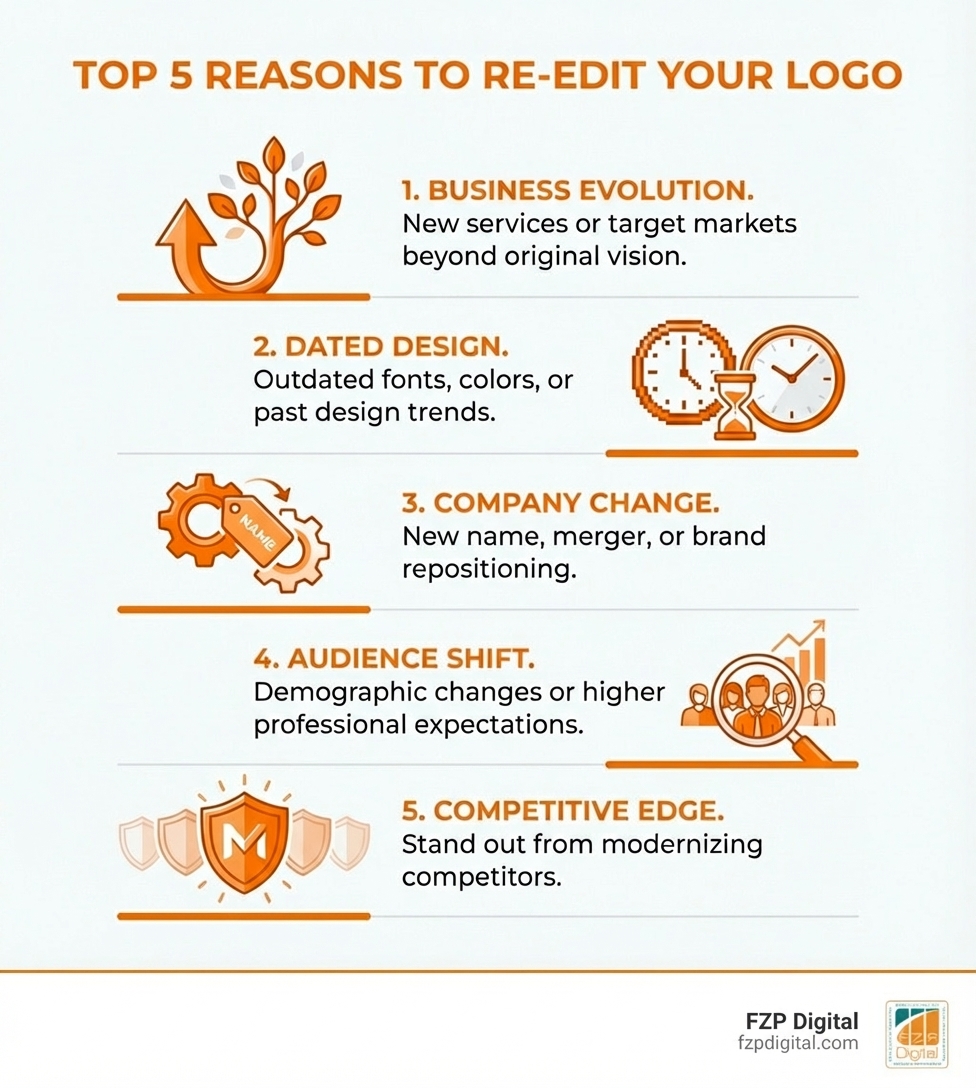
- Your Business Has Evolved: You started small, but now you’ve expanded your services or reached new markets in Philadelphia or Bucks County. Your logo needs to reflect this growth.
- Market Shifts Are Occurring: Consumer tastes and industry standards change. What was cutting-edge five years ago might look dated today, so your logo needs to adapt to stay relevant.
- Your Design is Tired: Sometimes, it’s as simple as your logo just looking old. Graphic design trends evolve, and a logo that once looked contemporary can feel like a thing of the past.
- You’ve Changed Your Brand Name: This one’s a no-brainer! If your company has a new name, your logo absolutely needs to follow suit.
- Competition is Gaining Share: If competitors are modernizing their look, an updated logo can be a crucial part of your strategy to stay competitive and stand out.
- Your Brand Identity Has Evolved: As your company matures, its values and personality might shift. Your logo should visually communicate this new identity.
- Brand Repositioning: If you’re targeting a new demographic or shifting your brand’s perception, a logo redesign is a powerful tool to signal this change.
Understanding these triggers is the first step. For more insights, check out our guide on More info about Brand Identity Design.
Real-World Redesign Stories
It’s always fascinating to see how even the biggest players have evolved their logos. These aren’t just cosmetic changes; they’re strategic moves reflecting growth and adaptation.
- Subway’s Journey: Subway started as “Pete’s Super Submarines” and went through several logo refreshes to stay current while keeping its iconic look.
- CVS Health’s Broadening Scope: Rebranding from “CVS Pharmacy” to “CVS Health” (and changing the logo) was a strategic move to communicate a broader commitment to healthcare services.
- Dunkin’ Drops the “Donuts”: Becoming just “Dunkin'” was a bold move to position themselves as a beverage-led, on-the-go brand, with a simpler logo to match.
- Google’s Continuous Evolution: Google’s 2015 logo update was a masterclass in modernizing a look while keeping it instantly recognizable, responding to its own brand evolution.
- Apple’s Iconic Simplicity: Apple has gone through six logos since 1976, with each change refining its image toward the sleek, minimalist design we know today.
- Uber’s Readability: After finding that consumers struggled to identify a previous icon, Uber wisely switched to a clear, readable wordmark, prioritizing recognition.
These examples show that a logo redesign isn’t a sign of failure, but a healthy part of a brand’s growth. The key is to make these changes intentionally.
Refresh vs. Overhaul: Choosing the Right Path for Your Brand
So, you know you need a change—but how big of a change? This is a big decision! A “refresh” is like giving your living room a new coat of paint and some fresh pillows. An “overhaul” is more like a full renovation. The right choice depends on your goals, and that’s where a little expert advice can go a long way.
A logo refresh is an evolution. It involves subtle updates—a modernized font, a tweaked color palette, or a minor icon adjustment. Your core identity remains, ensuring instant recognition. It’s a simpler, quicker, and less risky approach.
A full logo overhaul, or rebranding, is a complete reinvention. This can mean a new name, a totally new visual identity, and a new market position. It’s a fundamental shift to signal major company changes or attract a new audience.
Here’s a quick comparison to help you decide:
| Criteria | Logo Refresh | Logo Overhaul |
|---|---|---|
| Goal | Modernize, update, improve clarity, better represent current offerings. | Signal a major change, attract a new audience, correct a severe brand misalignment, reinvent brand identity. |
| Scope of Change | Minor adjustments to existing elements (colors, fonts, spacing, slight icon tweaks). | Complete redesign, new name (sometimes), new visual elements, new messaging. |
| Risk Level | Lower risk; maintains brand equity and recognition. | Higher risk; potential for audience confusion if not managed carefully. |
| Best For… | Established brands needing to stay current, minor market shifts, visual updates. | Companies undergoing mergers, significant business model changes, targeting entirely new demographics. |
Deciding between a refresh and an overhaul requires a deep understanding of your brand and goals. As a Philadelphia-based agency, FZP Digital specializes in helping businesses in Newtown, Richboro, and beyond make these strategic decisions. We help you define your What is Visual Identity and Branding in Design? to ensure your logo truly represents your vision.
Your Step-by-Step Guide to Re-Edit a Logo Like a Pro
Ready to roll up your sleeves? Whether you’re making a small tweak or a big change, having a clear process is key. It saves you headaches and helps you end up with a logo you’ll love. Let’s break it down.
Step 1: Define Your “Why” and Set Clear Goals
Before you touch a single pixel, you need a plan. Why are you doing this? What should your new logo say about you? Skipping this step is like starting a road trip without a map.
- What’s the Problem? Can you state in one sentence why your current logo isn’t working?
- What are Your Goals? Where do you want your business to be in 1-5 years? Your logo should help you get there.
- Who is Your Audience? Will the new logo speak to the people you want to reach?
- What to Keep vs. Change? What parts of your existing logo are still strong and recognizable?
Defining these elements builds a strong foundation for your redesign. For a deeper dive, explore our How to Develop a Unique Brand Identity: The 9-Step Guide.
Step 2: The DIY Route – Tools and Tips to Re-Edit Logo Files
If you’re just making minor adjustments, you might be able to handle it yourself. The most important thing? Work with the right files so your logo doesn’t end up looking blurry or unprofessional.
Here’s the golden rule: always work with vector files.
- Vector Files (AI, EPS, SVG): These are made of mathematical paths, not pixels. That means you can scale them to any size—from a tiny website icon to a giant billboard in Philadelphia—without losing quality. This is what the pros use.
- Raster Files (PNG, JPG): These are pixel-based. If you try to enlarge them, they’ll get blurry and look unprofessional. If this is all you have, you’ll need to have your logo professionally recreated as a vector file.
Once you have your vector file, you can make minor tweaks like changing colors, editing text, or adjusting shapes using professional design software. For a technical walkthrough, this Technical guide to edit a logo is helpful. And if you need assistance, remember our Small Business Logo Designer services.
Step 3: Partnering with a Pro – When to Bring in a Designer to Re-Edit Logo Assets
Sometimes, a DIY fix isn’t enough. If your redesign is part of a bigger rebrand, or if you don’t have the right files, it’s time to call in an expert. A professional designer (like the team at FZP Digital) brings strategic thinking and technical skill that online tools can’t match.
Here’s when bringing in a pro is essential:
- Complex Redesigns or Rebrands: A designer guides you through the strategic process, ensuring your new logo aligns with your overall brand strategy.
- You Lack Vector Files: A designer can expertly recreate your logo as a high-quality vector file, which is critical for everything from business cards in Newtown to vehicle wraps in Richboro.
- You Need Strategic Branding: A pro understands design principles, color psychology, and typography to ensure your logo conveys the right message to your target audience.
- You Want Brand Consistency: A designer will help establish a brand style guide, ensuring your new logo is applied consistently everywhere, which builds trust and strengthens your brand.
Hiring a designer is an investment in your brand’s long-term success. For businesses in Philadelphia and Bucks County, our team at FZP Digital is here to help. Learn more about How to Hire a Brand Identity Designer and how our “Develop . Design . Deliver” process can bring your vision to life.
Best Practices & Pitfalls to Avoid in Your Logo Redesign
A logo redesign can be a huge win for your brand, but there are definitely some traps to avoid. (We’ve all seen those redesigns that make you scratch your head, right?) Following a few best practices can help you land on the right side of history.
The Do’s and Don’ts of a Logo Redesign
Starting a logo redesign is exciting, but it’s crucial to be thoughtful. Here’s a quick checklist of what to do and what to avoid:
The Do’s:
- Keep it Simple: A good logo is simple and easily identifiable. Think of the most iconic logos—they’re often incredibly straightforward.
- Ensure Versatility: Your logo needs to look great everywhere: on your website, social media, and business cards. It should be scalable and legible in all sizes.
- Get Feedback: Don’t design in a vacuum! Share concepts with colleagues and people who represent your target audience. Their feedback is invaluable.
- Honor Your Heritage: If your brand has a long history, a subtle refresh can modernize your look while maintaining brand recognition.
The Don’ts:
- Follow Trends Blindly: Fleeting design trends can quickly make your logo look dated. Aim for a timeless design, not just what’s popular right now.
- Overcomplicate It: Too many colors or fonts can make your logo hard to recognize and reproduce. Simplicity is key.
- Ignore Your Audience: Your logo is for your customers. If it doesn’t resonate with your target market, it has missed the mark.
- Fall for the “Make the Logo Bigger” Trap: While brand recognition is important, making the logo excessively large can hurt your website’s usability. A website is built to serve users, and a giant logo can push important content off the screen, creating a poor experience. It’s about balance, not brand ego.
By keeping these tips in mind, you’re on your way to a successful redesign. For more guidance, explore our Logo Design Philadelphia Complete Guide.
After the Glow-Up: Launching and Measuring Your New Logo’s Success
You did it! You’ve got a beautiful, revitalized logo. But the work isn’t over. A successful launch is just as important as the design itself. And you’ll want to know if it’s actually working, right?
Rolling Out Your New Look
Once your new logo is finalized, the next step is to roll it out consistently across all your brand touchpoints. This ensures a seamless transition and reinforces your refreshed identity.
- Update Your Brand Style Guide: This is your rulebook. It should detail your new logo’s approved versions, spacing, sizes, and color codes (RGB/HEX for digital, CMYK for print) to ensure everyone uses it consistently.
- Update Your Website: Your website is often the first place customers see your brand. Update the logo in your header, footer, and everywhere else it appears. 81% of consumers say a branded website is important, so don’t skip this.
- Update Social Media Profiles: Change your profile pictures and cover photos on all social media platforms (Facebook, Instagram, LinkedIn, etc.) to reflect the new logo.
- Update Marketing Materials: Replace your old logo on business cards, brochures, letterheads, email signatures, and any promotional items.
- Update Internal Branding: Don’t forget internal documents, presentations, and any branded merchandise for your team.
- Announce the Change: Consider a blog post or social media announcement explaining the “why” behind your new look to get your audience excited about the change.
Measuring Success
How do you know if your redesign was a success? It’s not just about looks; it’s about impact.
- Social Media Engagement: Watch for mentions, shares, and comments about your new look. Are people excited? Brand sentiment tools can help track the conversation.
- Brand Sentiment and Perception: Use surveys or focus groups to see how your audience perceives the new logo. Does it evoke the right feelings?
- Website Analytics: Look for changes in website traffic, bounce rate, or time on page, which could signal shifts in brand engagement.
- Conversion Rates: If your redesign was part of a larger strategy, monitor if it has any impact on your conversion rates.
- Customer Surveys: The most direct way to get feedback is to simply ask your customers what they think of the new logo.
Measuring these metrics helps you understand the tangible benefits of your logo refresh. For strategies to boost your digital presence, check out our Digital Marketing Agency Small Business Guide.
Frequently Asked Questions about Logo Redesigns
How can I edit a logo without losing quality?
The absolute key is to use a vector file (formats like .AI, .EPS, or .SVG). Unlike pixel-based files like .JPG or .PNG, vectors are made of mathematical paths and can be scaled to any size—from a tiny favicon to a giant billboard—with zero loss of quality. If you try to enlarge a .JPG, it will just get blurry. Always work from the vector master file, and if you don’t have one, consider having it professionally recreated to ensure crisp results for all your branding.
Can AI help me redesign my logo?
AI tools can be a great starting point for brainstorming ideas or playing with colors. They can generate tons of options quickly! But for a final design that truly tells your brand’s unique story and meets your strategic goals, you really need the creative insight of a human designer. A pro, like the team at FZP Digital, ensures your logo is not just another template, but a unique and impactful asset for your business in Philadelphia or Bucks County.
How much does it cost to re-edit a logo?
The cost can vary a lot! A quick tweak using an online tool might not cost any money, just your time. But for a strategic redesign that gives you high-quality, versatile files and a look that truly lifts your brand, partnering with a professional design agency is an investment in your future success. The right choice really depends on your goals and how much you value your brand’s identity and its long-term impact.
Conclusion: Your Brand, Reimagined
Giving your logo a refresh is more than just a cosmetic change; it’s a strategic move that realigns your visual identity with your business’s mission and growth. Whether you opt for a subtle tweak or a complete overhaul, the goal is the same: to create a powerful, memorable symbol that connects with your audience. As your business evolves, so too should your brand’s most important visual asset.
If you’re in the Philadelphia or Bucks County area and feeling like this process is a bit daunting, you don’t have to go it alone. At FZP Digital, Fred Z. Poritsky and the team live and breathe this stuff. Their “Develop . Design . Deliver” process is all about partnering with you to build a brand that not only looks amazing but also achieves real business goals. We’re here to help you steer the complexities of design, ensuring your logo perfectly captures your brand’s essence and sets you up for continued success.
Ready to explore what’s next for your brand? Explore our branding services