

WordPress Migration Services: The Easiest Way to Switch Hosts
Is Moving Your WordPress Site Giving You Anxiety? Here’s What You Need to Know
Hey there! Thinking about moving your WordPress site? It can feel like a huge leap, can’t it? The good news is that it doesn’t have to turn into a stressful, all-consuming project. This guide is here to help you understand your options in plain English so you can make a smart move and feel confident every step of the way. WordPress migration services are professional or self-serve solutions that transfer your entire website — files, database, themes, plugins, and settings — from one host to another safely, smoothly, and without breaking your site.
Here’s a quick look at your main options:
| Option | Best For | Starting Cost | Typical Time |
|---|---|---|---|
| DIY plugin (e.g., Duplicator, All-in-One WP Migration) | Tech-comfortable users, small sites | Free – $69/year | Under 1 hour |
| Host-provided migration | Switching to a new hosting provider | Often free | Hours to 2–3 days |
| Professional migration service | Businesses, complex or large sites | $57 – $149+ | 1–3 business days |
| Agency/developer service | Enterprise, CMS-to-WordPress moves | $70–$120/hr+ | Varies by project |
If you just want the short answer: for most small to medium-sized businesses, a professional migration service is the safest, fastest, and least stressful choice.
Here’s the part a lot of business owners don’t realize until they’re in the middle of it: moving a WordPress site is about much more than dragging files from one server to another. You’re also dealing with your database, your website address structure, security certificates, domain settings, and the behind-the-scenes pieces that make your site actually work. Miss one small detail, and you could end up with pages that won’t load, forms that stop sending, images that disappear, or rankings that slip in Google.
That’s why expert help can make such a difference. When your website brings in leads, sales, or appointments, a migration isn’t just a technical chore — it’s a business decision. And that’s exactly how FZP Digital approaches it. Fred Z. Poritsky, founder of FZP Digital, brings a mix of digital strategy, design, and business-minded thinking to every project, which means your migration is handled with both technical care and real-world perspective.
At the end of the day, you don’t just want your site moved. You want it protected, tested, and ready to perform better in its new home. And honestly, isn’t that what matters most?
Why You Should Consider Professional WordPress Migration Services

Are you dealing with slow performance, spotty support, or hosting costs that keep creeping up? If so, you’re definitely not the only one. A lot of businesses reach a point where their current hosting setup just isn’t helping anymore. Maybe your site loads too slowly, maybe support takes forever to respond, or maybe you’ve simply outgrown the platform you started with.
That’s where professional wordpress migration services can be a real lifesaver. You’re not just relocating your website — you’re setting it up for a better future. A well-handled migration can improve speed, stability, security, and overall user experience. And when your site performs better, your visitors notice it. Google does too.
The biggest benefit is peace of mind. Instead of guessing your way through backups, database exports, file transfers, and server settings, you’ve got experienced people handling it for you. That matters because even a small mistake can create major problems, from broken layouts to missing content to downtime right when your customers are trying to reach you.
At FZP Digital, Fred Z. Poritsky and the team understand that your website isn’t just a collection of pages — it’s part of how your business earns trust and generates revenue. That’s why migrations are handled carefully, with a focus on protecting your content, preserving performance, and making sure everything works the way it should before the switch is finalized.
And if you’re already thinking, “If I’m moving my site, maybe it’s time to improve it too,” that’s a smart instinct. If you’re looking to elevate your site’s look while you’re at it, you might want to check out our thoughts on professional WordPress design.
DIY Tools vs. Managed Transfers: Finding Your Best Fit
So, you’re wondering if you can just do it yourself, right? That’s a totally fair question. And honestly, sometimes you can. If your site is small, fairly simple, and you’re comfortable working inside WordPress, DIY tools can do the job. Plugins like Duplicator or All-in-One WP Migration are popular for a reason — they make the process more accessible and can work really well for straightforward websites.
But here’s the catch: not every website is straightforward. Once your site has a larger media library, more plugins, custom features, ecommerce functionality, or a more complex database, things can get tricky fast. What looks easy at first can suddenly turn into hours of troubleshooting. And if your website is important to your business, that risk can feel pretty uncomfortable, can’t it?
| Feature | DIY Plugins (Automated) | Professional Migration Services |
|---|---|---|
| Ease of Use | High (if tech-savvy) | Extremely High (hands-off) |
| Technical Hurdles | Can fail on large sites/timeouts | Handled by experts |
| Data Integrity | Dependent on plugin/server | Guaranteed (often manual checks) |
| Time Savings | You do the work | You focus on your business |
| Cost | Free to ~$69 | $57 to $149+ |
| Support | Documentation/Forums | 24/7 Expert assistance |
Understanding the Risks of DIY WordPress Migration Services
Ever heard of the “white screen of death”? It sounds dramatic, but it’s very real — and it’s just one example of what can happen during a DIY migration. When you try to handle wordpress migration services on your own, common issues can include:
- Database serialization issues: If your old website address isn’t updated correctly in the database, your site can end up looking broken, with missing images, messed-up layouts, or features that stop working.
- Plugin conflicts: Some plugins don’t play nicely during a migration. Security tools like iThemes Security, for example, can block parts of the process if they aren’t managed properly first.
- File permission problems: Your new server may use different rules for who can access or edit files, which can leave parts of your site inaccessible.
- Broken links: Miss one step when updating URLs, and suddenly visitors are running into 404 pages all over your site.
It’s a lot to think about, especially if this isn’t something you do every day. That’s why many business owners prefer to hand it off to a team that knows what to look for. With FZP Digital, you’re not left hoping everything works — you’re getting guidance from people, including Fred Z. Poritsky, who understand how to move a site carefully while protecting the business behind it.
The Step-by-Step Journey to a New Hosting Home
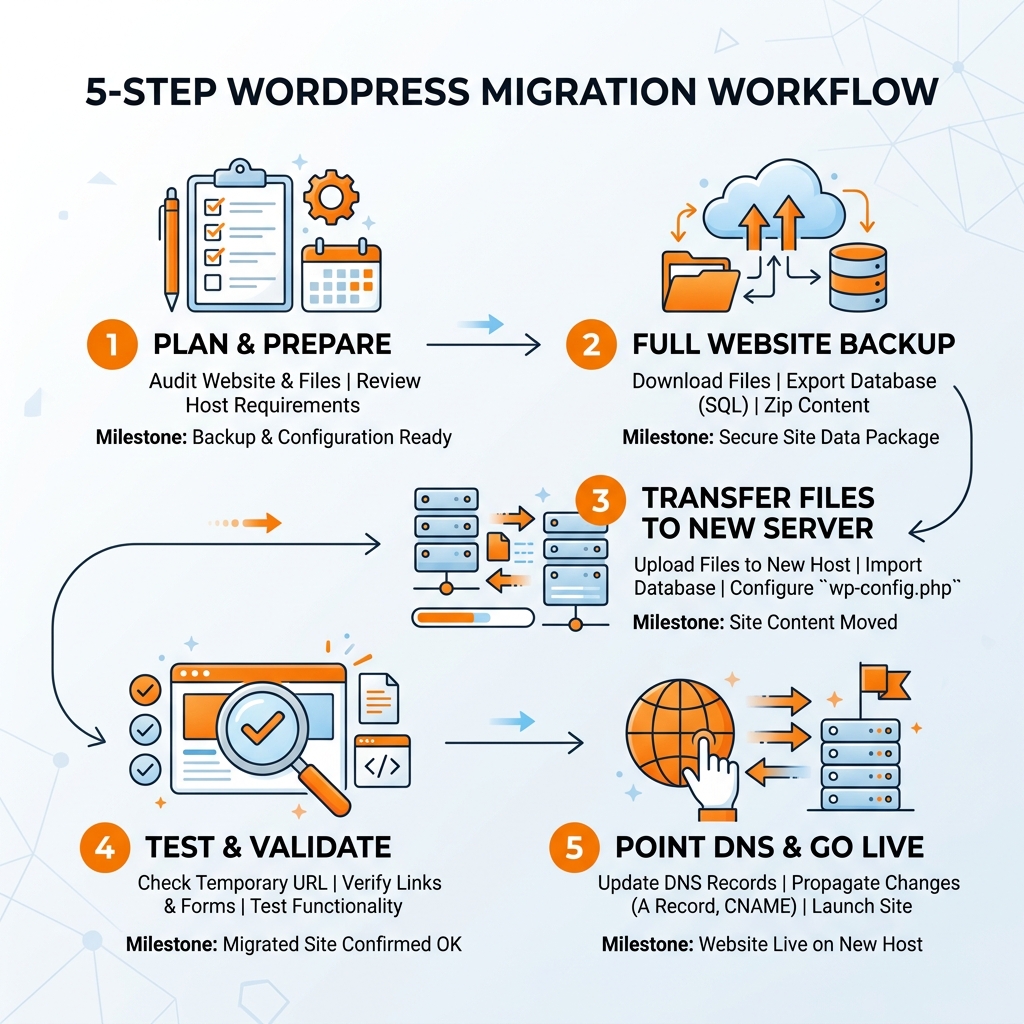
Curious about how we make it all happen? Our process is designed for peace of mind. While every site is unique, a professional migration usually follows a very specific path to ensure nothing is lost.
- Preparation & Backup: We start with a full, redundant backup of your entire site—files and database. We also recommend deactivating caching and security plugins to ensure a smooth export.
- Meticulous Database Export: We move your database carefully. For enterprise-level sites, this is often done manually to maintain 100% data integrity.
- File Transfer: Using secure methods like SFTP or SSH, we move your themes, plugins, and media uploads to the new server.
- The Staging Environment: This is the secret sauce. We set up your site on a temporary URL (a staging site) so we can test everything. We check every link, every form, and every image before the world sees it.
- DNS Propagation & SSL: Once you’ve given the “all clear,” we update your DNS settings. This tells the internet your site has moved. While DNS propagation can take 24–48 hours, our methods aim for zero downtime. We also provision your SSL certificate immediately so your site stays secure.
Preserving Your SEO and Data Integrity During the Move
Your search engine rankings are precious, aren’t they? You’ve spent months or years building your authority in the Philadelphia market. A botched migration can seriously impact your organic traffic. In fact, research shows that websites losing 301 redirects or suffering from broken links can see a 30% decrease in organic traffic!
Preserving your SEO and data integrity is paramount. We don’t just move the content; we move the structure. This means ensuring your permalinks stay exactly the same and that your metadata—those titles and descriptions that show up in Google—remains intact. No one wants broken images or lost rankings after a move!
If you want to dive deeper into how local search works, take a look at our guide where Philly SEO is explained.
How Experts Handle SEO During WordPress Migration Services
So, how do the pros ensure your SEO stays intact? It’s all about precision and a “check twice, cut once” mentality.
- 301 Redirects: If you’re changing your domain or URL structure, we set up permanent redirects so both users and search engines find the new pages.
- Search and Replace: We perform thorough operations to update every instance of your old URL to the new one within your database.
- Google Search Console: We update your sitemap and monitor for any crawl errors that might pop up during the transition.
- Speed Optimization: Since page load time is a direct ranking factor, we ensure your new hosting environment is tuned for speed. Every 1-second delay can lead to an 11% drop in page views!
Frequently Asked Questions About Switching Hosts
How long does a typical migration take?
Got questions? We’ve got answers! A standard host-to-host migration usually takes about 1 business day for the actual move. However, you should account for the 24–48 hours it takes for DNS changes to propagate globally. For complex enterprise sites, the process might take a bit longer—sometimes 2–3 business days—to ensure every custom feature is working perfectly.
Will my website experience any downtime?
Worried about your site being offline? That’s the most common fear! With professional wordpress migration services, the goal is always zero downtime. By using staging environments and keeping your old host active until the new one is fully verified, your visitors will never even know a switch happened. They’ll just notice the site is suddenly faster!
Can I migrate from Wix or Shopify to WordPress?
Thinking of making a bigger leap from another platform? Absolutely! We specialize in helping businesses transition from “closed” platforms like Wix, Squarespace, or Shopify to the unlimited flexibility of WordPress. While these moves are more complex because the underlying code is different, we can preserve your design and SEO rankings during the transfer.
Whether you’re moving a small blog or a massive store, we can help you create a website that truly scales with your business.
Conclusion: Let’s Get Your Site Where It Belongs
Ready to give your WordPress site the home it deserves? At FZP Digital, led by Fred Z. Poritsky, we believe in a collaborative “Develop. Design. Deliver” process. We aren’t just a service; we’re your Philadelphia and Bucks County experts, dedicated to making your migration smooth, secure, and completely stress-free.
Whether you’re in Downtown Philly or Newtown, we understand the local market and the technical requirements needed to succeed. Let us handle the technical heavy lifting—the databases, the DNS, and the redirects—so you can focus on what you do best: running your business and serving your customers.
Ready to see how we can help? Check out our affordable SEO services and let’s start a conversation about your site’s future.