

Why CRM Integration Is the Missing Link in Your Business Tech Stack
CRM integration is one of the most powerful — and most overlooked — moves a growing business can make. If you’re juggling a handful of apps just to get through your workday, you already know the pain: customer data lives in five different places, your team is copy-pasting information between systems, and nobody has a clear picture of what’s actually going on.
Here’s a quick answer to what CRM integration means and why it matters:
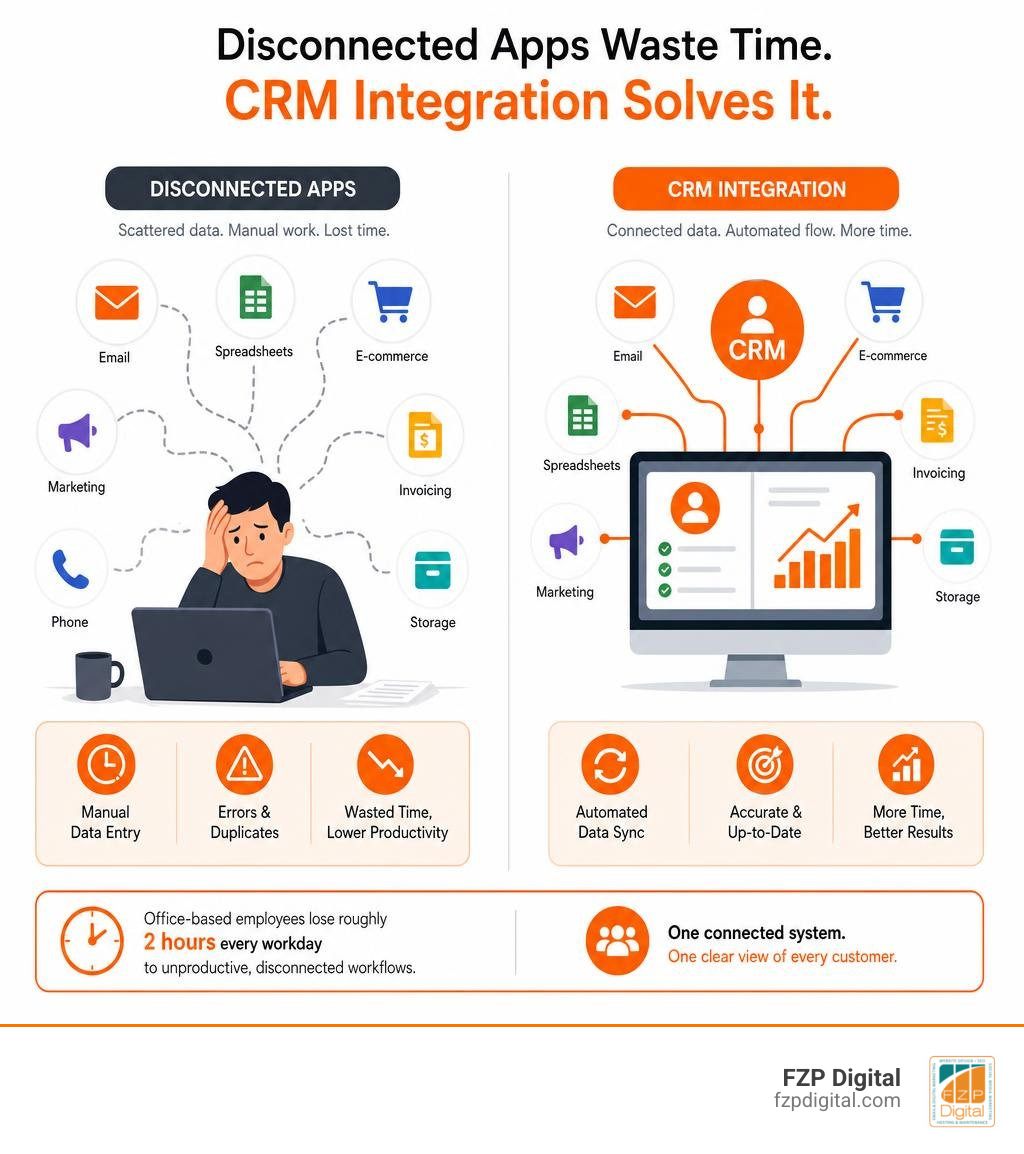
What is CRM integration? CRM integration is the process of connecting your Customer Relationship Management (CRM) software with other business tools — like email, accounting, e-commerce, and marketing platforms — so that data flows automatically between them, giving everyone on your team a single, up-to-date view of every customer.
Why does it matter?
- Eliminates data silos — no more hunting across five apps for one customer’s history
- Saves time — office-based employees lose roughly 2 hours every workday to unproductive, disconnected workflows
- Improves accuracy — real-time sync means no more outdated or duplicate records
- Powers AI and automation — connected data is what makes intelligent automation actually work
- Strengthens customer relationships — your team can respond faster and more personally
The numbers tell a striking story. The average organization uses over 900 apps, yet the average business has integrated only 28% of them. That gap is where productivity goes to die. And according to research, 81% of IT leaders say data silos are actively blocking their digital transformation efforts.
Put simply: your CRM is only as powerful as the data flowing into it.
I’m Fred Z. Poritsky, founder of FZP Digital, and my background spans nonprofit financial management, digital marketing, and web design — giving me a grounded, real-world perspective on how CRM integration can transform the way businesses operate. In this guide, I’ll walk you through everything you need to know, from the basics to implementation, so you can make smarter decisions for your business.
Similar topics to crm integration:
- how to integrate chatbot with crm for lead capture
- how to integrate sms and phone systems with crm
- how to integrate inventory systems with crm
What is a Connected CRM and How Does It Work?
To understand how a connected CRM works, think of your business as a busy restaurant. Your website, email tools, and accounting software are like the kitchen, waitstaff, and host stand. If they aren’t talking to each other, orders get lost, customers wait too long, and dinner service turns into absolute chaos.
A connected CRM acts as the ultimate floor manager, keeping everyone perfectly aligned. But how does it actually make that happen?
At its core, crm integration works through automated data exchange. Instead of a team member manually exporting a CSV file of new leads from your website and importing it into your CRM, the systems communicate directly. When a prospect fills out a contact form, their details instantly populate your CRM database, triggering a welcome email and assigning a task to a sales representative.

This seamless loop creates what we in the industry call a Single Source of Truth (SSOT). This means that whether your team is checking a customer’s payment status, reading a support ticket, or reviewing an email campaign click, everyone sees the exact same, real-time data.
As highlighted in IBM’s Guide on CRM Integration, this automatic synchronization prevents the critical gaps that happen when systems operate in isolation. When you bridge these gaps, you move away from disjointed software and toward a unified digital ecosystem. For a deeper dive into why this shift is so vital for modern businesses, check out our insights on Why Your Business Needs Integrated Customer Relationship Management Now.
Why CRM Integration is a Game-Changer for Your Business
Have you ever had a customer call in, only for your team to ask them to repeat their entire backstory because the support rep couldn’t see what the sales rep promised? It is incredibly frustrating for the customer, and it makes your business look disorganized.
When you connect your systems, you instantly break down the annoying data silos that hold your team back. A staggering 58% of business leaders agree that customer, prospect, and account data comes from too many different sources to easily make sense of it. By unifying these sources, you unlock several major operational advantages:
- Exceptional Customer Experience: With a 360-degree view of your customer, you can personalize every single interaction. Whether they interact with marketing, sales, or customer support, they get a consistent and helpful experience.
- Boosted Operational Efficiency: Your team stops wasting time on manual data entry and “app toggling.” Did you know that office employees switch apps and interfaces more than 1,100 times a day? Eliminating that friction keeps your team focused on high-value work.
- Enhanced Team Collaboration: When your sales, marketing, and finance departments share a single database, handoffs are seamless. Marketing knows exactly which leads converted to sales, and sales knows exactly which marketing campaigns inspired the prospect to reach out.
As detailed in Salesforce’s CRM Integration Guide, connecting these dots isn’t just about making life easier for your IT department — it is about driving bottom-line growth and building deep trust with your clients.
Overcoming the Challenges of CRM Integration
While the benefits are massive, getting there isn’t always a walk in the park. Like any tech project, integrating your CRM comes with potential hurdles that require careful planning.
One of the most common issues is data duplication. If your systems aren’t mapped correctly, you might end up with three different records for the exact same customer. This makes clean data mapping and deduplication rules absolutely critical before you flip the switch.
There are also security risks to consider. When data flows between multiple platforms, you must ensure that proper encryption, secure APIs, and user permission levels are strictly enforced to protect sensitive customer information.
Finally, don’t underestimate the human element. User training and active change management are vital. Even the most advanced integration will fail if your team doesn’t know how to use it or defaults back to their old, comfortable habits. Preparing your team, explaining the “why” behind the change, and providing hands-on support makes all the difference.
How CRM Integration Supports AI and Automation
Here is where things get really exciting. We are living in the era of artificial intelligence, but AI is only as smart as the data you feed it. If your customer data is scattered across isolated systems, your AI tools can’t do much.
When you integrate your CRM, you build the ultimate data foundation for advanced automation:
- Conversational AI: Chatbots can access real-time purchase history and tracking details, resolving customer inquiries instantly without needing a human agent.
- Generative AI: Your system can autonomously draft highly personalized follow-up emails, referencing specific details from recent customer interactions.
- Predictive AI: Algorithms can analyze your entire integrated database to score leads, predict which customers are at risk of leaving, and forecast sales with incredible accuracy.
For instance, innovative tools like FavCRM for Claude allow businesses to run their CRM using plain English prompts. This means you can ask an AI assistant to find VIP clients who haven’t booked in two months and draft a personalized outreach message in seconds — a workflow that is only possible when your data is fully connected.
The Different Types of System Connections
When it comes to connecting your CRM, there is no one-size-fits-all approach. The right choice depends on your budget, your technical resources, and the specific apps you use.
To help you visualize your options, let’s look at a quick comparison of the three primary integration methods:
| Integration Method | Best For | Pros | Cons |
|---|---|---|---|
| Built-in Connectors | Standard, widely-used applications (e.g., Gmail, Slack) | Fast setup, extremely reliable, low cost | Limited customization, dependent on vendor updates |
| iPaaS Platforms | Connecting multiple cloud apps without custom coding | Highly flexible, visual mapping, scalable | Monthly subscription costs, learning curve |
| Custom API Integrations | Proprietary software, legacy systems, complex workflows | Unlimited customization, complete control over data | Requires developer expertise, higher upfront cost |
Let’s break these down a bit further:
- Built-In Connectors (Native Integrations): Many modern CRMs come with pre-built integrations for popular tools. For example, Cloop’s native CRM integration connects directly to major platforms like HubSpot, Salesforce, and Pipedrive. Native integrations are fantastic because they write directly to first-party objects, meaning your existing workflows and reports continue to run smoothly without any extra middleware.
- iPaaS Platforms (Integration Platform as a Service): Tools like Zapier or Make.com act as a bridge between applications that don’t have a direct connection. They allow you to build custom “if-this-then-that” workflows using a visual interface, making them highly accessible for growing businesses.
- Custom-Built Connections: If you are running highly specialized, proprietary, or legacy software, you may need a developer to write custom code using APIs. While this takes more time and investment, it gives you 100% control over how your data moves.
How to Use APIs to Connect Your Systems
If you decide to go the custom route, you’ll be working with an Application Programming Interface (API). Think of an API as a digital translator that allows two completely different software programs to understand and talk to each other.
To make your integration robust and scalable, it helps to organize your APIs into three distinct layers:
- System APIs: These connect directly to your core databases and systems of record (like your ERP or legacy billing software), pulling the raw data out securely.
- Process APIs: These take that raw data and shape it to fit your specific business processes. For example, a Process API might combine customer data from your website and shipping data from a delivery service to create a unified order status.
- Experience APIs: These format the final data so it looks great and is easy to digest on whatever device or app your team is using (like a mobile CRM app or a customer portal).
Structuring your connections this way keeps your systems clean and prevents your code from breaking every time a software vendor runs an update. If you want to master the technical side of this process, check out our step-by-step guide on How to Hook Your Data Up to Your CRM Using APIs.
How Long Does a Typical Project Take?
A common question we get at FZP Digital is: “How long is this going to take?”
The honest answer is that it depends entirely on complexity. A simple integration using native, built-in connectors can be set up and tested in a single afternoon. On the other hand, a complex enterprise-level integration involving legacy ERP systems, custom databases, and multiple API layers can take several weeks or even months of careful planning, mapping, and testing.
If you are looking to connect your CRM to financial systems quickly, utilizing a specialized platform like the CRM & ERP Integration Platform | Salesforce & Creatio — InterWeave can dramatically accelerate the process. These platforms offer pre-built industry frameworks that can get your systems talking to each other in days rather than months, saving you valuable time and engineering resources.
Common Systems to Link with Your Customer Database
To build a truly frictionless business, you want to connect your CRM to all the key touchpoints along your customer journey.
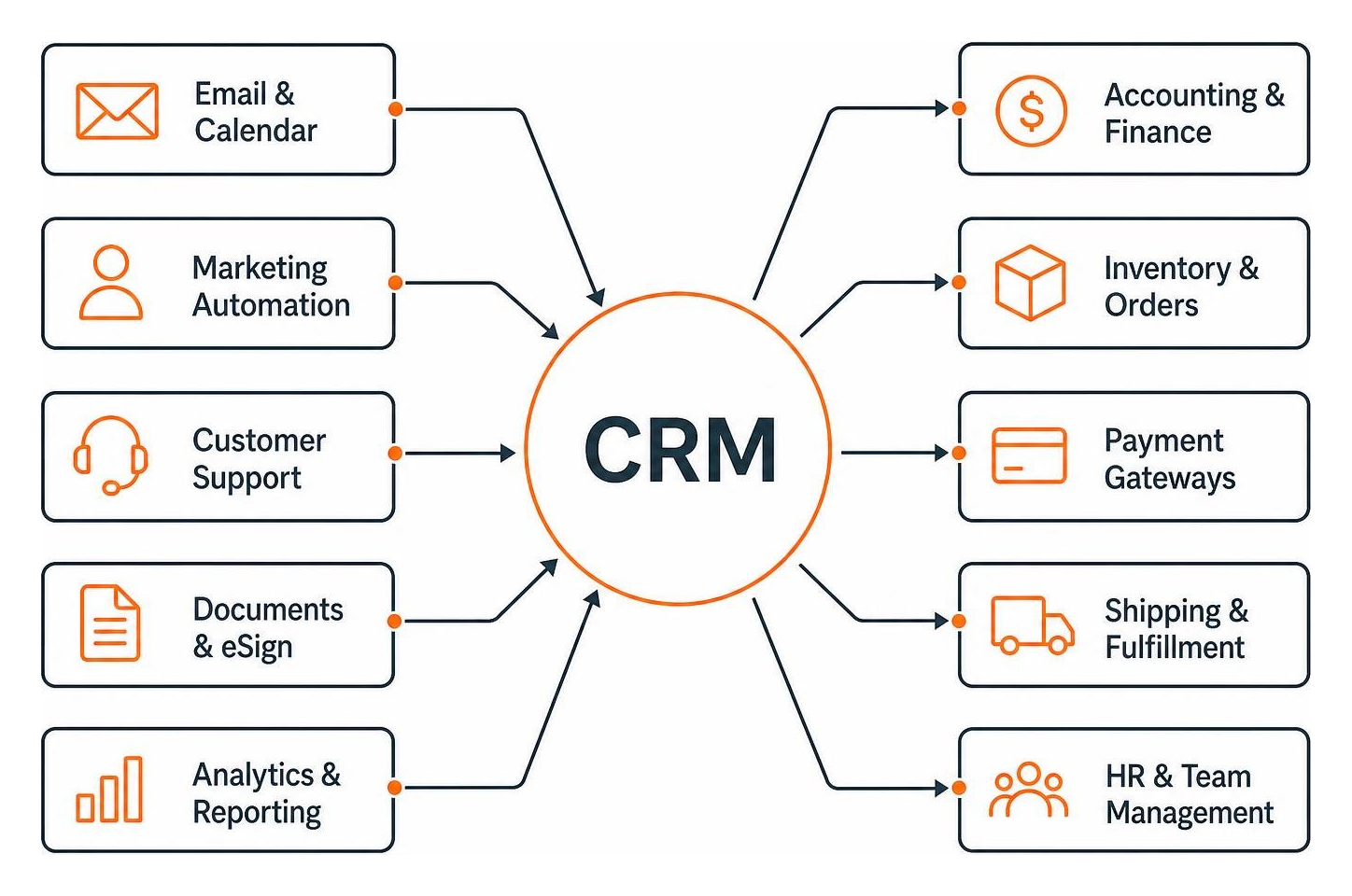
By linking these critical business tools to a central database, you turn your CRM from a simple digital address book into the absolute brain of your business operations. For a complete library of tips, tricks, and tutorials on connecting various platforms, explore our Category: CRM Connection resource hub.
Email and Calendar Integration
Your sales reps live in their email and calendars. If they have to manually log every sent email, scheduled meeting, and follow-up task into the CRM, they are going to spend half their day on admin work instead of actually selling.
By connecting your email client directly to your CRM, every interaction is tracked automatically. You can sync calendar events, update contact details on the fly, and send emails directly from your CRM dashboard. It is a simple tweak that saves hours of tedious work. Learn how to streamline this workflow with our guide on how to Stop Toggling Tabs by Connecting Outlook to Your CRM.
Accounting and ERP Integration
When your sales team closes a deal, the finance team needs to know immediately so they can send an invoice, process the payment, and record the revenue. If these systems are disconnected, you run a high risk of billing delays, double-entry errors, and frustrated customers.
Integrating your CRM with your accounting software or ERP ensures that when a deal is marked “Closed-Won,” a customer record and invoice are automatically generated in your financial system. You can also sync payment statuses back to the CRM, so your sales reps know instantly if an account is in good standing.
For high-volume B2B businesses, setting up an automated CRM to ERP Customer Master Sync is a game-changer. It prevents duplicate accounts and ensures that shipping, billing, and credit data are perfectly aligned. Dive deeper into this connection by reading our article on how to Make Your Money Talk by Connecting CRM and Accounting.
Phone and SMS Integration
In today’s world, customers expect quick, omnichannel communication. They want to be able to call you, send a text, or chat online — and they expect you to remember the conversation across all of those channels.
Integrating your phone and SMS systems with your CRM allows for automatic call logging, one-click dialing directly from customer profiles, and instant call pop-ups that show the rep exactly who is calling and their entire purchase history before they even pick up the phone. See how easy it is to set this up by reading our guide on How to Integrate SMS and Phone Systems with CRM.
Website and Lead Generation Integration
Your website is your digital storefront, and it is where the vast majority of your leads are born. If those leads aren’t flowing directly into your CRM, you are losing valuable time — and potentially losing hot prospects to faster competitors.
For businesses running on WordPress, linking your site to your CRM is essential. At FZP Digital, we always recommend hosting your WordPress site on premium, reliable platforms like GoDaddy or WP Engine to ensure maximum uptime, lightning-fast speeds, and secure data transfers. Once your site is securely hosted, you can easily connect your web forms, landing pages, and user activity directly to your customer database.
Get started with our step-by-step FZP Digital’s Beginners Guide to WordPress Pipedrive Integration to see how simple it is to turn your website into an automated lead-generation machine.
Frequently Asked Questions
What is the easiest way to connect a CRM?
The easiest and fastest way to connect a CRM is by utilizing built-in connectors or native integrations. Most popular CRMs offer direct, one-click integrations with standard business tools like Google Workspace, Microsoft 365, Slack, and Mailchimp. These require absolutely zero coding and can be set up in minutes.
How does connecting systems improve data accuracy?
By automating the flow of information, you eliminate the need for manual data entry, which is the number-one cause of typos, outdated records, and duplicate files. Real-time synchronization ensures that when a customer updates their address or phone number in one system, it instantly updates across your entire business ecosystem.
Can small businesses benefit from connected systems?
Absolutely! In fact, small businesses often benefit the most because they have fewer team members and need to maximize every single hour of the day. Connecting your systems automates tedious admin tasks, allowing your small team to punch well above their weight class and deliver a seamless, enterprise-level experience. Discover how this works in practice by reading How Pipedrive CRM Integrations Can Save Your Sales Team Time.
Conclusion
At the end of the day, crm integration isn’t just a tech project — it is a strategic business decision that frees your team from administrative headaches, eliminates costly human errors, and allows you to deliver the fast, personalized experiences your customers deserve.
But we also know that planning, mapping, and executing these connections can feel incredibly overwhelming when you are busy running your day-to-day operations. That is where we come in.
At FZP Digital, we are a premier digital marketing agency serving Philadelphia, Bucks County, Richboro, Newtown, and Downtown Philadelphia. Led by our founder, Fred Z. Poritsky, we specialize in premium, responsive WordPress website design, custom logo design, and boosting your organic search rankings.
We use a collaborative, transparent “Develop . Design . Deliver” process to take the stress out of digital growth, ensuring your website, marketing, and CRM work together in perfect harmony.
Ready to stop toggling tabs, eliminate manual data entry, and unlock the true potential of your business technology? Partner with FZP Digital for Expert Digital Marketing Services today, and let’s build a unified, high-performing digital ecosystem together!