

How to Build a WordPress Store That Actually Sells
Why E-Commerce WordPress Development is the Smartest Way to Build an Online Store
E-commerce WordPress development is the process of building a fully functional online store using WordPress as the foundation — most commonly powered by the WooCommerce plugin. If you’re looking to get started quickly, here’s what it involves at a glance:
How to build an e-commerce store with WordPress:
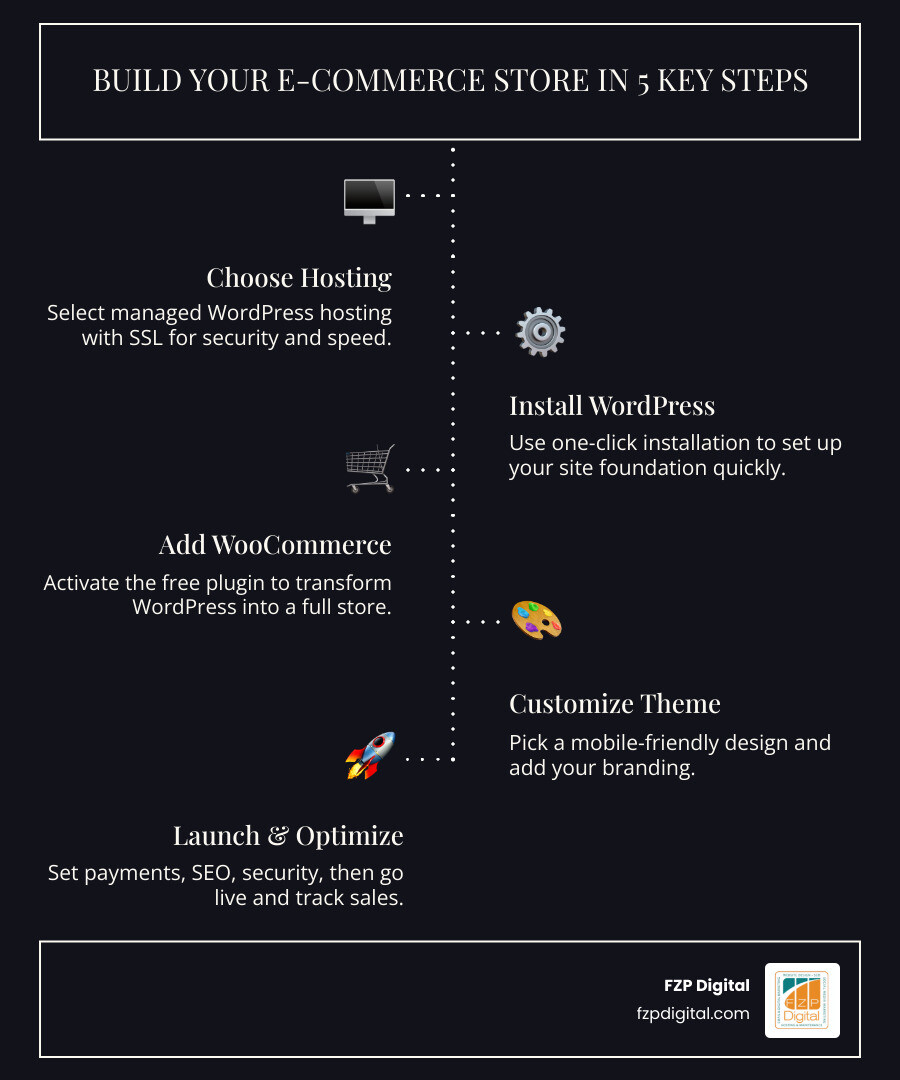
- Choose a hosting provider — Pick managed WordPress hosting with SSL included
- Install WordPress — Most hosts offer one-click installation
- Add WooCommerce — The free plugin that turns WordPress into a store
- Pick a theme — Choose a mobile-friendly, conversion-optimized design
- Add your products — Physical, digital, variable, or subscription-based
- Set up payments and shipping — Connect Stripe, PayPal, or WooPayments
- Optimize for SEO and security — Use plugins like Yoast SEO and Wordfence
- Launch and grow — Track performance with built-in analytics and Google Analytics
It sounds straightforward — and in many ways, it is. But there’s a real difference between a store that exists and a store that sells.
The numbers tell the story. Over 40% of the internet runs on WordPress, and more than 4 million online stores have been built with WooCommerce. That’s not a coincidence. WordPress gives you unmatched flexibility, full ownership of your data, and an enormous ecosystem of tools — without locking you into expensive monthly platform fees.
But for small business owners and nonprofits in the Philadelphia area, getting from “I need an online store” to “my store is actually making sales” can feel overwhelming. What hosting do you pick? Which plugins do you actually need? How do you make sure your site is secure, fast, and showing up on Google?
That’s exactly what this guide is here for.
I’m Fred Z. Poritsky, founder of FZP Digital, and I’ve spent years helping businesses — from local retailers to nonprofits — build powerful digital presences through e-commerce WordPress development. My background spans nonprofit financial management, accounting, and digital marketing, which means I understand both the business goals and the technical side of building a store that works for you.
Let’s walk through everything you need to know.
What is WooCommerce and Why is it the Secret Sauce for Your Store?
Think of WordPress as the beautiful, sturdy building you’ve just moved into. It’s great for showing off your brand, but if you want to actually ring up sales, you need the shelves, the cash register, and the inventory system. That is exactly what the WooCommerce plugin does.
WooCommerce is an open-source e-commerce platform built specifically for WordPress. Because it’s open-source, you aren’t “renting” your store from a giant corporation; you own it. You have complete control over your data and your customer experience. Did you know that 31% of the top 1 million e-commerce sites choose WooCommerce? It’s not just for small shops; it’s a powerhouse used by some of the world’s biggest brands.
When we talk about ecommerce websites, we’re talking about more than just a “Buy Now” button. We’re talking about a system that manages your stock, calculates taxes for a customer in Newtown, and sends out professional invoices automatically.
Why E-commerce WordPress Development is the Best Choice for Growth
You might be wondering, “Why shouldn’t I just use a cookie-cutter site builder?” Well, those platforms often come with “paywalls” for every little feature you want to add. With e-commerce WordPress development, the sky is the limit.
Because 43% of the internet runs on WordPress, there is a massive community of developers constantly creating new tools. Whether you need to sell physical pottery, digital ebooks, or monthly memberships for a Bucks County nonprofit, WordPress can do it. It’s developer-friendly, which means as your business grows, we can customize the code to do exactly what you need.
Building on WordPress means you’re investing in a scalable platform that won’t punish you with higher monthly fees just because you’re becoming more successful.
The Essentials of E-commerce WordPress Development: From Hosting to Installation

Before you can start decorating your digital shop, you need a place for it to live. This is your hosting. For an ecommerce site, you can’t just pick the cheapest “bargain bin” hosting. Why? Because a slow site kills sales. If your page takes more than a few seconds to load, your customers in Philadelphia will bounce faster than a basketball at the Wells Fargo Center.
We highly recommend managed WordPress hosting. Managed hosting means the provider handles the technical “under the hood” stuff—like software updates and security patches—so you can focus on your business.
Your hosting checklist should include:
- An SSL Certificate: This is the little padlock icon in the browser. It encrypts customer data (like credit cards) and is non-negotiable for trust.
- A Custom Domain Name: Something short, memorable, and relevant to your brand.
- One-Click Installation: Most modern hosts allow you to install WordPress and WooCommerce with a single click.
Setting Up Your Digital Storefront
Once WordPress is live, you’ll run the WooCommerce Setup Wizard. This is where you tell the “brain” of your store how to behave. You’ll set your store’s physical location (essential for calculating those PA sales taxes!), choose your currency, and define your shipping zones.
Having a responsive-ecommerce-website starts here. By configuring your basic settings correctly from day one, you ensure that the checkout process is smooth for everyone, whether they are shopping from a desktop in Newtown or a smartphone in Center City.
Designing for Dollars: Choosing Themes and Customizing Your Look
First impressions are everything. In fact, users often form an opinion about a website in about 50 milliseconds! That’s why choosing the right theme is a critical part of e-commerce WordPress development.
You want a theme that is “lightweight” (meaning it loads fast) and fully compatible with the block editor. The Storefront theme is the official WooCommerce theme—it’s clean and very reliable. Other popular choices like Astra offer incredible flexibility.
When we work on professional-wordpress-design, we focus on more than just “pretty colors.” We look at:
- Logo Placement: Your brand identity should be clear and professional.
- Navigation: Can a customer find what they want in two clicks or less?
- Mobile Layout: Does it look just as good on an iPhone as it does on a 27-inch monitor?
Essential Design Elements for High Conversion:
- High-Quality Images: Use professional photos on clean backgrounds.
- Clear Call-to-Action (CTA): Your “Add to Cart” buttons should pop!
- Trust Signals: Show off your reviews and security badges.
- Whitespace: Don’t clutter the page; let your products breathe.
Managing Your Digital Aisle: Products, Payments, and Shipping
Now for the fun part: filling the shelves! WooCommerce allows you to add several types of products:
- Simple Products: A single item, like a t-shirt.
- Variable Products: One item with different options, like a shirt that comes in Small, Medium, and Large or Red and Blue.
- Digital Downloads: Ebooks, music, or software sent via email after purchase.
Managing your inventory is a breeze with the built-in dashboard. You can track stock levels and get alerts when you’re running low. But how do you actually get paid? You’ll need a payment gateway.
| Payment Gateway | Best For | Key Feature |
|---|---|---|
| Stripe | Global Sales | Seamless on-site checkout experience |
| PayPal | Trust & Familiarity | Millions of users already have an account |
| WooPayments | Integrated Management | Manage payments directly in your WordPress dashboard |
| Apple/Google Pay | Mobile Shoppers | One-tap purchasing to reduce friction |
Once the payment is made, you need to get the product to the customer. You can set up “Shipping Classes” for different items (e.g., “Heavy” for furniture vs. “Standard” for books) and define shipping zones to offer free shipping to local Philly customers while charging a flat rate for the rest of the country. For a deeper dive into these features, check out how to unleash-your-online-store-divis-e-commerce-power-explained.
Keeping Your Store Fast, Safe, and Searchable
A beautiful store is useless if nobody can find it—or if it gets hacked. Security is a major concern for any online business. In fact, Wordfence stopped a record 18.5 billion attacks on websites in just the first half of 2019.
To keep your store safe, we recommend the Wordfence security plugin. It’s like having a digital security guard standing at your door 24/7. Additionally, you should always keep your WordPress core, themes, and plugins updated.
For visibility, Yoast SEO is the gold standard. It helps you optimize your product descriptions and meta tags so that when someone searches for your products, you show up on page one. Site speed is also a ranking factor for Google, so tools like Jetpack Boost are great for giving your site that extra “zip.” Following wordpress-website-design-best-practices ensures your technical foundation is rock solid.
Mastering E-commerce WordPress Development for Mobile Shoppers
We live on our phones. If your store isn’t easy to use on a mobile device, you are leaving money on the table. This means having touch-friendly buttons, easy-to-read text, and a checkout process that doesn’t require a magnifying glass.
Our wordpress-web-design-philadelphia-guide-2025 emphasizes that mobile responsiveness is no longer “optional”—it’s the priority. We also use schema markup to help Google understand your products better, which can lead to your items appearing in the “Shopping” tab of Google search results via the Google Merchant Center.
Scaling Your Success: Is Your Store Ready for the Big Leagues?
One of the best things about WooCommerce is that it grows with you. Whether you’re processing ten orders a month or ten thousand, the platform can handle it. For high-volume stores, there is Woo Enterprise, which offers advanced features for businesses handling massive traffic.
To keep growing, you need to know your numbers. Integrating Google Analytics with your store allows you to see where your customers are coming from and what they’re buying. With over 4 million stores built on this platform, the data is clear: WooCommerce is a long-term solution.
Success in small-business-wordpress-website-design comes down to more than just the initial launch; it’s about constant refinement based on what your customers are telling you through their actions.
Frequently Asked Questions about E-commerce WordPress Development
Is WordPress secure enough for an online store?
Absolutely! While WordPress is a target because of its popularity, it is incredibly secure when managed correctly. By using a reputable hosting provider, an SSL certificate, and a dedicated security plugin like Wordfence, your store can be just as safe as any major retailer.
How much does it cost to build a WooCommerce site?
The “core” WordPress and WooCommerce software is free! However, you will have costs for hosting (usually $15–$50/month for good managed hosting), your domain name (~$15/year), and potentially some premium plugins or themes. Compared to other platforms that take a percentage of every sale plus a high monthly fee, WooCommerce is extremely cost-effective.
Can I sell digital products and services on WordPress?
Yes! WooCommerce isn’t just for physical goods. You can easily sell digital downloads (like PDFs or software), appointments, memberships, and even online courses. It’s the ultimate “sell anything” platform.
Conclusion
Building an online store is an exciting journey, but you don’t have to walk the path alone. At FZP Digital, we pride ourselves on our collaborative “Develop . Design . Deliver” process. We don’t just build a website and disappear; we partner with you to ensure your digital presence is actually driving results for your business or nonprofit.
Whether you’re in Richboro, Newtown, or Philadelphia, we’re here to help you navigate the complexities of SEO, design, and technical development. Ready to turn your vision into a high-performing reality?
Contact FZP Digital for premium WordPress design and let’s start building a store that actually sells!