

How to turn your chatbot into a lead generating machine
Why Every Small Business Should Know How to Integrate Chatbot with CRM for Lead Capture
How to integrate chatbot with crm for lead capture is one of the highest-leverage moves you can make to automate your sales pipeline — and here’s the short version of how it works:
- Choose your chatbot platform (e.g., Jotform AI Agents, Landbot, CustomGPT.ai, or Zapier Chatbots)
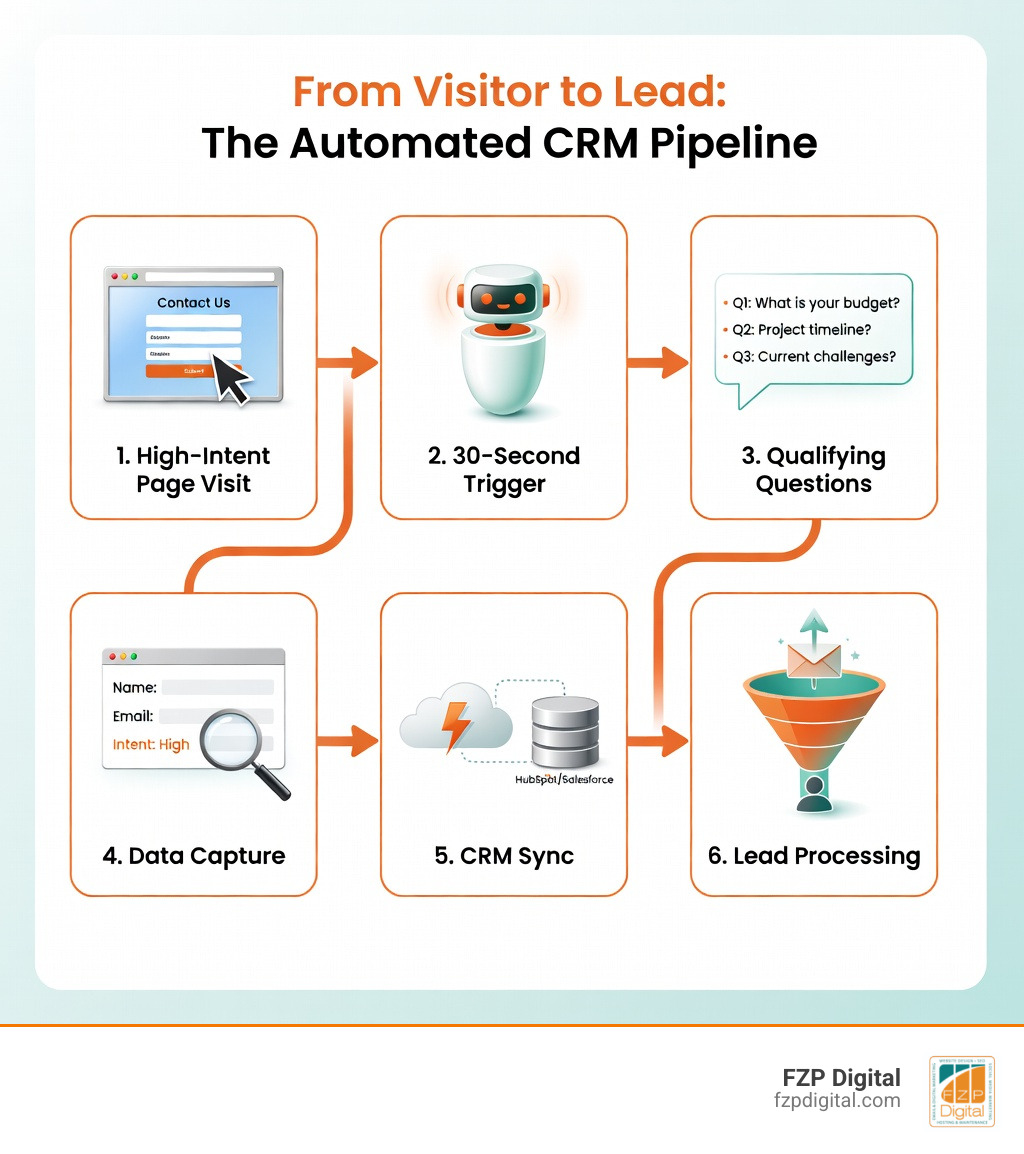
- Design a conversation flow that asks 3-5 qualifying questions on your high-intent pages (pricing, demo, contact)
- Connect your chatbot to your CRM (HubSpot, Salesforce, Zoho, etc.) via a native integration, Zapier, or API webhook
- Map your data fields so captured info (name, email, company, intent) flows directly into the right CRM properties
- Set behavior-based triggers to launch the chatbot at the right moment — after 20-30 seconds on a page, on exit intent, or at scroll depth
- Test, monitor, and optimize using your CRM data and chatbot analytics dashboard
That’s the core loop. The details — and the difference between a bot that sits idle and one that fills your pipeline — are what this guide is all about.
Here’s a number that should stop you in your tracks: companies using AI chatbots see 3× higher conversion rates compared to traditional lead forms. And yet, most small business websites are still sending visitors to a static contact form and hoping for the best.
The gap between a website that generates leads and one that captures and qualifies them automatically comes down to one thing: whether your chatbot is actually talking to your CRM.
Without that connection, your chatbot is just a fancy FAQ widget. With it, it becomes an always-on sales development rep that never takes a lunch break.
I’m Fred Z. Poritsky, founder of FZP Digital — and after years of helping Philadelphia-area businesses build smarter digital presences, I’ve seen how the right chatbot-to-CRM connection can transform a slow lead pipeline into a consistent, automated one. In this guide, I’ll walk you through exactly how to integrate chatbot with crm for lead capture, step by step, in plain language.
The Power of Connecting Your Bot to Your CRM
Have you ever wondered why some websites seem to “stick” while others have visitors bouncing off the page faster than you can say “digital marketing”? It often comes down to responsiveness. According to a recent report, companies that respond to a lead within five minutes are 100 times more likely to connect with them than those waiting just 30 minutes.
That’s a staggering difference! In our world, 59% of consumers expect a chatbot response within five seconds. If you aren’t there to answer, your competitor probably is. This is exactly how can you use AI in your business to gain a massive edge. By integrating your chatbot with your CRM, you ensure that every interaction is captured, logged, and ready for follow-up instantly.

When we talk about how to integrate chatbot with crm for lead capture, we’re talking about moving beyond “reactive” customer service. An integrated bot can reduce response times by up to 70% for straightforward inquiries. It doesn’t just sit there; it qualifies the lead by asking about their budget, timeline, and specific needs.
| Feature | Static Lead Forms | Conversational Chatbots |
|---|---|---|
| Engagement Style | Passive / Transactional | Proactive / Helpful |
| Response Time | Hours or Days | Instant (under 5 seconds) |
| Completion Rate | 2% – 5% | 25% – 40% |
| Data Quality | Limited to form fields | Rich context and intent signals |
| Availability | 24/7 (but no interaction) | 24/7 (interactive qualification) |
By automating the entry of this data, you eliminate human error and ensure your sales team has a “360-degree view” of the prospect before they even pick up the phone. At FZP Digital, we believe in making technology work for you, not the other way around.
How to integrate chatbot with CRM for lead capture: A Step-by-Step Guide
Setting this up might sound like a job for a NASA engineer, but I promise it’s much more approachable than it looks. Whether you’re in Newtown or downtown Philadelphia, the roadmap for how to integrate chatbot with crm for lead capture follows a proven path.
- Define What a “Good Lead” Looks Like: Before touching any settings, decide what info you actually need. Is it just an email? Or do you need their company size and specific pain points? Knowing this helps you build the right questions.
- Pick Your High-Intent Pages: Don’t just stick your bot on every single page. Place it where the “warm” traffic lives—like your pricing page, product comparisons, or your Digital Marketing Services page.
- Set Up Behavior Triggers: You don’t want to be the pushy salesperson who jumps on someone the second they walk in the door. Set your bot to trigger after a visitor has been on the page for 20-30 seconds or once they’ve scrolled halfway down.
- Connect the Plumbing (API/Webhooks): This is where the magic happens. You’ll use an API key from your CRM (like Salesforce or HubSpot) and plug it into your chatbot’s integration settings.
- Test and Deploy: Always run a few “fake” leads through the system first. Check your CRM to see if the data landed in the right spot. If it did, you’re ready to go live!
Mapping your data fields for how to integrate chatbot with CRM for lead capture
The “secret sauce” of a successful integration is field mapping. This is simply telling the chatbot, “When the user gives you their email, put it in the ‘Email’ box in my CRM.”
You want to map standard lead properties like Name, Email, and Company, but don’t stop there. If your bot asks, “What is your biggest marketing challenge?” you should map that answer to a custom “Notes” or “Pain Points” field in your CRM. This gives your sales team incredible context. Instead of a cold call, they’re having a warm conversation based on real data captured during the chat.
Using Zapier and no-code platforms for how to integrate chatbot with CRM for lead capture
If the word “API” makes you want to hide under your desk, don’t worry! Zapier is a lifesaver for small business owners. It acts as a universal translator between your chatbot and your CRM.
Platforms like Landbot, Jotform AI, and CustomGPT have built-in “Zaps” that make syncing data as easy as clicking a few buttons. This is a huge part of our Search Engine Optimization Services Philadelphia strategy—ensuring that the traffic we drive to your site actually turns into a measurable lead in your database without you needing to write a single line of code.
Best Practices for Qualification and Personalization
To turn your bot into a true “lead generating machine,” you need to treat it like a friendly concierge. Start by providing value before you ask for information. If a user asks about pricing, have the bot provide a range or a helpful PDF before asking for their email. This “value-first” approach builds trust and significantly lowers the “drop-off” rate.
Using help + fast track logic is another pro move. If a visitor identifies as a “Current Customer,” the bot should route them to support. If they identify as “Interested in a New Project,” it should fast-track them to a calendar booking link.
For our friends looking for a Local SEO Philadelphia Complete Guide, personalization can even be location-based. Your bot can say, “Hey there! Looking for help with your Newtown business?” based on the user’s IP address. This level of detail makes your business feel present and attentive, even at 3:00 AM.
Frequently Asked Questions about Chatbot Integrations
How long does it take to set up a lead capture chatbot?
For a basic setup using a no-code platform like Social Intents or CustomGPT.ai, you can have a functional bot running in about 1-2 hours. A fully optimized system with deep CRM mapping and custom triggers usually takes a day or two of testing to get just right.
Will a chatbot replace my sales team?
Absolutely not! Think of the chatbot as the “assistant” who handles the initial greeting and vetting. It filters out the “tire kickers” and ensures that when your sales team does step in, they are talking to a qualified lead who is actually ready to buy. It frees them up to do what they do best: close deals.
How do I ensure my chatbot is GDPR compliant?
Transparency is key. Always include a clear “Privacy Policy” link within the chat interface and ensure you have a checkbox or a clear statement that by continuing the conversation, the user consents to data collection. Most modern platforms like Landbot and HubSpot have built-in tools to help you stay compliant with GDPR and CCPA.
Conclusion
At the end of the day, how to integrate chatbot with crm for lead capture isn’t just about technology—it’s about people. It’s about being there for your customers the moment they need you and making it as easy as possible for them to do business with you.
At FZP Digital, Fred Z. Poritsky and our entire team are dedicated to this collaborative “Develop. Design. Deliver” process. We don’t just build websites; we build growth engines. Whether you’re in Richboro, Newtown, or Philadelphia, navigating the complexities of AI and SEO can feel like a mountain to climb. But you don’t have to do it alone.
If you’re ready to stop letting warm traffic slip away and start filling your sales funnel with qualified opportunities, we’re here to help. Explore our Digital Marketing Services and let’s turn your website into the 24/7 lead-generating machine it was meant to be. Reach out today—we’d love to help you navigate your next digital challenge!