

Why Your Choice of Web Chat App Matters More Than You Think
Finding the right web chat app can genuinely transform how you communicate — whether you’re running a small business, managing a remote team, or just trying to stay connected with people across the globe.
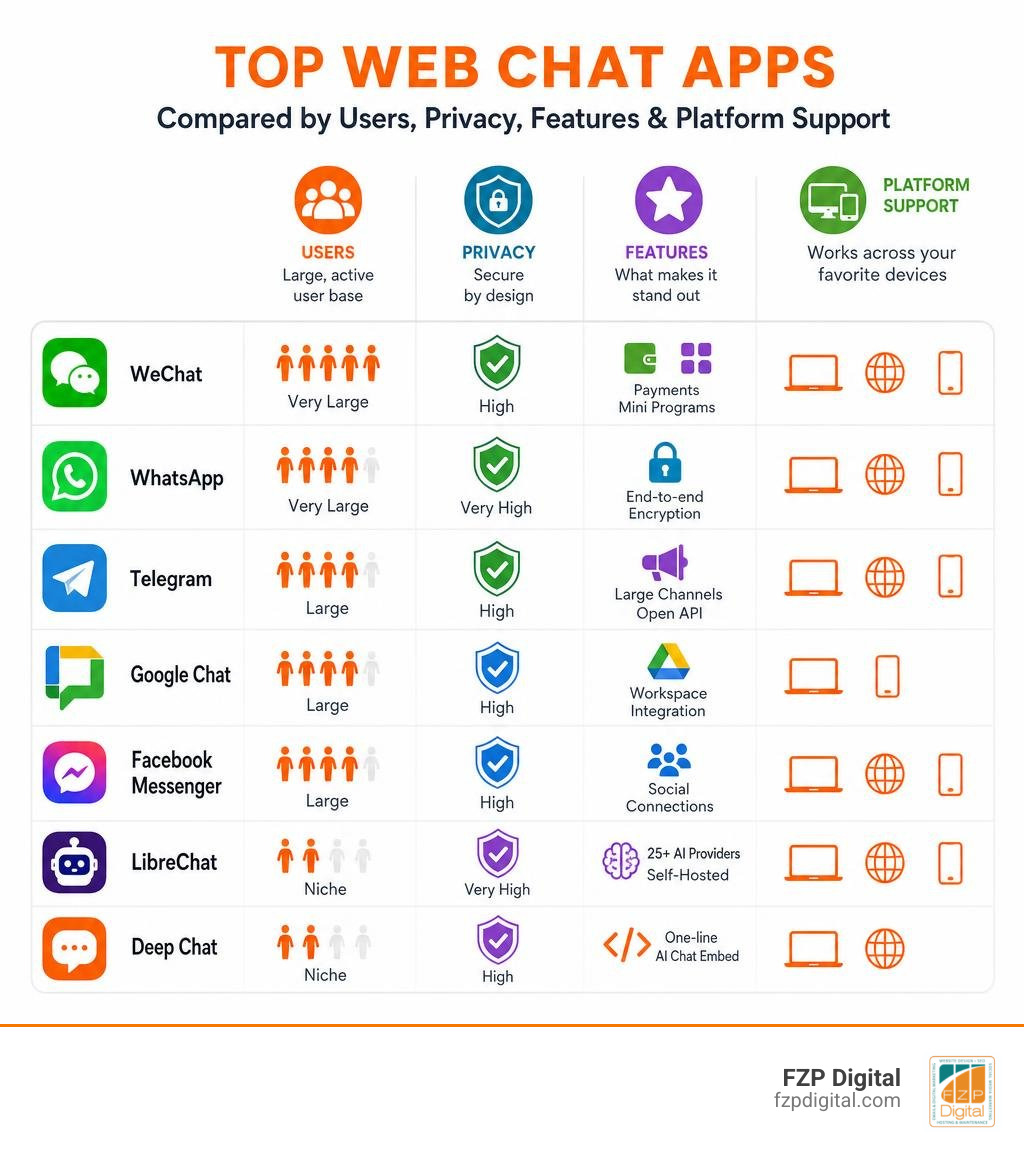
Here’s a quick look at the most popular web chat apps and what they’re best for:
| Web Chat App | Best For | Standout Feature |
|---|---|---|
| International & lifestyle | Payments, Mini Programs, 1B+ users | |
| Simple global messaging | End-to-end encryption | |
| Telegram | Privacy-focused groups | Large channels, open API |
| Google Chat | Workplace teams | Google Workspace integration |
| Facebook Messenger | Social connections | Facebook ecosystem |
| LibreChat | AI power users | 25+ AI providers, self-hosted |
| Deep Chat | Website integration | One-line AI chat embed |
With over a billion people relying on apps like WeChat alone, the stakes for picking the right platform are higher than ever.
The thing is, not all chat apps are created equal. Some are built for casual conversation. Others double as full-blown business platforms — handling payments, customer service, video calls, and even AI-powered responses. And if you’re a small business owner, the app you choose could directly impact how your customers reach you.
So whether you’re comparing features, worried about privacy, or trying to figure out which app actually works across all your devices — you’re in the right place.
I’m Fred Z. Poritsky, founder of FZP Digital, and while my background is rooted in accounting and nonprofit financial management, my work in digital marketing has given me a front-row seat to how the right web chat app can make or break a business’s online communication strategy. Let’s dig into what’s actually worth your time in 2026.
Basic web chat app vocab:
What Makes a Great Web Chat App in 2026?
When you are looking for the perfect web chat app to keep up with your daily grind, you cannot just look at whether it lets you send a quick text. In 2026, communication is much more dynamic. A truly great app needs to be highly multi-platform, working seamlessly across your phone, tablet, and desktop browser without dropping your chat history. It also needs to drive deep user engagement, making conversations feel natural, fast, and interactive.
For businesses, this engagement translates directly to customer trust and conversions. We often tell our clients in Philadelphia and Bucks County that the way you communicate with your audience is changing rapidly. In fact, we have explored this shift deeply in our guide on Why Live Customer Service Chat Is the New Phone Call, showing that customers now expect immediate, conversational, and personalized interactions. If your platform feels clunky or limits how your team can reply, your audience will simply move on to a competitor who makes it easier to get in touch.

The Evolution of the Modern Web Chat App
Gone are the days when instant messaging meant sitting in front of a bulky desktop computer waiting for an old-school chat program to chime. Today, the modern web chat app has evolved into a highly responsive, browser-based powerhouse. You do not always need to download heavy software to get work done anymore. Progressive Web Applications (PWAs) and browser extensions allow you to chat, share files, and manage projects directly within your browser tabs.
This evolution has also democratized communication tools. Small businesses in Richboro and Newtown no longer need massive enterprise budgets to access cutting-edge tools. You can easily find out How to Get Premium Features with a Free Web Chat Tool, allowing you to enjoy features like canned responses, basic automation, and clean user interfaces without paying a dime.
Key Features to Look For in a Web Chat App
If you are evaluating options to streamline your communication, here are the non-negotiable features you should keep on your radar:
- Robust Group Chats: Look for apps that support large group conversations without lagging. Whether it is a project team or a community hub, the interface must remain clean and searchable.
- High-Quality Video Calls: A seamless transition from text to voice or video is crucial. The best apps allow you to launch a call with a single click, supporting screen sharing and virtual backgrounds.
- Effortless File Sharing: You should be able to drag and drop PDFs, images, spreadsheets, and audio files directly into the chat window without running into strict file size limits.
- Integration with Your Website: For business owners, your chat tool should not live in a vacuum. It needs to connect directly with your main digital storefront.
Setting this up does not have to be a headache. If you are running your site on the world’s most popular content management system, you can follow The 5-Minute Guide to Setting Up Your WordPress Live Chat Widget to get up and running in no time.
WeChat: The All-in-One Giant and How It Compares
You cannot talk about the global web chat app landscape without discussing WeChat. Owned by Tencent, WeChat is a massive ecosystem that connects with over 1 billion users worldwide. While Western users are highly familiar with platforms like Messenger , WhatsApp, or Telegram, WeChat operates on an entirely different level. It is not just a messaging tool; it is a comprehensive lifestyle app that integrates social media, mobile payments, and daily utilities into a single platform.
WeChat vs. Competitors: Features, Moments, and Mobile Payments
To understand what makes WeChat so unique, we have to look at how its core features compare to other popular platforms like LINE, WhatsApp, and Telegram.
While WhatsApp and Telegram focus heavily on clean, secure messaging, WeChat builds an entire social environment. Its “Moments” feature acts like a private social media feed where you can share photos, videos, and status updates with your confirmed contacts. Additionally, WeChat supports massive group chats with up to 500 members and group video calls with up to 9 participants (and up to 15 on iOS devices).
The true game-changer, however, is Weixin Pay (WeChat’s mobile payment system). In China, this feature has virtually replaced physical cash. You can use it to pay for groceries, split dinner bills, book flights, and even pay utility bills without ever leaving the app. Competitors like WhatsApp and Telegram have tried to introduce payment features in select markets, but none have achieved the deep, daily-use integration that WeChat enjoys.
| Feature | Telegram | ||
|---|---|---|---|
| Max Group Chat Size | 500 members | 1,024 members | 200,000 members |
| Social Feed | Yes (Moments) | No (Status only) | No (Channels only) |
| Built-in Payments | Yes (Weixin Pay) | Limited by region | Yes (via third-party bots) |
| Mini Programs | Yes (Full app ecosystem) | No | Yes (Telegram Web Apps) |
| Primary Focus | Lifestyle & Utility | Simple, Secure Chat | Privacy & Large Groups |
International vs. Local Use: Pros and Cons
If you are using a web chat app for international communication, WeChat presents a unique set of pros and cons.
On the positive side, it is the absolute gold standard for communicating with anyone living, working, or doing business in China. It features a built-in translation tool that translates messages into your preferred language with a simple tap, bridging communication gaps instantly. It also offers “WeChat Out,” a feature that allows you to make low-cost international calls to landlines and mobile numbers globally.
However, for purely local use outside of China, WeChat can feel incredibly bloated. The app size on iOS is a massive 851.2 MB, which is significantly heavier than its competitors. Many of its most convenient lifestyle features, like local mobile payments and certain Mini Programs, are highly restricted or completely unavailable if you do not have a Chinese bank account or phone number.
Security, Privacy, and User Trust: Navigating the Pitfalls
When choosing a web chat app, security and privacy should always be at the top of your mind. How your data is handled, where it is stored, and who has access to it are critical questions you must ask—especially if you are sharing sensitive business information or personal details.
Common User Complaints and App Store Ratings
While WeChat is immensely popular, its user reviews and app store ratings paint a complicated picture regarding reliability and user satisfaction.
On Google Play, WeChat has over 100M+ downloads and 6.02M reviews, but it carries a relatively low 2.9 out of 5 rating. On the Apple App Store, it fares slightly better with a 3.9 out of 5 rating across 80K ratings.
A quick look through these reviews reveals several common user complaints:
- Account Lockouts: Users frequently report getting locked out of their accounts with very little explanation. Because WeChat has strict security algorithms, logging in from a new device or a different IP address can trigger an automatic suspension.
- Difficult Verification: If your account is flagged or locked, unlocking it often requires another active WeChat user (who meets strict tenure criteria) to verify your identity. If you do not have close friends on the app, you might find your account permanently inaccessible.
- Login Issues: Many international users complain about delayed SMS verification codes, making the initial setup or device migration highly frustrating.
Data Collection Policies and Best Practices for Security
WeChat holds a TRUSTe certification for privacy standards, but its data collection policies are vastly different from privacy-first apps like Signal or Telegram. Because WeChat must comply with local regulations in its primary market, user data is subject to strict monitoring and censorship policies. Messages sent within the app are not end-to-end encrypted by default, meaning they can be scanned and logged on central servers.
If you must use WeChat for business or personal communication, here are some best practices to avoid security issues and lockouts:
- Enable Two-Factor Authentication: Always link both a secure phone number and an active email address to your account.
- Avoid Sensitive Topics: Be mindful of what you share in group chats, as certain keywords can trigger automated account flags or permanent bans.
- Keep Your App Updated: Given its large 851.2 MB size on iOS, regular updates are necessary to patch security vulnerabilities.
- Review Age Ratings and In-App Purchases: WeChat is rated 17+ on the App Store due to its unrestricted web access and social features. Keep an eye on in-app purchases and linked payment methods to prevent unauthorized transactions.
Privacy-First and AI-Powered Alternatives
If you love the idea of a highly functional web chat app but want to avoid data tracking, censorship, or heavy app downloads, you are in luck. The open-source community and modern AI developers have built incredible, privacy-first alternatives that put you back in control of your data.
Open-Source and Local-First Chat Solutions
For users who want complete control over their messaging environment, open-source and self-hosted platforms are the way to go. These tools allow you to run your own chat server, ensuring that no third-party corporation has access to your private conversations.
- LibreChat: This is an incredible, open-source web chat platform that brings together the power of multiple AI assistants. The project is highly collaborative, boasting 270 contributors and supporting over 25 languages. It is a fantastic self-hosted alternative to commercial AI interfaces, allowing you to switch between different AI models mid-conversation. Plus, it supports group video calls with up to 15 people on iOS devices. You can explore the project directly on the noblezilla/LibreChat GitHub repository.
- LiteChat: If you are a developer or a power user looking for a highly modular, local-first option, LiteChat is a fantastic project to check out. It features a client-side architecture that stores all your data directly in your browser’s IndexedDB, meaning your chats never touch an external server without your permission. You can learn more on the DimitriGilbert/LiteChat repository.
- Chrome Built-in AI Chat UI: Want to chat with an AI completely offline? This innovative, zero-dependency Progressive Web App (PWA) leverages Google Chrome’s built-in Gemini Nano model to run AI processing locally on your computer. All your chat history stays completely on your machine. Check out how to set it up on the arif891/chromeaiui page.
Customizable AI Chat Components for Websites
If you are a business owner looking to add an intelligent chat assistant to your website, you do not have to rely on expensive, rigid third-party software.
You can use OvidijusParsiunas/deep-chat , a fully customizable AI chat component that can be injected into any website with just a single line of code.
Deep Chat is highly popular in the developer community, with 3,637 stars and 445 forks on GitHub. It supports over 20 popular AI APIs, allowing you to connect your website’s chat interface directly to services like ChatGPT , Claude, or Gemini. This gives you the power to build a highly responsive, custom-trained chatbot that can answer customer questions, schedule appointments, and capture leads 24/7.
Frequently Asked Questions about Web Chat Apps
Navigating web-based communication can raise a lot of questions. Here are quick, clear answers to some of the most common queries we hear from clients and readers.
What is the best web chat app for complete privacy?
If you are looking for absolute, zero-trace privacy, the WebChat – Apps on Google Play app is a unique choice. Unlike mainstream apps that require your phone number, email, and personal details, WebChat requires no credentials or account creation. It features zero data retention, meaning all your messages are discarded immediately as soon as you refresh or close the browser tab. You simply choose an anonymous username, join a public channel, or create a private channel to invite others.
How do I install a standalone web chat app on my desktop?
You do not always need to keep a browser tab open to stay connected. Many modern chat apps are built as Progressive Web Applications (PWAs). For example, if you use Google Chat, you can easily install the standalone app directly through your Chrome browser.
To do this, your computer simply needs to run Google Chrome version 73 or higher. When you navigate to Google Chat, you will see a small install icon on the right side of your browser’s URL address bar. Clicking this will install a clean, standalone desktop app that you can launch directly from your computer’s applications folder or set to run automatically at startup.
Can I integrate a live chat widget into my WordPress site?
Absolutely! Adding a live chat widget to your WordPress site is one of the smartest moves you can make to increase conversions and boost customer satisfaction. Best of all, you do not need a massive budget to get started.
You can easily set up a Free Live Chat Service Because the Best Things in Life Are Free, allowing you to connect directly with your website visitors in real-time.
However, making sure your chat widget looks beautiful, loads quickly, and integrates perfectly with your site’s design can sometimes be a challenge. That is where having a team of web design experts on your side makes all the difference.
Conclusion: Let’s Build Your Perfect Communication Strategy
Choosing the right web chat app is not just about picking a tool; it is about building a seamless bridge between you, your team, and your customers. From massive global platforms like WeChat to cutting-edge, self-hosted AI chat solutions, the options available in 2026 are incredibly powerful.
But with so many choices, figuring out how to integrate these tools into your website, optimize them for mobile users, and use them to boost your search engine rankings can feel like an uphill battle.
That is where we come in. At FZP Digital, we are a dedicated digital marketing agency serving businesses throughout Richboro, Newtown, Philadelphia, and Downtown Philadelphia. Led by our founder, Fred Z. Poritsky, we specialize in premium responsive WordPress website design, custom logo design, and implementing smart strategies to increase your organic search rankings.
We believe in a collaborative “Develop . Design . Deliver” process. We do not just build websites; we partner with you to understand your unique business goals, ensuring your digital presence is beautiful, fast, and equipped with the perfect communication tools to turn casual visitors into loyal customers.
Ready to take your business’s online presence and communication strategy to the next level? Partner with FZP Digital for Custom Web Solutions today, and let’s build something incredible together!