

From Code to Clicks: Choosing the Best WordPress Template for Your IT Business

Why WordPress Powers Modern Tech and IT Enterprises
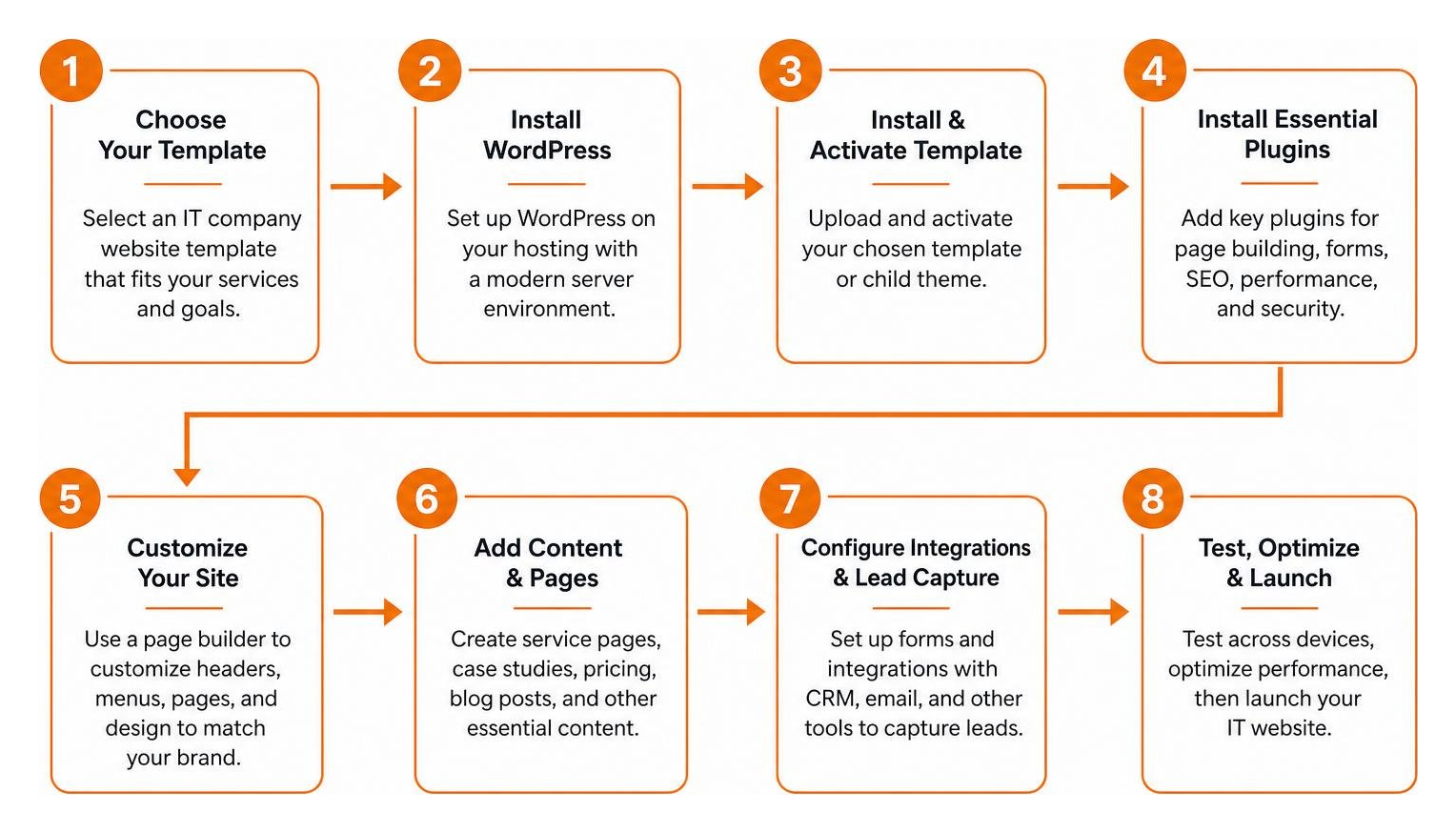
Choosing the best IT company website template on WordPress comes down to a few practical priorities: dedicated service silos for your core offerings, fast semantic architecture that supports Core Web Vitals, CRM-ready lead capture, and flexible page builder customization. When those pieces are in place, your site can turn technical expertise into clear business value for prospective clients.
Have you ever wondered why so many technology firms rely on WordPress to drive their digital presence? While some developers might reflexively think of building custom web apps from scratch, WordPress remains the heavyweight champion of content management systems. As of December 2024, WordPress is used by 62.0% of all websites whose CMS is known, and it powers 22.52% of the top one million websites worldwide. In fact, it powers well over a third of the entire web!
For an IT enterprise, credibility is everything. When potential clients land on your site looking for managed cloud services, software development, or cybersecurity solutions, they expect seamless performance and modern layouts. WordPress delivers this through its modular Gutenberg block editor, thousands of developer hooks, and robust REST API capabilities. These tools allow your team to decouple the frontend when needed, integrate internal tools, and push real-time updates smoothly without disrupting active user sessions.
Managing content on the go is just as straightforward. The official WordPress mobile app—boasting over 10 million downloads on Google Play and a 4.6-star rating across tens of thousands of iOS reviews—makes reviewing drafts or updating post visibility effortless. If you want a deeper look at setting up your digital framework, take a look at our practical guide to company website templates in WordPress to see how modern brands structure their pages for sustainable online growth.
Essential Features of an IT Company Website Template WordPress
When you’re searching for an IT company website template on WordPress, it’s easy to get distracted by flashy animations or trendy visual gimmicks. But what truly converts a casual visitor into a qualified enterprise lead?
An effective IT website needs to translate complex technical jargon into clear, actionable business value. That requires purposeful design components built to guide decision-makers through your offerings:
- Dedicated Service Silos: Clean, dedicated landing pages for managed IT, cloud migration, network infrastructure, cybersecurity audits, and help-desk support.
- Dynamic Case Study Showcases: Highlight problem-and-solution narratives, quantifiable metrics, client testimonials, and technology stacks to prove your expertise in action.
- Lead Capture and CRM Integration: Smart forms connecting directly to platforms like HubSpot, Salesforce, Zoho, or custom webhook endpoints for instant follow-up.
- Interactive Pricing Tables: Transparent support tiers, SLA packages, or project scope calculators that guide purchasing decisions and reduce sales friction.
Following established WordPress website design best practices helps maintain visual hierarchy, logical conversion funnels, and fast-loading layouts across every device.
Core Architecture of an IT Company Website Template WordPress
Beneath the visual design, your site’s codebase determines its search engine visibility, accessibility, and overall performance. Modern tech buyers expect instantaneous page loads, making Core Web Vitals a top priority.
A well-engineered template utilizes clean semantic HTML5, native CSS Grid/Flexbox layouts, and full compatibility with modern server environments like PHP 8.3 and MariaDB 10.11+. Valid schema markup helps search engines interpret your technical offerings, software reviews, customer ratings, and office locations clearly. If you want to review basic architecture before investing in commercial options, exploring the IT Company theme directory on WordPress.org can provide a helpful baseline for foundational block structures.
Customizing Your IT Company Website Template WordPress with Modern Page Builders
Modern page builders like Elementor give you complete visual control over headers, mega menus, footers, and dynamic post archives. With reusable global styles, you can maintain consistent corporate typography and brand colors across hundreds of pages effortlessly.
However, off-the-shelf options come with trade-offs. Ready-made templates often load excess scripts or generic assets that weigh down your server and impact load times. In our review on custom WordPress design versus templates, we break down how starting with a pre-made skin compares to building a custom-engineered child theme tailored directly to your business goals and conversion funnel.
Top Templates and Frameworks for Technology Service Providers
Selecting the right framework saves hundreds of development hours while giving your tech firm a rock-solid foundation. Below is a comparison of top WordPress themes built specifically for technology and IT consulting providers:
| Theme Name | Page Builder Compatibility | Key Features | Best Suited For |
|---|---|---|---|
| ITzen | Elementor Drag-and-Drop | 50+ custom tech widgets, mega menu builder, WPML translation | Cloud providers, SaaS startups, cybersecurity agencies |
| Tronix | Elementor & Gutenberg | AI content integration, smart internal link assistant, 30+ subpages | IT support companies, software agencies, digital firms |
| Tech Corp | Elementor Kit | Semantic HTML5, lightweight Flexbox structure, custom sitemap tools | Digital service providers, boutique IT consulting firms |
| IT-Tech | Elementor & Theme Options | 40+ niche homepage demos, lifetime updates, WooCommerce ready | Technology consultancies, enterprise MSPs, AI agencies |
Premium Theme Options for IT Consulting and Software Companies
If you want a complete turnkey solution, commercial marketplaces offer specialized options. For example, the ITzen IT Solutions WordPress Theme on ThemeForest comes with pre-built layouts tailored for cloud services, SaaS platforms, and technology consultancies, featuring responsive mega menus and multilingual support.
Similarly, the Tronix Technology WordPress Theme on ThemeForest focuses on high-speed page templates and built-in AI writing workflows. These themes give fast-growing tech teams a polished foundation without requiring months of ground-up coding.
Niche Frameworks for Managed Service Providers and Cloud Firms
Managed Service Providers (MSPs) and cybersecurity firms often require specialized layouts. High-contrast dark-mode user interfaces, security certification badges, compliance disclaimers, and direct integration with client ticket portals are standard expectations in this space.
When configured alongside an e-commerce framework like WooCommerce, your site can handle software licensing renewals, hardware procurement, and recurring support retainers. Setting up these advanced workflows is where investing in professional WordPress design pays off, ensuring custom portals, payment gateways, and client forms work together securely and reliably.
Hosting, Security, and Scalability for Enterprise WordPress

An IT company’s website should set an example for web security and performance. If your site suffers from slow load times, unpatched vulnerabilities, or downtime, prospective clients will naturally question your technical capabilities.
A secure, enterprise-grade hosting environment requires:
- Server Modernization: Run PHP 8.3 or higher with isolated database resources on MySQL 8.0+ or MariaDB 10.11+ to maximize execution speed.
- Web Application Firewalls (WAF): Block brute-force login attempts, SQL injections, and cross-site scripting (XSS) at the DNS edge level.
- Isolated Staging Environments: Test major core, theme, and plugin updates thoroughly on a staging server before pushing changes live to production.
- Automated Real-Time Backups: Store encrypted, off-site snapshots of your database and media directories daily to guarantee zero data loss.
When it comes to managed WordPress hosting, server performance and dedicated support make all the difference. We evaluate hosting platforms on uptime reliability, server-level caching, and security tooling. GoDaddy stands out as a leading managed platform for business websites, providing automated daily backups, built-in staging, and high-performance server configurations. At FZP Digital, we recommend GoDaddy and WP Engine as top managed hosting providers for technology companies that need guaranteed uptime, speed, and scalable cloud infrastructure.
Frequently Asked Questions About IT WordPress Websites
How do I choose between a pre-built template and custom WordPress development?
Pre-built themes provide a quick launch timeline and lower initial software costs, making them great for startups. However, as your service offerings expand, a custom-designed WordPress site offers cleaner code, better Core Web Vitals scores, and tailor-made user journeys that can significantly improve lead generation.
What are the essential plugins for an IT services website?
Every corporate IT site benefits from an enterprise-grade SEO plugin (such as Yoast SEO or Rank Math), server-level or object caching (like LiteSpeed or Redis Object Cache), a trusted form builder that connects to your CRM, and a comprehensive security scanner to monitor file integrity.
How do I ensure my tech website template meets accessibility and performance standards?
Ensure your theme adheres to WCAG 2.1 AA standards by maintaining high color contrast, logical tab navigation, semantic heading structures (H1 through H3), and descriptive image alt attributes. For speed, compress all images to WebP format, use a global content delivery network (CDN), and eliminate unnecessary third-party tracking scripts.
Conclusion
Choosing the right WordPress template for your IT company comes down to finding the sweet spot between technical performance, clean design, and a user experience that builds immediate trust. When your website clearly explains how your technical expertise solves real-world business challenges, turning clicks into long-term clients becomes second nature.
Are you ready to elevate your tech firm’s web presence? Explore our comprehensive web design and development services to see how our team at FZP Digital, led by founder Fred Z. Poritsky, can help you develop, design, and deliver a modern WordPress website that fuels your business growth and outpaces the competition.