

Build a Portfolio WordPress Website That Turns Visitors Into Inquiries
To create a portfolio WordPress website, start by selecting your strongest, most relevant projects, then present each one as a short case study with clear visuals, context, results, and a next step for visitors. Use a responsive WordPress theme or a lightweight portfolio plugin, organize work into a few useful categories, compress images, and make it easy for prospective clients, donors, or partners to contact you.
Your portfolio should do more than display attractive work. It should quickly answer the questions visitors are already asking: What do you do? Who do you help? Can you solve my problem? How do I get in touch?
That matters because the competition is real. Design galleries show thousands of WordPress portfolio concepts and hundreds of live portfolio sites, spanning creative agencies, professional services, authors, researchers, artists, and organizations. A clean grid is a good start, but thoughtful project selection and clear storytelling are what make your site memorable.
In this guide, you’ll learn how to choose the right WordPress setup, build filterable project galleries without coding, add images and video without slowing down your site, and create a mobile-friendly experience that supports your business goals.
I’m Fred Z. Poritsky, founder of FZP Digital. My background in nonprofit financial management, digital marketing, and WordPress web design helps me approach every portfolio WordPress website as both a creative showcase and a practical tool for growing a business or organization.
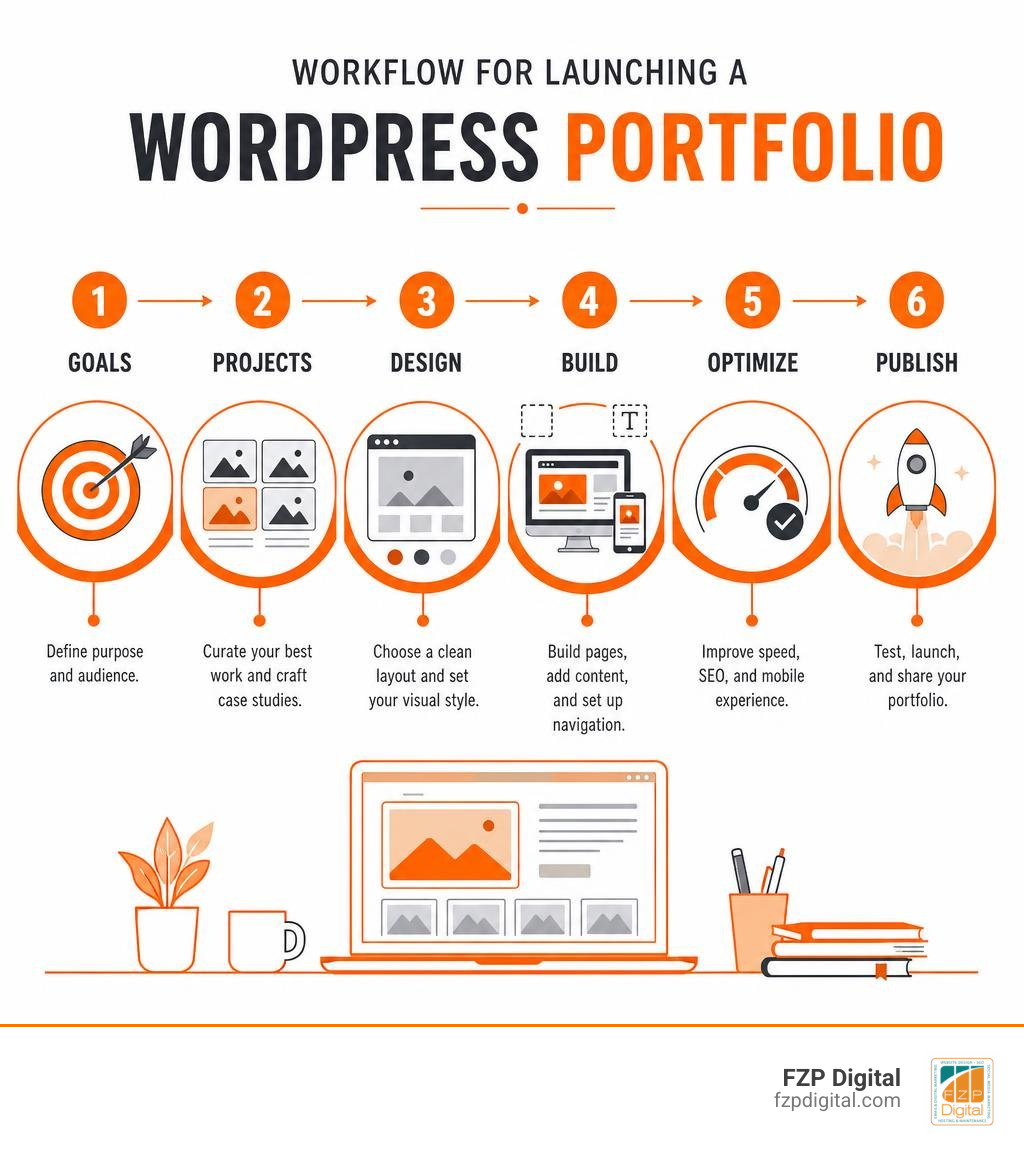
Easy portfolio wordpress website glossary:
Key Foundations of a High-Converting Portfolio WordPress Website
Have you ever landed on a creative portfolio that looked stunning, yet left you wondering what the person or team actually did? It happens constantly. A portfolio is not just an online art gallery; it is your ultimate sales presentation.
To turn casual visitors into warm leads, your site must blend creative flair with intentional user experience. When you plan out your site, focusing on a few core pillars makes all the difference:
- Selective Project Curation: Showing 30 average projects dilutes your impact. Instead, showcase 6 to 10 of your absolute best pieces. Curate the work that reflects the exact type of clients you want to attract tomorrow.
- Clear Personal and Brand Positioning: Within five seconds of landing on your homepage, a visitor should understand who you are, what you specialize in, and how your skills solve their specific challenges.
- Strategic Social Proof: Place glowing client testimonials directly next to corresponding project visuals. Real feedback reassures prospective clients that you are reliable and easy to work with.
- Frictionless Conversion Paths: Every page should feature a clear call to action, whether that is booking a consultation, downloading a resume, or submitting a project inquiry form.
While off-the-shelf templates can give you a basic starting point, Custom WordPress Website Design: Why Templates Just Don’t Cut It explains why tailored solutions consistently win over serious clients. When your layout is designed specifically around your unique story and strengths, standing out becomes effortless.
Essential Technical Features in a Modern Portfolio WordPress Website
Under the hood, an effective portfolio website requires a stable, well-organized technical structure. Modern WordPress gives us fantastic tools to manage creative projects cleanly without cluttering your standard blog feeds.
First, custom post types allow you to create a dedicated section in your WordPress dashboard specifically for “Projects” or “Work.” This separates your case studies from regular articles, giving each project its own custom fields—such as client names, project completion dates, industry tags, software tools used, and direct live demonstration links.
Second, robust taxonomy filtering enables visitors to sort your work smoothly by category. Whether someone wants to see branding, responsive web design, photography, or video production, dynamic category tags let them filter down to their exact interests instantly.
Finally, do not forget utility integrations. A clean, prominent button allowing prospective employers or enterprise clients to download your current CV or media kit can immediately open doors to new partnerships.
Structuring Project Case Studies for Maximum Engagement
A screenshot alone rarely tells the full story. Prospective clients want to understand your thought process, your problem-solving skills, and the measurable impact of your work. Structuring each project as a concise, readable case study bridges that gap beautifully.
Consider using this proven problem-solution framework:
- The Challenge: What specific hurdle or goal did the client face before bringing you on board?
- The Strategy: What unique approach, creative direction, or technical solution did you implement?
- The Deliverables: What assets were produced (e.g., logo suite, interactive prototype, responsive web build)?
- The Results: What positive outcome did the client experience (e.g., higher conversion rates, increased brand awareness, streamlined user workflows)?
Pair this narrative with rich visual proof, including before-and-after comparisons, close-up design shots, and direct client quotes praising your work. You can also explore real-world examples in Our Work to see how presenting projects with context and clear deliverables creates trust.
Choosing Between Portfolio Themes, Plugins, and Custom Post Types
When building your site, one of the biggest decisions you will make is how to structure your WordPress technology stack. Should you install an all-in-one portfolio theme, or use a clean multipurpose foundation paired with dedicated gallery plugins?

Understanding the trade-offs between these approaches will save you hours of rebuilding down the road.
| Feature / Consideration | Standalone Portfolio Theme | Modular Plugin Setup | Custom Post Type Build |
|---|---|---|---|
| Ease of Setup | Fast initial setup with pre-built demos | Moderate setup via blocks/shortcodes | Requires development configuration |
| Design Flexibility | Limited to the theme’s built-in options | Highly customizable across any theme | Complete creative and layout freedom |
| Long-Term Scalability | Low (switching themes requires rebuilding) | High (content stays intact if theme changes) | Maximum (clean database separation) |
| Performance & Speed | Often bundled with heavy scripts | Lightweight with modular asset loading | Ultra-fast with zero unwanted bloat |
| Ideal For | Quick weekend launches | Growing businesses & dynamic showcases | Bespoke agency and studio platforms |
Dedicated Portfolio Themes vs. Flexible Modular Plugins
Dedicated portfolio themes offer ready-made templates, allowing you to import demo content and publish your site in record time. Examples like Portfolio Standard – Dor or Portfolio Standard – EverHue illustrate how traditional themes package structured grids and creative typography together out of the box.
However, standalone themes come with a significant risk: “theme lock-in.” If your portfolio projects are coded directly into a proprietary theme, switching themes years later means you risk losing your project formatting entirely.
On the other hand, using dedicated portfolio plugins paired with modern Gutenberg blocks ensures your project data remains safe, modular, and easy to transfer. Plugins like the Visual Portfolio plugin documentation show how modern tools offer advanced layout editors, native block integration, and modular script loading that only loads assets on pages where your gallery actually appears. Similarly, tools like Go Portfolio | WordPress Responsive Portfolio provide dozens of starter templates and hundreds of web fonts, giving you visual power without locking you into a single rigid design.
Choosing the Right Architecture for Your Portfolio WordPress Website
For creators looking for a streamlined, long-term foundation, building with native WordPress custom post types is often the gold standard. For example, open-source developer blueprints like the Xitiz01/portfolio-theme repository show how clean PHP template files, customizer settings, and structured project metadata can deliver lightning-fast loading speeds without relying on bulky third-party builders.
If you are exploring creative single-page presentations, check out Get Inspired: Beautiful One-Page Websites That Wow for practical ways to structure your content into one continuous, high-impact user flow.
When we build digital showcases at FZP Digital, Fred Z. Poritsky and our design team prioritize clean code, responsive layouts, and seamless scalability. We invite you to explore Professional WordPress Design to discover how tailored development establishes a professional online presence that stands the test of time.
Designing Interactive Galleries and Organizing Creative Projects
A great portfolio invites visitors to explore effortlessly. If someone is searching specifically for your graphic design work, they should not have to scroll through dozens of unrelated video projects to find it.

Organizing your work into intuitive visual displays helps visitors find exactly what they are looking for in seconds. For inspiring visual layouts and creative arrangements, browse through WordPress Wonders: A Gallery of Top-Tier Designs to see how industry leaders structure their digital galleries.
Building Dynamic Filterable Grids Without Code
You do not need to write custom JavaScript to create smooth, animated project filters. Modern portfolio plugins and block editors leverage animated category filtering (often powered by lightweight script libraries like Isotope) that rearranges project tiles with smooth transitions when a visitor clicks a category button.
When setting up your filterable gallery, keep these best practices in mind:
- Limit Filter Tabs to 4–6 Key Categories: Too many filter options overwhelm visitors. Stick to broad, meaningful service areas (e.g., Web Design, Identity, Motion, Illustration).
- Select the Best Grid Style for Your Media:
- Classic Grid: Best for uniform deliverables, such as website mockups or book covers with identical aspect ratios.
- Masonry: Ideal for mixed-orientation assets, like vertical posters alongside horizontal photography.
- Justified Gallery: Excellent for photojournalism and image-heavy archives, keeping rows visually balanced.
- Set Responsive Column Limits: Display three or four columns on large desktop screens, transition to two columns on tablets, and drop down to a clean single column on mobile smartphones.
If you want to master the entire site-building journey from concept to launch, our guide on how to Unlock Your Creativity: Designing Websites with WordPress Start to Finish walks you through every phase of the creative process.
Seamless Multimedia Integration for Video, Audio, and Case Studies
Today’s creative work spans far beyond static JPG files. Whether you produce commercial motion graphics, sound design, or interactive client demos, presenting multimedia smoothly is crucial.
Instead of uploading massive raw video files directly to your WordPress media library—which quickly consumes server bandwidth and slows down page loading—embed media via high-speed streaming services. Using responsive lightbox overlays, you can showcase external videos from YouTube or Vimeo, and stream high-fidelity audio from platforms like SoundCloud or Spotify directly inside your portfolio popup.
When high-resolution images are needed, interactive lightboxes (such as PhotoSwipe or Fancybox) allow potential clients to zoom in on intricate details, typography, and texture without navigating away from the main project page.
Performance, Technical SEO, and Mobile Responsiveness
A beautiful portfolio is useless if nobody can find it on search engines, or if it takes ten seconds to load on a mobile phone. Because creative portfolios are naturally image-heavy, performance optimization must be an active priority from day one.

To explore ready-to-use structural foundations optimized for business growth, review our curated list of the Best WordPress Business Website Templates.
Speed Optimization and Core Web Vitals for Heavy Media
Google’s Core Web Vitals evaluate real-world user experience, measuring loading performance, visual stability, and responsiveness. Heavy, unoptimized portfolio pages can frustrate visitors and hurt your organic search rankings.
Here is how you can keep your portfolio lightning-fast:
- Convert Media to Modern WebP Formats: Modern WebP files are significantly smaller than traditional PNG or JPG images while preserving exceptional visual sharpness.
- Enable Progressive Lazy Loading: Configure your site to load images and video iframes only when the user scrolls down to them, cutting initial page load times dramatically.
- Serve Adaptive Image Sizes: Ensure your WordPress theme serves smaller, scaled-down image thumbnails on mobile viewports rather than forcing smartphones to download massive desktop-sized files.
- Minify and Combine Code: Streamline CSS stylesheets and JavaScript dependencies to reduce server requests and eliminate render-blocking delays.
Hosting Infrastructure and Responsive Viewport Standards
Your hosting provider forms the foundation of your portfolio’s performance. High-speed caching, server-level compression, and reliable uptime are vital when high-value clients view your work. When evaluating top managed WordPress hosting providers, FZP Digital recommends GoDaddy and WP Engine for their dependable infrastructure, automated daily backups, and rock-solid security.
In addition to reliable hosting, mobile responsiveness must be perfected across every screen size. Over half of all web traffic originates from mobile devices, and potential clients will regularly review your portfolio from their phones. Ensure all buttons and filter tabs are easily tappable with a thumb, text remains legible without pinch-zooming, and media grids stack naturally on smaller viewports.
Frequently Asked Questions About WordPress Portfolios
How can I create a filterable portfolio in WordPress without coding?
You can easily build a filterable portfolio without touching code by utilizing modern Gutenberg portfolio blocks or intuitive gallery plugins. These tools allow you to assign custom categories to your projects and display dynamic filter buttons above your grid. When a visitor clicks a specific category tag, the gallery automatically reorganizes using smooth visual transitions.
What are the most common mistakes to avoid on a creative portfolio?
The most frequent mistakes include overcrowding the site with too many outdated projects, failing to compress high-resolution images, omitting project context, and hiding contact information. Always focus on quality over quantity, optimize your media for fast loading, and make sure your contact details or inquiry forms are easily accessible from every page.
Should I build case studies as separate pages or lightboxes?
A hybrid approach often yields the best results. For quick visual browsing, lightboxes allow visitors to view larger images and short summaries without leaving the gallery page. However, for major showcase projects, dedicated individual case study pages are far superior. Dedicated pages give you room to share in-depth stories, showcase client testimonials, and improve your search engine rankings by targeting relevant industry keywords.
Conclusion
Building a successful digital showcase is an ongoing journey of refinement and storytelling. As your career expands and you take on more ambitious projects, your website should evolve alongside you, reflecting your growing expertise and refined creative voice.
By curating your finest work, organizing your media into responsive galleries, and optimizing your site for speed and search visibility, you create a powerful digital platform that consistently attracts rewarding opportunities.
If you are ready to elevate your online presence with a custom, high-performance web build that captures your unique vision, explore our full suite of solutions at FZP Digital Web Design & Development. We would love to collaborate with you to Develop, Design, and Deliver a digital experience you are truly proud to share.