

W3C Accessibility Guidelines: What Your Team Needs to Know
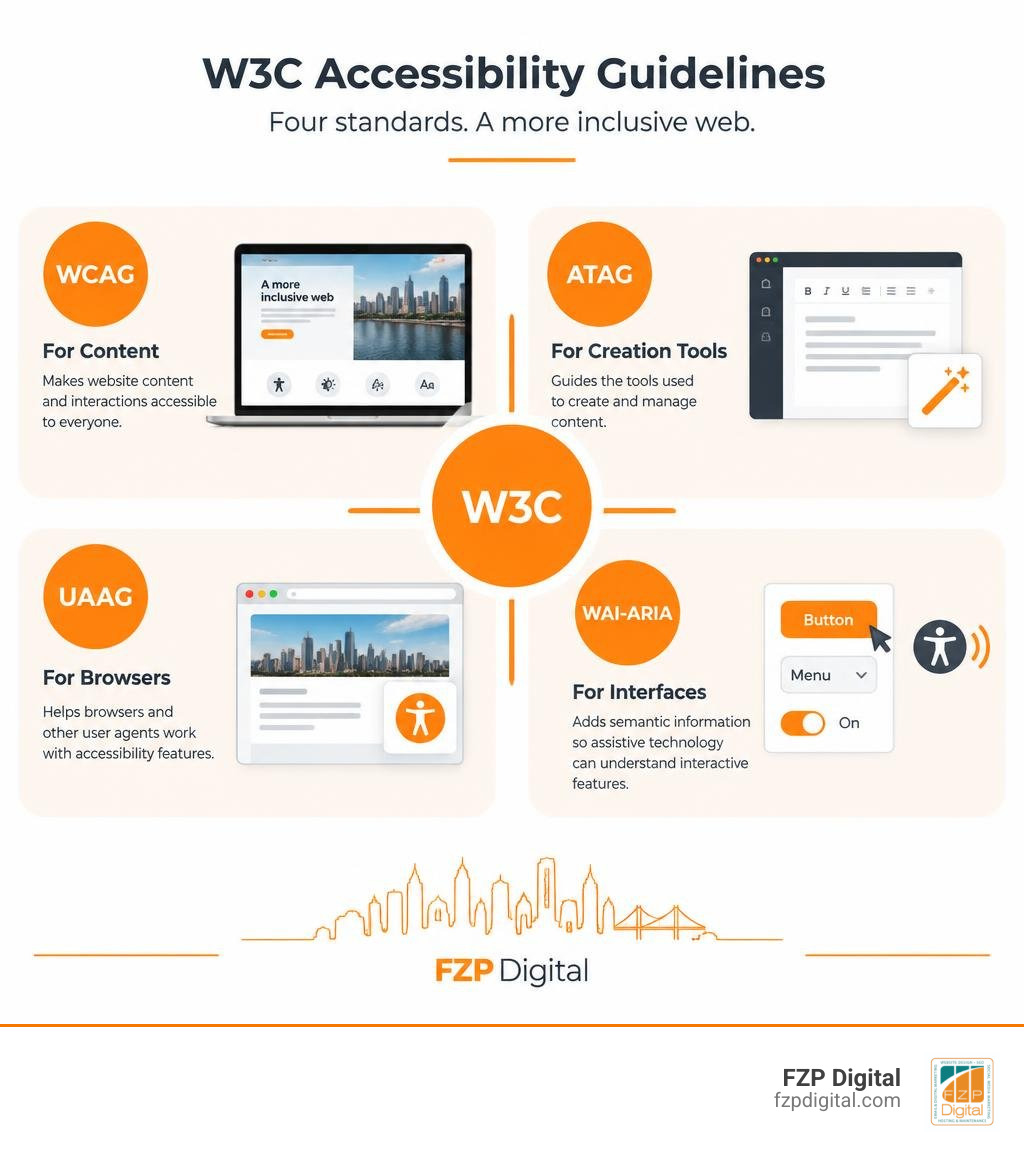
W3C accessibility guidelines help you make digital experiences usable by people with disabilities. Start with WCAG 2.2 for your website’s content and interactions. The other standards address the tools used to create content (ATAG), browsers and other user agents (UAAG), and the code that helps assistive technology understand interactive features (WAI-ARIA).
If you’ve heard about WCAG 3.0, don’t replace your current checklist yet. It’s a Working Draft, while WCAG 2.x remains the standard referenced by many policies. This guide will help you understand how the standards fit together, what WCAG 3 proposes, and where to focus your team today.
I’m Fred Z. Poritsky. My background in nonprofit financial management and WordPress web design shapes how I answer the question behind “accessibility guidelines w3c”: what do these standards mean for the people using your website?
Glossary for accessibility guidelines w3c:
The Core Architecture of Accessibility Guidelines W3C Standards
Building a digital product without standard accessibility rules is like constructing a modern office building without ramps, elevators, or clear exit signs. You might create a visually stunning space, but you’re accidentally locking out millions of people who need to use it. That’s where the World Wide Web Consortium (W3C) steps in. Through its Web Accessibility Initiative (WAI), the W3C produces international standards that ensure digital inclusion across every layer of the internet.
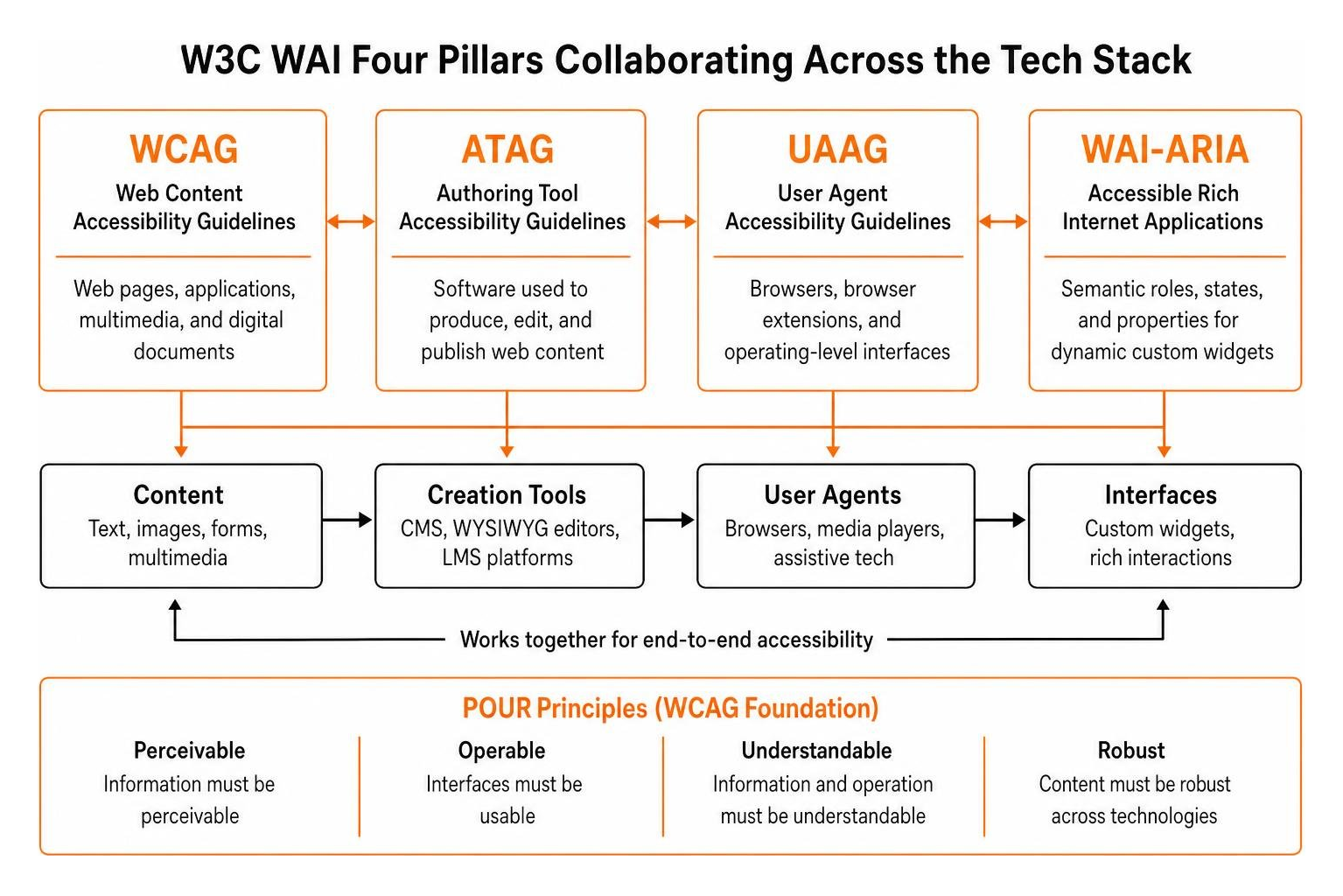
To see the big picture, you must understand that web accessibility doesn’t rest on a single checklist. It’s an entire interconnected ecosystem. As outlined in the Accessibility Principles from W3C WAI, accessibility requires harmonious communication between content creators, authoring software, web browsers, and assistive hardware like screen readers and switch devices. If you’re brushing up on website accessibility basics, understanding how these technical specifications fit together is your very first step.
| Standard | Full Name | Primary Target Audience | Technical Scope |
|---|---|---|---|
| WCAG | Web Content Accessibility Guidelines | Designers, Front-End Developers, Content Creators | Web pages, applications, multimedia, and digital documents |
| ATAG | Authoring Tool Accessibility Guidelines | CMS Developers, WYSIWYG Builders, LMS Platforms | Software used to produce, edit, and publish web content |
| UAAG | User Agent Accessibility Guidelines | Browser Engineers, Media Player Devs, Assistive Tech | Browsers, browser extensions, and operating-level interfaces |
| WAI-ARIA | Accessible Rich Internet Applications | Complex UI Engineers, Full-Stack Developers | Semantic roles, states, and properties for dynamic custom widgets |
Understanding the Four Pillars: WCAG, ATAG, UAAG, and WAI-ARIA
Each of these four pillars plays a specialized role in building an equitable web:
- WCAG (Web Content Accessibility Guidelines): This is the flagship standard most product teams encounter daily. It focuses squarely on content—text, images, forms, sound, and the code that presents them.
- ATAG (Authoring Tool Accessibility Guidelines): Ever wondered how content management systems (like WordPress) help or hinder accessibility? ATAG ensures two things: the editing interface itself is usable by people with disabilities, and the tool actively encourages authors to create accessible output (like prompting you for image alt text).
- UAAG (User Agent Accessibility Guidelines): This specification guides developers building browsers and media players, ensuring users can adjust font sizes, control media captions, and operate browser chrome using keyboards alone.
- WAI-ARIA (Accessible Rich Internet Applications): Native HTML elements (like
or) come with built-in accessibility semantics. But when your engineers build custom interactive widgets like modal dialogs, tab panels, or autocomplete search bars, ARIA bridges the gap by exposing roles, states, and properties to assistive technologies. Mastering these roles is a cornerstone of inclusive web design.
How POUR Principles Anchor Modern Web Development
Every guideline within the WCAG 2.x family anchors back to four foundational principles, affectionately known across the tech industry as POUR:
- Perceivable: Users must be able to perceive all presented information. If someone has a visual impairment, you must provide text alternatives or audio descriptions. If someone has hearing loss, you provide synchronized captions.
- Operable: Users must be able to operate your interface components. The entire user journey—from homepage navigation to multi-step checkouts—must work seamlessly with a keyboard alone, provide enough time for inputs, and avoid causing physical reactions like seizures.
- Understandable: Information and interface operations must be clear. Your layout should behave predictably, inputs should feature helpful error guidance, and language should be simple and structured.
- Robust: Content must be coded cleanly so it works across a wide variety of current and future user agents, including modern assistive technologies.
These principles guarantee backward compatibility while giving development teams a sturdy compass as design trends shift.
Evolution of WCAG: Comparing WCAG 2.x and the WCAG 3.0 Framework
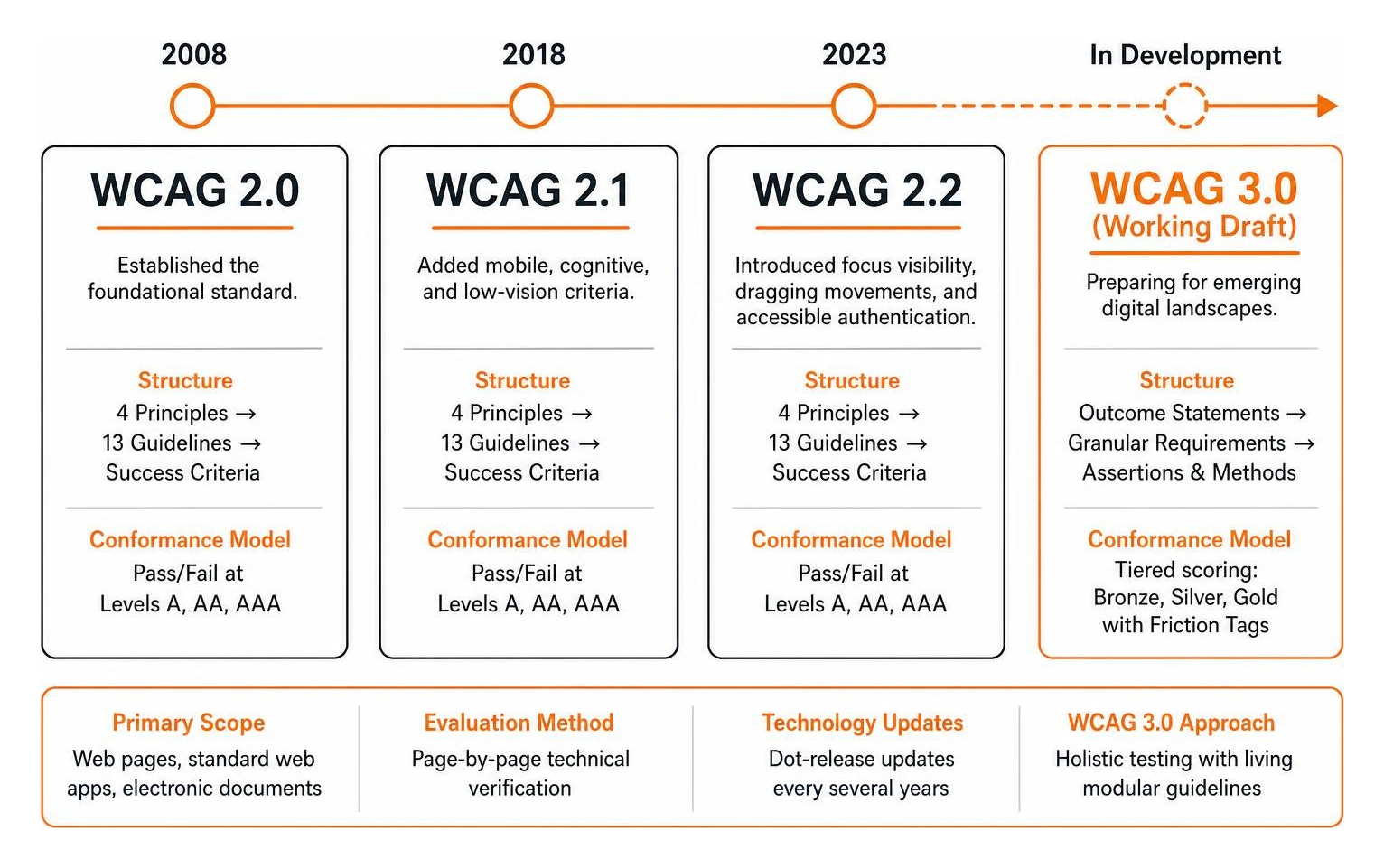
The web has transformed dramatically since WCAG 2.0 debuted in 2008. We’ve journeyed through WCAG 2.1 (which added vital mobile, cognitive, and low-vision criteria) all the way to WCAG 2.2, which introduced crucial success criteria for focus visibility, dragging movements, and accessible authentication. The official WCAG 2 Overview confirms that WCAG 2.2 serves as the international baseline, recognized globally under ISO/IEC 40500, the European Accessibility Act (EN 301 549), and legal mandates tied to the Americans with Disabilities Act (ADA).
If you’re auditing your current site, using a practical checklist of WCAG guidelines based on WCAG 2.2 is your gold standard today. However, the W3C Accessibility Guidelines Working Group is currently pioneering WCAG 3.0 (originally code-named “Silver”) to prepare the world for emerging digital landscapes.
| Architectural Element | WCAG 2.x (Current Standard) | WCAG 3.0 (Working Draft) |
|---|---|---|
| Primary Scope | Web pages, standard web apps, electronic documents | Web, native apps, AR/VR, wearables, Web of Things (WoT), tools |
| Structure | 4 Principles to 13 Guidelines to Success Criteria | Outcome Statements to Granular Requirements to Assertions & Methods |
| Conformance Model | Pass/Fail binary checklists across Levels A, AA, AAA | Tiered scoring model (Bronze, Silver, Gold) with Friction Tags |
| Evaluation Method | Page-by-page technical verification | Holistic testing: item, view, user process, and aggregate scoring |
| Technology Agility | Dot-release updates every several years | Living modular guidelines updated regularly with new methods |
Structural Differences in Accessibility Guidelines W3C Drafts
The most noticeable difference between legacy versions and the W3C Accessibility Guidelines (WCAG) 3.0 Working Draft is how requirements are constructed. In WCAG 2.x, success criteria are strictly binary: you either pass or you fail.
WCAG 3.0 abandons this rigid structure in favor of an outcome-based model. Each guideline outlines a broad user-centric outcome statement, supported by granular requirements and specific technology methods (for HTML, CSS, native mobile, or WebXR). Because WCAG 3.0 is being built transparently in the open, sections carry explicit maturity labels:
- Placeholder: Conceptual placeholders being drafted.
- Exploratory: Early-stage concepts undergoing initial review.
- Developing: Actively written requirements receiving structural edits.
- Refining: Mature guidelines nearing broad consensus.
- Mature: Fully validated requirements ready for practical application.
New Conformance Models: From A/AA/AAA to Bronze, Silver, Gold and Friction Tags
Instead of the traditional A, AA, and AAA levels, WCAG 3.0 introduces a tiered scoring system featuring Bronze, Silver, and Gold levels. Bronze roughly correlates to the baseline protections of WCAG 2.2 AA, ensuring organizations maintain high compliance while working toward advanced UX enhancements in Silver and Gold.
Furthermore, WCAG 3.0 introduces a impact tagging system that helps product teams prioritize code fixes based on real-world user consequences:
- Physical Harm: Flashing lights or sudden camera rotations that could cause seizures, vestibular illness, or physical injury.
- Risk: Barriers that create severe legal, financial, privacy, or medical vulnerabilities (e.g., inaccessible banking authorization).
- Barrier: Critical bugs that completely block a user from completing an essential task or workflow.
- Friction: Unfriendly design patterns that slow users down or increase cognitive fatigue without entirely halting progress.
Key Functional Requirements in WCAG 3.0 for Modern Digital Media

Modern websites are dynamic, multimedia-rich environments. While the classic How to Meet WCAG Quick Reference provides excellent techniques for video and audio in WCAG 2.2, WCAG 3.0 takes multimedia requirements to a much deeper, more nuanced level.
Advancements in Media Alternatives: Captions, Transcripts, and Visual Descriptions
Under the developing WCAG 3.0 requirements, simple auto-generated captions are no longer enough. The draft outlines specific, high-quality media standards:
- Synchronized Captions: Captions must be unobstructed, customizable in font size and background contrast, and strictly synchronized with the spoken audio.
- Descriptive Transcripts: Podcasters and video creators must provide descriptive transcripts that capture spoken dialogue, non-speech acoustic cues (e.g., laughter, suspenseful music), and visual descriptions of on-screen actions.
- Speaker & Language Identification: Transcripts and captions must clearly label who is speaking (e.g., “[Maya Angelou]”) and indicate language shifts.
- Findable Alternatives: Users shouldn’t have to hunt for access; links to media alternatives must sit adjacent to the media player itself.
Clear Language, Cognitive Usability, and Visual Presentation
Cognitive accessibility has received a massive, well-deserved upgrade in recent W3C discussions. WCAG 3.0 places heavy emphasis on clear language, predictable layouts, and reduced cognitive strain. Product teams will need to evaluate:
- Text Appearance & Reflow: Typography must scale smoothly without breaking container boundaries or requiring frustrating horizontal scrolling.
- Distinct Focus Indicators: Keyboard focus outlines must meet strict size, contrast, and visual distinctiveness ratios against surrounding backgrounds.
- Plain Language & Reading Level: Content should use active voice, clear headings, and concise sentence structures, avoiding unnecessary corporate jargon.
Navigating these subtle nuances between design trends and technical standards is tough for fast-moving product teams. That’s why our founder, Fred Z. Poritsky, and our team at FZP Digital work side-by-side with businesses throughout Philadelphia and Bucks County. We help demystify technical standards and implement beautiful, accessible WordPress designs that work flawlessly for every visitor.
Applying Accessibility Guidelines W3C Frameworks to Emerging Tech and AI
The digital frontier is expanding way beyond traditional desktop screens and mobile viewports. By reviewing All ACT Rules, you can see how testing criteria are constantly evolving to support modern interfaces.
Immersive Realities: Virtual and Augmented Reality (VR/AR) Needs
Spatial computing and 360-degree immersive environments introduce accessibility challenges that WCAG 2.0 never anticipated:
- Directional Sound & Spatial Captions: In a 360-degree virtual room, a sound might originate behind the user. WCAG 3.0 proposes captions that remain centered in the user’s field of view while incorporating customizable visual arrows pointing toward the source of the audio.
- Vestibular & Motion Sickness Safeguards: Fast-moving camera pans or unrequested parallax scrolling can cause severe nausea. Systems must provide user controls to disable motion and lock focal horizons.
Mobile Interfaces, Wearables, and AI-Driven Web Content
As AI chat interfaces and wearable tech become standard, product teams must adapt:
- Generative AI Transparency: AI-generated interfaces must output clean semantic markup, announce dynamic response changes via ARIA live regions, and provide clear error recovery mechanisms when a model hallucinates or fails.
- Touch Targets & Sensor Inputs: Buttons on mobile and wearable screens must maintain generous touch targets (at least 24 by 24 CSS pixels minimum, and ideally 44 by 44 CSS pixels). Interfaces must never force users to rely solely on shaking or tilting their device to perform an action.
If your product team is unsure where your platform stands across these modern benchmarks, scheduling a comprehensive accessibility audit with an experienced digital agency is the quickest way to uncover and resolve hidden roadblocks.
Frequently Asked Questions About Accessibility Guidelines W3C
What is the primary difference between WCAG 2.2 and WCAG 3.0?
WCAG 2.2 is the current, legally referenced international standard based on binary pass/fail criteria across Levels A, AA, and AAA. WCAG 3.0 is an active Working Draft that expands beyond web content to include apps, wearables, and virtual reality, using an outcome-based scoring model with Bronze, Silver, and Gold tiers.
Is WCAG 2.2 still legally required if WCAG 3.0 is in development?
Yes, absolutely! WCAG 2.2 (and WCAG 2.1 AA) remains the mandatory baseline for global legal compliance, including the European Accessibility Act, Section 508, and ADA enforcement. WCAG 3.0 will coexist with WCAG 2.x for several years after its eventual final publication without immediately deprecating it.
How can product teams participate in the WCAG 3.0 Working Draft process?
You can actively shape future web standards! The W3C Accessibility Guidelines Working Group and the Silver Community Group welcome public feedback. You can file issues directly on the official WCAG 3 GitHub repository or submit detailed comments by email to public-agwg-comments@w3.org.
Conclusion
Building accessible products isn’t a one-time project you check off your roadmap; it’s an ongoing commitment to quality, usability, and genuine human inclusion. By aligning your design systems and front-end code with current WCAG 2.2 AA standards today, you’re not only protecting your organization from legal friction—you’re also laying the exact foundation needed to thrive when WCAG 3.0 eventually takes center stage.
Ready to make your digital presence welcoming, accessible, and high-performing? Let’s build something exceptional together. Explore how you can partner with FZP Digital for web accessibility solutions and let our expert team elevate your brand across Philadelphia, Bucks County, and beyond.