


Why WordPress Google Optimization Is Harder — and More Important — Than Ever
WordPress Google optimization has changed dramatically, and if your Philadelphia-area business is running on WordPress, there’s a good chance your site isn’t as visible as it could be.
Here’s a quick answer to get you started:
How to optimize WordPress for Google (2026 checklist):
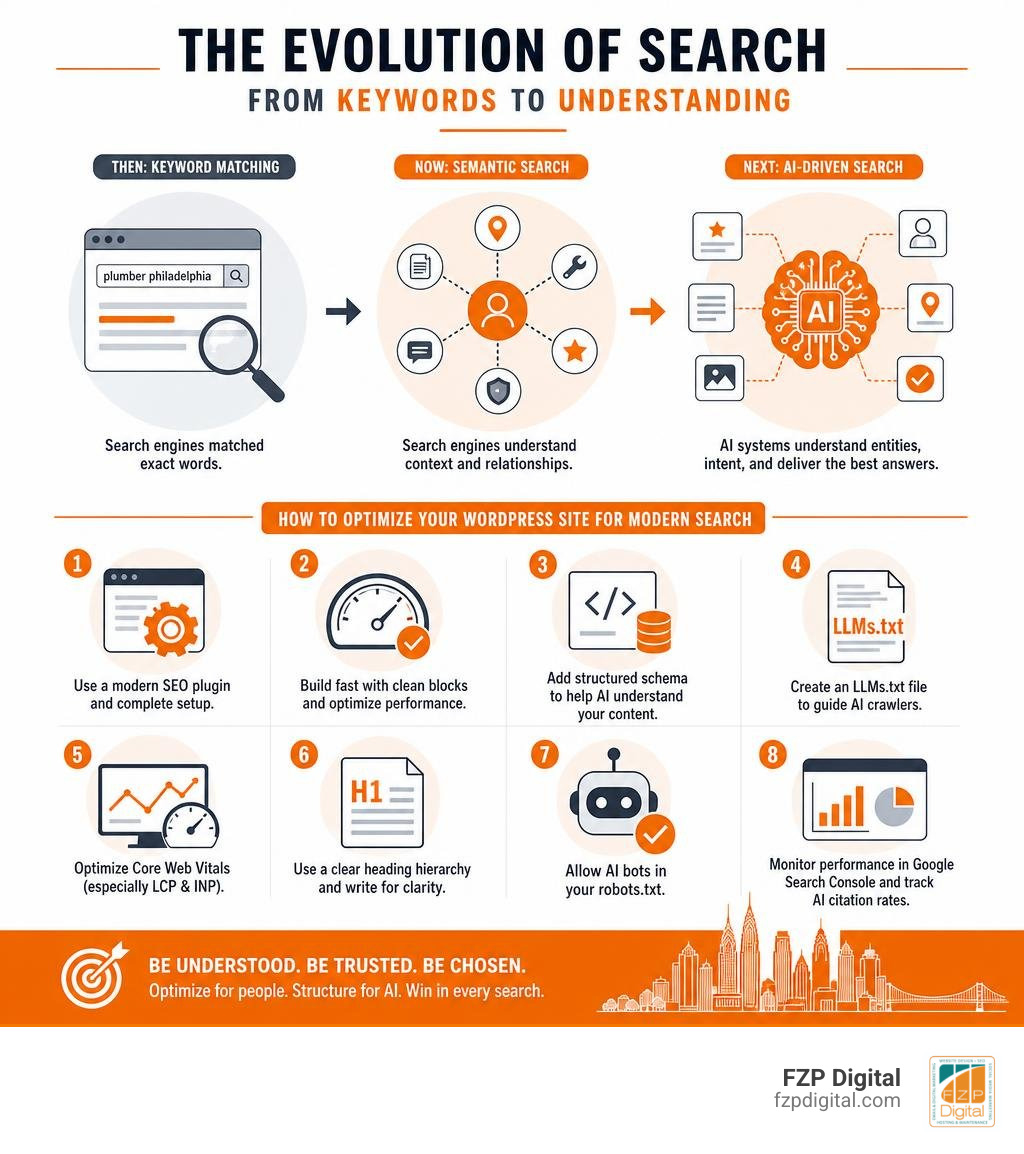
- Install a modern SEO plugin (Rank Math or Yoast SEO) and complete the setup wizard
- Use clean Gutenberg blocks instead of heavy page builders for faster load times
- Add structured schema markup (FAQPage, Article, Organization) to help Google and AI engines understand your content
- Create an LLMs.txt file to guide AI crawlers like ChatGPT and Perplexity to your best content
- Optimize Core Web Vitals — especially LCP and INP — through caching and image compression
- Build a logical heading hierarchy (one H1, clear H2s) with short, fact-rich paragraphs
- Allow AI bots (GPTBot, ClaudeBot, PerplexityBot) in your robots.txt
- Monitor performance regularly in Google Search Console and track AI citation rates
WordPress still powers 43% of the web, but here’s the uncomfortable truth: most WordPress sites are nearly invisible — not just in traditional Google search, but in the AI-driven search results that are increasingly where your potential clients are looking.
The rules have shifted. It’s no longer enough to stuff keywords into a title tag and call it a day.
Google now evaluates your content through the lens of entity recognition, semantic relationships, and answer completeness. And tools like Google’s AI Overviews, ChatGPT, and Perplexity are pulling citations from sites that are structured to be understood — not just indexed.
That gap between “technically online” and “genuinely visible” is exactly where businesses get left behind.
I’m Fred Z. Poritsky, founder of FZP Digital, and my background in nonprofit financial management, web design, and digital marketing gives me a practical, business-first perspective on WordPress Google optimization that goes well beyond plugin checklists. Let’s walk through exactly what you need to know — and do — to get your WordPress site working harder for your business.
The Modern Playbook for WordPress Google Optimization
To win on Google today, you have to understand how search engines have evolved. In the early days, Google was essentially a giant index matching exact words. If you wrote a page about “plumbing services in Richboro PA” and repeated that phrase ten times, you stood a good chance of ranking.
Today, Google uses sophisticated machine learning models to understand search intent. Instead of just scanning for keywords, it identifies entities (people, places, concepts, and things) and maps the semantic relationships between them.
When someone searches for a local service, Google doesn’t just look for pages that say the exact phrase. It looks for pages that demonstrate deep topical authority, provide clear answers, and use structured data to define exactly what the business is and who it serves.
This shift is why we always tell our clients in Newtown and Downtown Philadelphia that true optimization is an architectural challenge, not just a writing exercise. If you want to understand the foundational principles of why this matters, take a look at our deep dive into Search Engine Optimization: What Is It & Why Do I Need It? to see how these pieces connect.
Why Traditional SEO Plugins Need a WordPress Google Optimization Upgrade
For years, the standard advice for WordPress users was simple: install an SEO plugin, fill out the keyword field until you get a green light, and hit publish.
But here is a secret that most tutorials skip: the keyword focus field inside traditional SEO plugins is largely decorative. It does not communicate anything directly to Google. It is simply an on-page calculator that measures keyword density and basic formatting. While these tools are great for keeping your writing disciplined, they only cover about 30% of what actually moves your search rankings today.
Traditional plugins like Yoast SEO – Advanced SEO with real-time guidance and built-in AI – WordPress plugin | WordPress.org and Rank Math are still incredibly valuable for managing technical basics. They handle your XML sitemaps, robots directives, and basic meta tags beautifully. However, relying solely on their default settings means you are missing out on the deeper semantic signals that Google and modern AI engines require.
To bridge this gap, your wordpress google optimization strategy needs to focus on how your content is structured behind the scenes, ensuring search engines can read your site’s architecture as easily as a human reads a book.
How Generative Engine Optimization (GEO) Changes the Game
If you have used Google lately, you have probably noticed that the search results page looks very different than it did a few years ago. Instead of just a list of blue links, you are often greeted by an AI-generated summary at the very top.
This is the era of Generative Engine Optimization, or GEO.
GEO is the practice of optimizing your website so that Large Language Models (LLMs) like Google’s Gemini, ChatGPT, and Perplexity can easily find, understand, and cite your content. This is not some future trend; it is happening right now. Early adopters of GEO strategies are already attributing 32% of their sales-qualified leads directly to AI search results.
When an AI engine generates an answer, it pulls from verified online sources and provides citations. If your WordPress site is optimized for GEO, your business becomes the trusted source that the AI cites. Beta users implementing dedicated GEO strategies have reported a 127% improvement in AI citation rates and a 45% increase in overall AI search visibility within just eight weeks.
To explore how these AI models are reshaping the digital landscape, check out the WordPress SEO + AI 2026: Complete Optimisation Guide for an in-depth look at this transition.
Optimizing WordPress for AI Search: SGE, ChatGPT, and Perplexity
So, how do you actually make your WordPress site attractive to these AI search engines? It comes down to structure, clarity, and technical transparency.
AI models are designed to find direct, authoritative answers to user queries. They do not want to wade through fluff or decipher confusing layouts. They want clear headings, structured data, and highly readable text.
To help them, you need to implement schema markup. Think of schema as a translator that tells search engines exactly what your content means. If you are not sure how to set this up, reading our guide on How to Use Schema Markup to Win at SEO will give you a major advantage in getting your business recognized by AI engines.

Actionable Steps for WordPress Google Optimization in the AI Era
If you want your WordPress site to stand out to both Google and AI engines, there are several concrete steps you can take today:
- Create an LLMs.txt file: This is a simple text file placed at the root of your domain (similar to a robots.txt file) that provides a clean, markdown-formatted directory of your most important pages. Tests show that sites with a well-configured LLMs.txt file see a 15% to 25% improvement in their citation rates by AI models.
- Configure your robots.txt file: Ensure you are not accidentally blocking AI crawlers. Make sure your robots.txt file explicitly allows access to bots like GPTBot, ClaudeBot, and PerplexityBot so they can crawl and index your helpful resources.
- Implement rich schema markup: Don’t settle for basic schema. Using FAQPage schema can boost your citations by 35%, while HowTo schema can increase them by 28%. Combining three or more schema types makes your pages 2.4 times more likely to appear in Google’s AI Overviews.
- Use a strict heading hierarchy: Keep your content organized with a single, unique H1 tag for your title, followed by logical H2 and H3 subheadings. AI crawlers use headings to quickly map the structure of your page.
- Incorporate comparison tables: AI engines love structured data. Including at least one comparison table or bulleted summary in your major articles makes it incredibly easy for AI bots to extract facts and cite your site as a source.
Key Features to Look For in a GEO Plugin
If you decide to use a plugin to help with your GEO efforts, you need to choose wisely. The market is flooded with tools, but a quality plugin should focus on the following key areas:
- Entity Mapping: The plugin should analyze your content and automatically link your main topics to recognized entities in databases like Wikidata.
- Advanced Schema Generation: It should allow you to build custom JSON-LD schema without adding bloated code to your site.
- Bot Control: It should give you the ability to easily manage which AI bots are allowed to crawl your content and which ones are restricted.
- Minimal Performance Impact: A great plugin is lightweight. Most top-tier GEO plugins add less than 100 milliseconds to your page load times, ensuring you do not sacrifice speed for visibility.
The Google Optimize Sunset: Best A/B Testing Alternatives for WordPress
While optimizing your site for search engines is crucial, you also need to make sure that the traffic landing on your site actually converts into customers. For years, the go-to tool for this was Google Optimize, a free and powerful platform that allowed website owners to run A/B tests and improve their conversion rates.
However, Google officially sunset Google Optimize on September 30, 2023. This left many business owners in Bucks County and Philadelphia searching for reliable alternatives to keep their conversion optimization strategies on track.
| A/B Testing Tool | Best For | WordPress Integration | Pricing | Key Strength |
|---|---|---|---|---|
| Thrive Optimize | WordPress-native testing | Excellent (built-in plugin) | Paid ($199/yr) | Shows results directly in the WordPress dashboard |
| OptinMonster | Popups and lead capture | Excellent (dedicated plugin) | Paid (from $19/mo) | Incredible drag-and-drop builder for split testing |
| VWO Testing | Growing businesses | Good (via script or plugin) | Free tier available | AI-powered copywriting assistant for headlines |
| Convert.com | Privacy-focused agencies | Good (via custom code integration) | Premium | Uses fast CDNs to prevent visual page flickering |
Why Google Sunset Its Famous Testing Tool
Google decided to retire Optimize because the tool lacked many of the advanced features and modern experimentation capabilities that enterprise users were requesting. Instead of maintaining a standalone tool, Google chose to integrate experimentation data directly into Google Analytics 4 (GA4), relying on third-party A/B testing platforms to handle the actual on-site testing.
This means that instead of using a single Google-native dashboard, you now connect your preferred testing tool to GA4 to monitor how your experiments impact user behavior and conversions.
Top WordPress Alternatives for Conversion Rate Optimization
Fortunately, there are several fantastic tools available that integrate beautifully with WordPress:
- Thrive Optimize: If you want a solution that keeps everything inside your WordPress site, this is our top recommendation. It allows you to create page variations and track conversion goals without ever leaving your WordPress dashboard.
- OptinMonster: While famous for lead generation, OptinMonster has built-in A/B testing that lets you test different headlines, designs, and calls-to-action to see what resonates best with your local audience.
- VWO Testing: VWO is a powerful platform that offers a free plan supporting up to 50,000 visitors per month. It is a fantastic option for businesses looking for enterprise-grade features without the massive price tag.
- Convert.com: If you are running a high-traffic site and want to avoid the “flicker effect” (where a visitor briefly sees the original page before the test version loads), Convert.com is a highly reliable, developer-friendly choice.
Technical Performance: Speed, Schema, and Clean Code
No matter how great your content is or how many keywords you use, your wordpress google optimization efforts will fail if your website is slow or poorly coded. Google has made it incredibly clear that user experience is a primary ranking factor.
If your website takes more than 3 seconds to load, 57% of consumers will abandon it. A slow site doesn’t just lose human visitors; it also discourages search engine bots from crawling your pages.
To see exactly where your site stands, we highly recommend scheduling a comprehensive Technical SEO Audit with us. We will dive deep into your site’s infrastructure to find and fix the bottlenecks holding you back.
Core Web Vitals and the Impact of Clean Gutenberg Code
Google measures website performance through a set of metrics called Core Web Vitals. These focus on three key areas:
- LCP (Largest Contentful Paint): How fast the main content of your page loads.
- INP (Interaction to Next Paint): How quickly your site responds when a user clicks a button or interacts with a page.
- CLS (Cumulative Layout Shift): How visually stable your page is as it loads.
One of the biggest culprits of poor Core Web Vitals scores is bloated page builders. While drag-and-drop builders make designing easy, they often generate massive amounts of unnecessary HTML and JavaScript. This bloated code blocks the browser’s main thread, destroying your INP scores.
This is why we advocate for clean, developer-first practices. Utilizing the native WordPress Gutenberg editor or custom lightweight code ensures your site loads lightning-fast. For a deeper look at how professional coding standards impact your rankings, take a look at these WordPress SEO Best Practices for WordPress Developers. to see why clean architecture always wins.
Additionally, if you want to make sure your site is fully optimized for speed, our Website Speed Optimization Services to Boost Your Rankings can help you achieve perfect performance scores.
Measuring Your Success and ROI
Investing time and resources into wordpress google optimization and GEO is a business decision, and you deserve to see a clear return on that investment. Quality optimization typically delivers a 3x to 5x ROI through improved search visibility, increased organic traffic, and enhanced conversion rates within 6 to 12 months of implementation.
When measuring the success of your optimization efforts, keep an eye on these key metrics:
- AI Citation Rates: Are ChatGPT, Perplexity, and Google AI Overviews sourcing your site when answering questions about your industry?
- Core Web Vitals Scores: Are your LCP and INP scores in the green on both mobile and desktop?
- Organic Search Visibility: Is your overall keyword footprint growing in Google Search Console?
To understand how resolving these technical crawl barriers directly translates into business growth, check out this guide on Technical SEO for WordPress: fix every issue on your site for a practical look at tracking performance.
Frequently Asked Questions About WordPress SEO
What is the difference between traditional SEO and GEO?
Traditional SEO focuses primarily on ranking your website in classic search engine results pages by optimizing for specific keywords, meta tags, and backlinks. Generative Engine Optimization (GEO) focuses on making your content easily readable, structured, and authoritative so that AI engines like ChatGPT, Perplexity, and Google AI Overviews can synthesize your information and cite your website as a trusted source.
How long does it take to see results from AI search optimization?
While traditional SEO can take 3 to 6 months to show significant results, AI search optimization often moves faster. Because AI crawlers index and update their models frequently, most websites see measurable improvements in AI search visibility and citation rates within 4 to 8 weeks of implementing technical optimizations like schema markup and an LLMs.txt file.
Do I need a developer to implement advanced schema and LLMs.txt?
While basic SEO plugins can handle simple schema, advanced customization and the creation of a highly optimized LLMs.txt file often require code-level adjustments. Working with an experienced team prevents “plugin bloat” — which slows down your site — and ensures your structured data is flawlessly integrated into your theme. To see how professional design and clean development go hand-in-hand, explore our guide on WordPress Website Design Best Practices.
Conclusion
Navigating wordpress google optimization can feel overwhelming, especially with the rapid rise of AI search and the constant updates to Google’s algorithms. But you do not have to tackle this challenge alone.
At FZP Digital, we specialize in helping local businesses in Richboro, Newtown, Downtown Philadelphia, and the surrounding areas stand out online. Through our collaborative “Develop . Design . Deliver” process, Fred Z. Poritsky and our dedicated team build premium, responsive WordPress websites that are designed to load instantly, convert visitors, and rank highly on both Google and modern AI search engines.
Whether you need to fix your technical SEO, optimize your site speed, or prepare your business for the era of AI search, we are here to help you succeed.
Partner with FZP Digital for expert WordPress design and optimization today, and let’s get your website working as hard as you do!