


Why Making Website Accessible Is No Longer Optional in 2026
Making website accessible is one of the most impactful things you can do for your business right now — for your users, your search rankings, and your legal protection.
Here’s a quick snapshot of what it means to make your website accessible:
- Use semantic HTML — proper headings, landmarks, and meaningful structure
- Add alt text to images — short, descriptive text for every informational image
- Ensure keyboard navigation — every page and feature must work without a mouse
- Meet color contrast standards — at least 4.5:1 ratio for normal text
- Caption videos and transcribe audio — so all users can access your media
- Make forms accessible — clear labels, error messages, and logical focus order
- Test with real tools — use Axe, WAVE, or Lighthouse, plus manual screen reader testing
Those seven steps won’t cover everything, but they address the majority of barriers that cause users to leave — and that’s the point.
Consider this: roughly 1 in 4 adults in the U.S. lives with some kind of disability. That’s not a niche audience. That’s a quarter of your potential customers, donors, or clients who may be completely locked out of your website right now.
And the stakes go beyond inclusion. 73% of users with accessibility needs abandon a site that presents barriers. That’s not a bounce rate problem — that’s a people problem.
The good news? Most accessibility improvements are straightforward once you know what to look for. This guide will walk you through everything.
I’m Fred Z. Poritsky, founder of FZP Digital, and after years of building WordPress websites for businesses, nonprofits, and professional services firms in the Philadelphia area, making website accessible has become a core part of how I approach every project. Whether you’re starting from scratch or improving an existing site, I’ll show you exactly how to do it right.
Basic making website accessible terms:
Why Making Website Accessible is a Game-Changer for Your Business
Have you ever tried to use your phone in bright sunlight and couldn’t read the screen? Or tried to watch a video in a noisy Philly coffee shop without headphones? If so, you’ve experienced a situational disability. When we talk about making website accessible, we aren’t just talking about a small group of people; we’re talking about everyone.
In the United States, approximately 55 million people have a disability according to the Census Bureau. That is nearly 1 in 5 Americans, and for adults over 65, that number jumps to about 40%. By ignoring accessibility, you aren’t just being “unfriendly”—you’re literally turning away a massive portion of the market.
Beyond the moral and ethical reasons, there is a massive business case here. When you Learn How Website Accessiblilty Can Help Grow Your Brand, you realize that accessible sites have better brand reputations, higher customer retention, and significantly better usability for everyone. If 73% of users with disabilities abandon a site because of barriers, imagine the revenue you’re leaving on the table!
The Legal Landscape: ADA and Section 508
Let’s chat about the “scary” stuff for a second: the law. In 2026, the Department of Justice (DOJ) is more active than ever in enforcing digital accessibility. The Americans with Disabilities Act (ADA) Title III applies to “public accommodations,” and the DOJ has consistently held since 1996 that this includes websites.
If your website acts as a gateway to your business—whether you’re a law firm in Newtown or a retail shop in Richboro—it needs to be accessible. Failing to do so opens you up to demand letters and lawsuits, which can cost tens of thousands of dollars in settlements and legal fees. Section 508 specifically applies to federal agencies and those receiving federal funding, but for most of us in the private sector, the ADA is the primary concern. You can read more about the fundamentals in our guide on What Is Web Accessibility.
How Accessibility Powers Your SEO Strategy
Here’s a fun fact: Google is essentially a “blind” user. It can’t “see” your beautiful images or “hear” your videos. It relies on the code. This is why making website accessible is actually a secret weapon for SEO.
When you use semantic HTML (like
,
, and
), you’re telling search engines exactly what your content is about. When you provide alt text for images, you’re giving Google more context to index. Furthermore, accessibility improves “Core Web Vitals” and reduces bounce rates because the site is easier to use. A site that is easy to navigate is a site that ranks higher. It’s a win-win!
The POUR Principles: Your Roadmap to Conformance
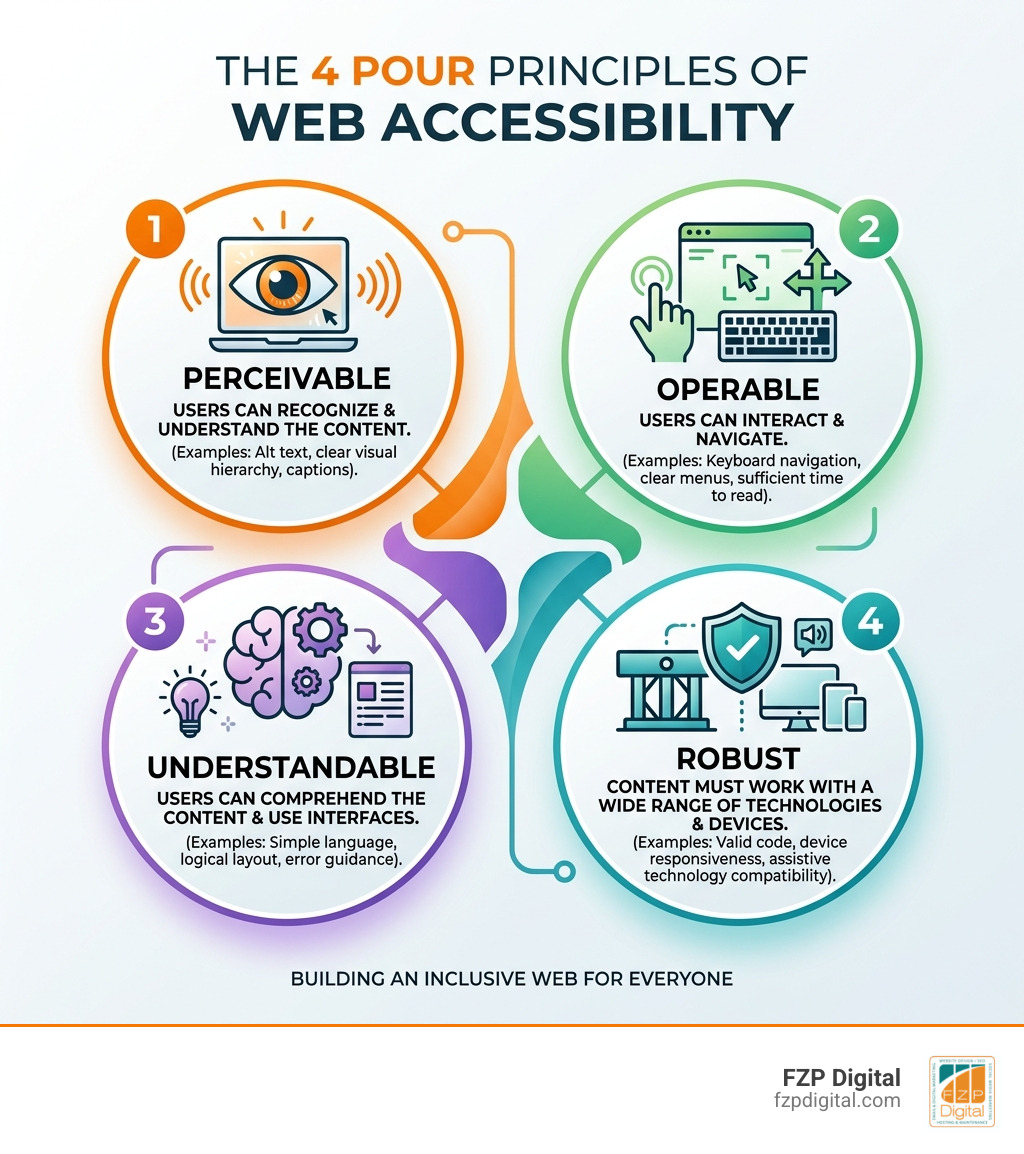
To keep things organized, the World Wide Web Consortium (W3C) created the WCAG (Web Content Accessibility Guidelines). These are built on four pillars known as the POUR principles. If you want to dive deep into the technical side, Learn Accessibility | web.dev is a fantastic resource, but let’s break them down simply here.
WCAG 2.2 is the current gold standard, and it features three levels of conformance:
- Level A: The bare minimum. If you don’t meet this, your site is likely unusable for many.
- Level AA: The industry standard. This is what we aim for at FZP Digital to ensure legal compliance and a great user experience.
- Level AAA: The highest level, usually reserved for specialized sites or high-stakes sectors like government or finance.
Perceivable and Operable: The Foundation of Making Website Accessible
Perceivable means users must be able to comprehend the information being presented. They can’t just “see” it; they might need to “hear” it via a screen reader. This involves providing text alternatives for non-text content and making sure your layout is easy to follow.
Operable means the site must be navigable. Can you get through your whole site using only the “Tab” key? If someone has a motor impairment or uses a mouth stick to navigate, they can’t use a mouse. We also have to ensure there are no “keyboard traps” where a user gets stuck in a menu or a pop-up with no way to exit.
Understandable and Robust: Ensuring Long-Term Usability
Understandable is all about clarity. Is your navigation predictable? Do your forms give clear error messages? If someone makes a mistake on a form, does the site tell them how to fix it? We want to avoid industry jargon and keep the reading level accessible to a broad audience.
Robust means your site works well with a wide variety of “user agents,” including assistive technologies like screen readers (NVDA, JAWS, VoiceOver). This comes down to clean, valid code. If your HTML is a mess, a screen reader won’t know how to interpret it.
Practical Design: From Alt Text to Color Contrast
When we sit down to design a site at FZP Digital, we don’t just think about what looks “cool.” We think about what works. For instance, did you know that red-green color blindness affects up to 8% of men? If you use red text to show an error and nothing else, those users might never know something went wrong.
Your Checklist for Making Website Accessible to Screen Readers
Screen readers are software programs that read the text on a screen out loud. To make your site friendly for them, you need a logical structure.
- Heading Hierarchy: Use one
per page, followed by
,
, etc., in order. Don’t skip levels! - Descriptive Links: Avoid “Click Here.” Instead, use “Download our 2026 Accessibility Guide.”
- Landmark Roles: Use HTML5 tags like
,
For a deeper dive, check out our article on How To Design For Everyone And Their Screen Reader.
Mastering Color Contrast and Focus Indicators
Color contrast is one of the most common “accessibility fails.” For normal text, you need a contrast ratio of at least 4.5:1 against the background. For large text (18pt or higher), 3:1 is acceptable.
Also, please—I’m begging you—never remove the “focus outline.” You know that little blue or orange box that appears around a link when you tab to it? That is a lifesaver for keyboard users. If you hide it for “aesthetic reasons,” you’re making your site invisible to anyone not using a mouse.
Multimedia and Forms: Going Beyond the Basics
Video and audio are great for engagement, but they can be huge barriers. If you have a video on your homepage, it needs synchronized, accurate captions. For podcasts or audio clips, a text transcript is a must. Not only does this help the Deaf and hard-of-hearing community, but it also helps that person in the noisy Philly coffee shop we mentioned earlier!
Building Forms That Everyone Can Fill Out
Forms are where conversions happen, so you want them to be as easy as possible.
- Labels: Every input field needs a clear, visible label. Don’t rely on “placeholder text” that disappears when you start typing.
- Error Messages: If a field is required, say so in text, don’t just turn the border red.
- Autocomplete: Support browser autocomplete for things like addresses and credit cards to reduce the “cognitive load” on your users.
The W3C has some great Developing for Web Accessibility – Tips for Getting Started if you’re looking for code-level advice.
Why You Should Avoid Accessibility Overlays
You might have seen ads for “one-click” accessibility overlays or widgets. They promise to make your site compliant instantly for a small monthly fee. Stay away from these.
Research shows that 13% of websites sued in 2021 actually had these overlays installed. Why? Because they often create more barriers for screen reader users and don’t actually fix the underlying code. They are a “band-aid” on a broken leg. At FZP Digital, we believe in fixing the code correctly from the start, rather than relying on a third-party script that slows down your site and provides a false sense of security.
Testing Your Site Like a Pro
How do you know if you’re doing it right? You test! We recommend a combination of automated and manual testing. Automated tools are great for catching low-hanging fruit, but they only catch about 30-40% of issues. You still need a human to check the logic.
Tools of the Trade for Modern Developers
Here are the tools we use every day:
- Axe DevTools: A browser extension that’s the industry standard for catching WCAG errors.
- WAVE: A visual tool from WebAIM that shows you exactly where errors are on your page.
- Google Lighthouse: Built right into Chrome, it gives you a quick “Accessibility Score.”
- NVDA or VoiceOver: The best way to test is to turn on a screen reader, close your eyes, and try to navigate your own site. It’s a humbling and eye-opening experience!
If you’re not sure where to start, an Website Accessibility Audit is the best first step to identify your biggest risks.
Frequently Asked Questions about Web Accessibility
How much does a professional accessibility audit typically cost for startups?
For a startup or small business in the Philadelphia area, a professional audit can range anywhere from $2,000 to $10,000 depending on the size and complexity of the site. While that might seem like a lot, compare it to the $25,000+ cost of a legal settlement. It’s an investment in your company’s future and protection.
What is the difference between mobile and desktop accessibility?
Mobile accessibility adds a few extra layers. You have to consider touch targets—buttons need to be large enough (at least 44×44 pixels) so people with tremors or large hands don’t mis-click. You also need to ensure the site works in both portrait and landscape orientations and that users can zoom in up to 200% without the text overlapping or disappearing.
How do I create an effective accessibility statement?
An accessibility statement shows your commitment. It should include:
- Your goal (e.g., “We aim for WCAG 2.2 Level AA”).
- Known limitations (it’s okay to be honest about what you’re still fixing!).
- A clear way for users to contact you if they encounter a barrier. This shows the DOJ and your users that you are being proactive and helpful.
Conclusion
Making website accessible isn’t a one-time task; it’s an ongoing commitment to excellence and inclusion. In the digital world of 2026, staying ahead means making sure everyone can access your message, your products, and your services.
At FZP Digital, we don’t just build websites; we craft digital experiences that are fast, responsive, and inclusive. Whether you’re in Downtown Philadelphia, Newtown, or Richboro, we’re here to help you navigate the complexities of SEO and accessibility. Our collaborative “Develop . Design . Deliver” process ensures that your brand doesn’t just look good—it does good.
Ready to make your corner of the internet a better place for everyone? Partner with FZP Digital for a fully accessible website and let’s build something amazing together.