

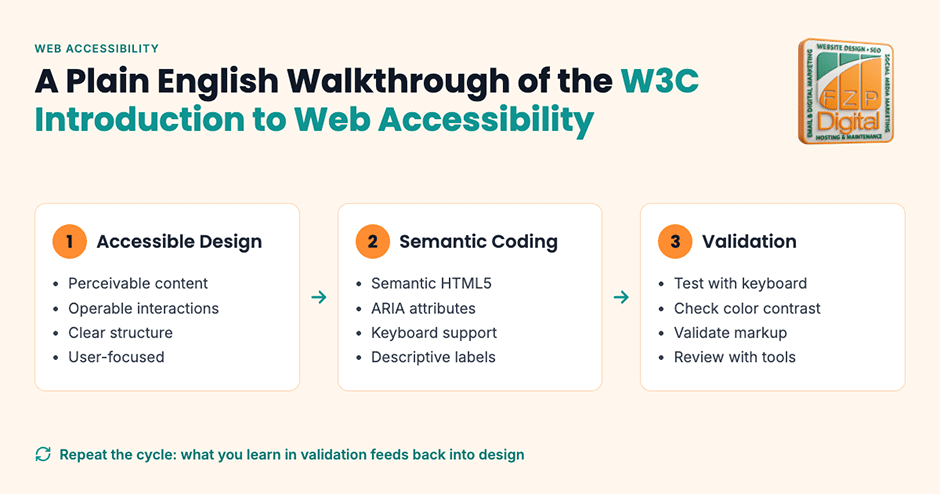

Understanding the W3C Introduction to Web Accessibility
The W3C Introduction to Web Accessibility is the World Wide Web Consortium’s foundational resource explaining how websites, tools, and technologies should be designed and coded so people with disabilities can use them effectively. It defines web accessibility, outlines the core principles of inclusive digital experiences, and serves as your entry point to removing artificial hurdles from the online world. At its heart, the official W3C Introduction to Web Accessibility makes a simple but powerful case: the web was designed to work for all people, regardless of their hardware, software, language, location, or ability.
Have you ever tried using the web when something was actively getting in your way? Maybe you left your reading glasses in another room, tried tapping tiny buttons on your phone while walking, or struggled to watch a training video in a crowded coffee shop without headphones. In those moments, browsing feels frustrating, clumsy, and slow.
Now imagine experiencing that level of friction during every single online interaction.
For more than one billion people worldwide—roughly 15% to 20% of the global population—digital barriers are an everyday reality. That is why the World Wide Web Consortium (W3C) established the Web Accessibility Initiative (WAI). The W3C develops the shared technical standards that keep the internet functioning smoothly, and its accessibility initiative exists to ensure that the digital world stays open to everyone.
When web pages, software tools, and digital platforms are thoughtfully designed and properly coded, people with disabilities can perceive, understand, navigate, interact with, and contribute to the web without unnecessary roadblocks.
The United Nations Convention on the Rights of Persons with Disabilities, ratified by 180 countries, officially recognizes access to information and communications technology as a fundamental human right. Building an inclusive website is not just a nice courtesy or a dry compliance exercise—it is about digital independence, social equity, and making sure everyone has equal access to information, commerce, public services, and community life.
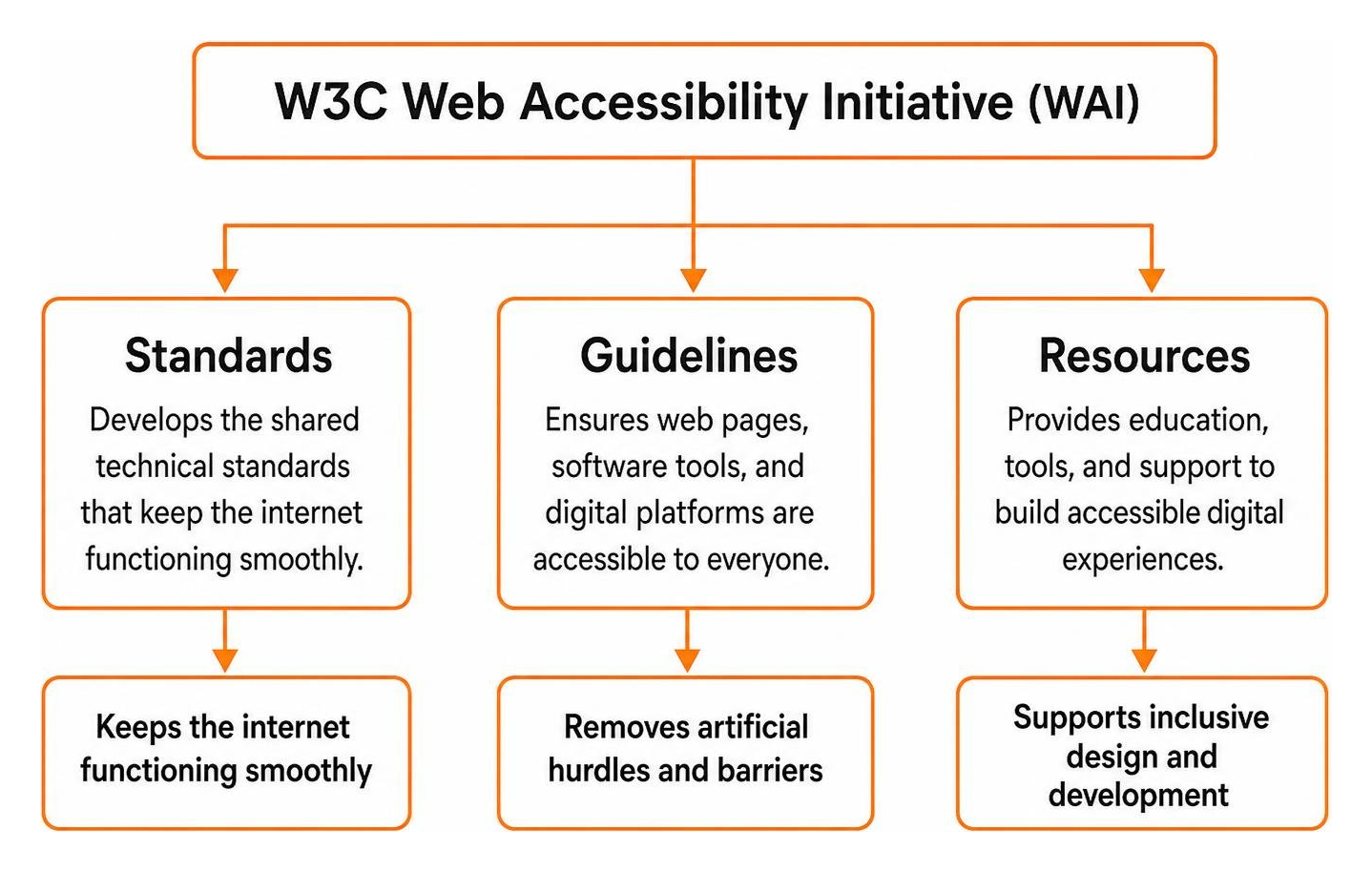
Core Principles in the W3C Introduction to Web Accessibility
The official W3C Introduction to Web Accessibility emphasizes that accessibility addresses a diverse spectrum of human needs. Disabilities generally fall into several broad categories, and modern websites must be flexible enough to accommodate all of them:
- Visual Disabilities: Ranging from total blindness to low vision and color blindness. Users frequently rely on screen-reading software, high-contrast display settings, or screen magnifiers. Learning how to design for everyone and their screen reader ensures these tools can interpret your layout seamlessly.
- Auditory Impairments: Encompassing mild hearing loss, profound deafness, and hard-of-hearing conditions. These visitors need visual alternatives for audio information, such as synchronized captions and complete text transcripts.
- Motor and Physical Limitations: Including muscle tremors, limb differences, paralysis, or conditions like arthritis. Many users navigate digital interfaces entirely through keyboards, single-switch devices, head pointers, or eye-tracking tech rather than a standard computer mouse.
- Cognitive and Neurological Differences: Encompassing learning disabilities, distractibility, memory loss, and difficulty processing complex visual layouts. Clear navigation, simple language, and predictable layouts make a dramatic difference here.
- Speech Disabilities: Affecting individuals who cannot use voice-driven commands or voice recognition interfaces. Providing text-based communication alternatives ensures they are never locked out of support channels.
The beauty of inclusive design is that it also helps people with temporary impairments (like navigating with a broken arm or recovering from eye surgery) and situational limitations (such as reading a smartphone screen in harsh outdoor glare or attempting to browse silently in a quiet library).
Why Accessibility Matters for Individuals, Businesses, and Society
Making your digital presence accessible creates a ripple effect of tangible benefits across every corner of your organization.
From an ethical standpoint, it provides equal opportunities for education, employment, civic participation, and personal connection. From a commercial perspective, businesses that overlook accessibility leave significant revenue on the table. When you exclude 15% or more of potential buyers, you hand those customers directly to your competitors.
On top of expanding your customer base, search engines love accessible websites. Search engine crawlers cannot “see” images or “hear” podcast audio; they rely on semantic markup, structured headings, descriptive alternative text, and transcripts to index your content accurately. By prioritizing accessibility, you simultaneously supercharge your organic search visibility.
When you learn how website accessibility can help grow your brand, you discover that it builds deep customer trust, demonstrates genuine social responsibility, and drastically reduces legal exposure under accessibility regulations.
The Core Standards: WCAG, POUR, and International Benchmarks
To help developers, designers, and business owners build accessible digital experiences, the W3C developed the Web Content Accessibility Guidelines (WCAG). WCAG has evolved into the recognized global benchmark, adopted as an international standard (ISO/IEC 40500) and woven directly into legal frameworks worldwide, including the European standard EN 301 549, the European Accessibility Act, and requirements under the Americans with Disabilities Act.
If you are currently navigating Americans with Disabilities Act website accessibility, WCAG conformance serves as your roadmap for compliance and risk reduction.
WCAG organizes all accessibility requirements under four foundational principles, affectionately known in the web industry as POUR:
- Perceivable: Users must be able to comprehend the information being presented. Content cannot be invisible to all of a person’s senses.
- Operable: Users must be able to operate the interface. Interactive controls cannot require an action that a user cannot physically perform.
- Understandable: Users must be able to understand the information as well as the user interface operations.
- Robust: Content must remain robust enough that it can be reliably interpreted by a wide variety of user agents, including modern assistive technologies.
WCAG breaks its technical guidelines down into three progressive conformance levels:
| Conformance Level | Description | Target Scope |
|---|---|---|
| Level A | Basic web accessibility features; addresses the most severe barriers that make content impossible for some users to access. | Minimum mandatory baseline |
| Level AA | Comprehensive accessibility; addresses the most common barriers across devices and assistive tools. | The global standard for legal and commercial compliance |
| Level AAA | Specialized accessibility enhancements; provides the highest possible level of inclusion for complex content. | Specialized platforms, government portals, and targeted environments |
Reviewing our essential checklist of WCAG guidelines gives you a clear look at how these levels translate into real website elements.
Perceivable and Operable Content Requirements
Let’s break down what Perceivable and Operable look like in everyday practice:
- Alternative Text for Images: Every informative image requires descriptive
alttext that conveys the visual’s core message to screen-reader users. Purely decorative graphics should carry an empty attribute (alt="") so assistive tools skip them cleanly. - Media Alternatives: Provide accurate, synchronized captions for all video content and comprehensive text transcripts for podcasts or voice recordings.
- Color Contrast Ratios: Text must stand out crisply against its background. Standard text requires a contrast ratio of at least 4.5:1, while larger text requires at least 3:1.
- Keyboard Operability: Every interactive button, link, drop-down menu, and form field on your site must be completely usable using only a keyboard (typically via the
Tab,Enter,Spacebar, and arrow keys). - Visible Focus Indicators: When a user tabs through your links, a prominent visual outline must clearly highlight which element is currently active.
- Skip Links: Providing a hidden “Skip to Main Content” link at the very top of your pages lets keyboard users bypass repetitive header menus and jump straight to your primary message.
Understandable and Robust Architecture
Creating an understandable and robust website requires clean technical hygiene and user-centered design:
- Clear Navigation & Structure: Organize your pages logically, keep menu systems consistent across every template, and use descriptive link labels (avoid vague text like “Click Here”).
- Readable Typography: Choose legible fonts, maintain generous line heights, and allow visitors to resize text up to 200% without breaking your site’s responsive layout.
- Helpful Form Validation: Clearly label form fields, indicate required inputs unmistakably, and provide descriptive error messages that explain exactly how to fix mistakes.
- Semantic HTML5: Use native HTML elements for their intended purpose—such as
, , and proper heading hierarchies (
through
). - ARIA Attributes: Use Accessible Rich Internet Applications (ARIA) roles and attributes when custom dynamic components need extra context, ensuring assistive tech interprets modern JavaScript interfaces accurately.
Embracing these architecture fundamentals is the core of inclusive web design, ensuring your digital assets work flawlessly across every modern browser and device.
How to Apply Accessibility to Your Website
Achieving accessibility is much easier—and significantly more affordable—when you plan for it from day one rather than trying to retrofit an existing platform. Discovering our approach to making your website ADA compliant the easy way highlights how integrating accessibility into your regular development lifecycle keeps projects on schedule and on budget.
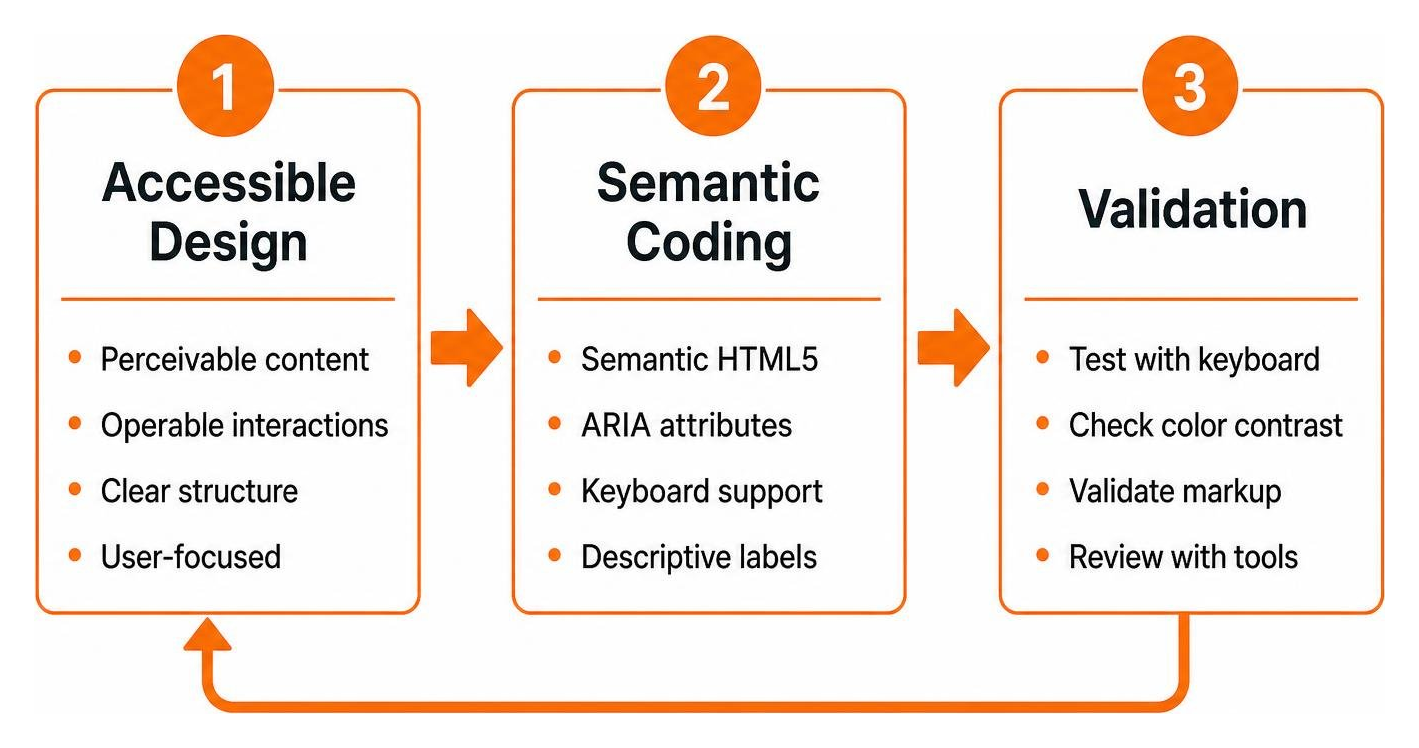
Translating the W3C Introduction to Web Accessibility into Daily Development
You do not need to overhaul your entire digital presence in a single afternoon. You can begin making immediate, meaningful improvements right now:
- Conduct a Fast Preliminary Review: Use the W3C Easy Checks preliminary review framework. Check your browser tab titles, verify heading hierarchy, confirm that color contrast is easy on the eyes, and test whether you can complete your contact form using only your keyboard.
- Standardize Component Design: Build reusable UI components (buttons, input boxes, modal dialogs) that have built-in keyboard support and high-contrast color pairings.
- Audit Your Content Workflow: Ensure content editors write meaningful image descriptions and upload video files with accompanying captions or transcripts.
Continuous Testing with Automated Tools and Human Evaluation
A healthy accessibility program relies on a balance between automated software scans and manual human reviews:
- Automated Accessibility Checkers: Automated tools can scan thousands of lines of code in seconds, catching obvious violations like missing image tags, empty buttons, and poor contrast ratios. We regularly evaluate which website accessibility checker actually catches the most WCAG errors to help teams select the best scanning software.
- Manual Keyboard and Screen-Reader Audits: Automated tools typically catch only 30% to 50% of potential barriers because software cannot interpret human context. A scanner cannot tell you whether an image’s alt text accurately describes the photo, or if a dynamic flyout menu traps a keyboard user in an endless loop. Manual audits with real assistive technologies are essential.
- Professional Education: Upgrading your team’s internal knowledge through resources like the W3Cx Introduction to Web Accessibility course builds a lasting culture of inclusion. In post-course surveys, 96% of participants reported an increase in their practical skills, and 90% expressed high satisfaction with the actionable techniques they learned.
Frequently Asked Questions About Web Accessibility Standards
What is the difference between WCAG 2.1, 2.2, and WCAG 3.0?
WCAG versions build on one another over time:
- WCAG 2.1: Expanded earlier standards by introducing critical criteria for mobile accessibility, touch gestures, and improved support for people with low vision and cognitive disabilities.
- WCAG 2.2: Added specific criteria to improve focus management, touch target sizes, accessible authentication (avoiding cognitive memory tests during login), and consistent user help features.
- WCAG 3.0: Currently in active development, WCAG 3.0 represents a future, outcome-based model designed to cover emerging technologies, artificial intelligence interfaces, and immersive environments with flexible scoring systems.
Can automated accessibility checkers catch 100% of WCAG violations?
No automated scanner can detect every accessibility issue. While automated tools are great for identifying syntax bugs, missing tags, and color contrast mismatches, they cannot assess subjective context. For example, an automated checker can verify that an image contains an alt attribute, but it cannot evaluate whether the text inside that attribute actually makes sense. Comprehensive compliance always requires manual testing alongside automated scans.
Does making my website accessible limit modern visual design?
Not at all! Accessible websites do not have to look plain, boring, or dated. Modern inclusive design focuses on strong visual hierarchy, generous white space, legible typography, intuitive navigation, and high performance. These exact qualities define award-winning contemporary web design. Accessibility enhances aesthetics and user experience for everyone rather than restricting your creative vision.
Conclusion: Building an Inclusive Web for Everyone
Creating an accessible website is one of the most rewarding investments you can make for your brand. It broadens your audience reach, elevates your organic search visibility, safeguards your organization against legal compliance risks, and ensures that every visitor is treated with dignity and respect.
When selecting technology partners for your website, infrastructure matters just as much as design. For reliable hosting, FZP Digital recommends GoDaddy and WP Engine as top managed WordPress hosting providers to keep your digital platform fast, secure, and accessible around the clock.
Making sense of technical guidelines, running screen-reader tests, and remediating legacy code can feel overwhelming when you are running a busy organization. You do not have to navigate this journey alone.
At FZP Digital, founder Fred Z. Poritsky and our dedicated team combine deep expertise in web development, SEO, and inclusive design through our proven “Develop . Design . Deliver” process. We help businesses and nonprofits across Philadelphia, Bucks County, and beyond build accessible digital experiences that deliver measurable results.
Ready to make your website welcoming to every visitor? Explore our FZP Digital professional accessibility services today, and let’s build a better, more inclusive web together.