


Navigating Americans with Disabilities Act Website Accessibility Without Getting Lost in Legal Jargon
What Americans with Disabilities Act Website Accessibility Means for You

Americans with disabilities act website accessibility requires public-facing websites to be fully usable by individuals with disabilities. Under Title III (for private businesses) and Title II (for state and local governments), your digital content must not create barriers that prevent people from perceiving, navigating, or interacting with your site.
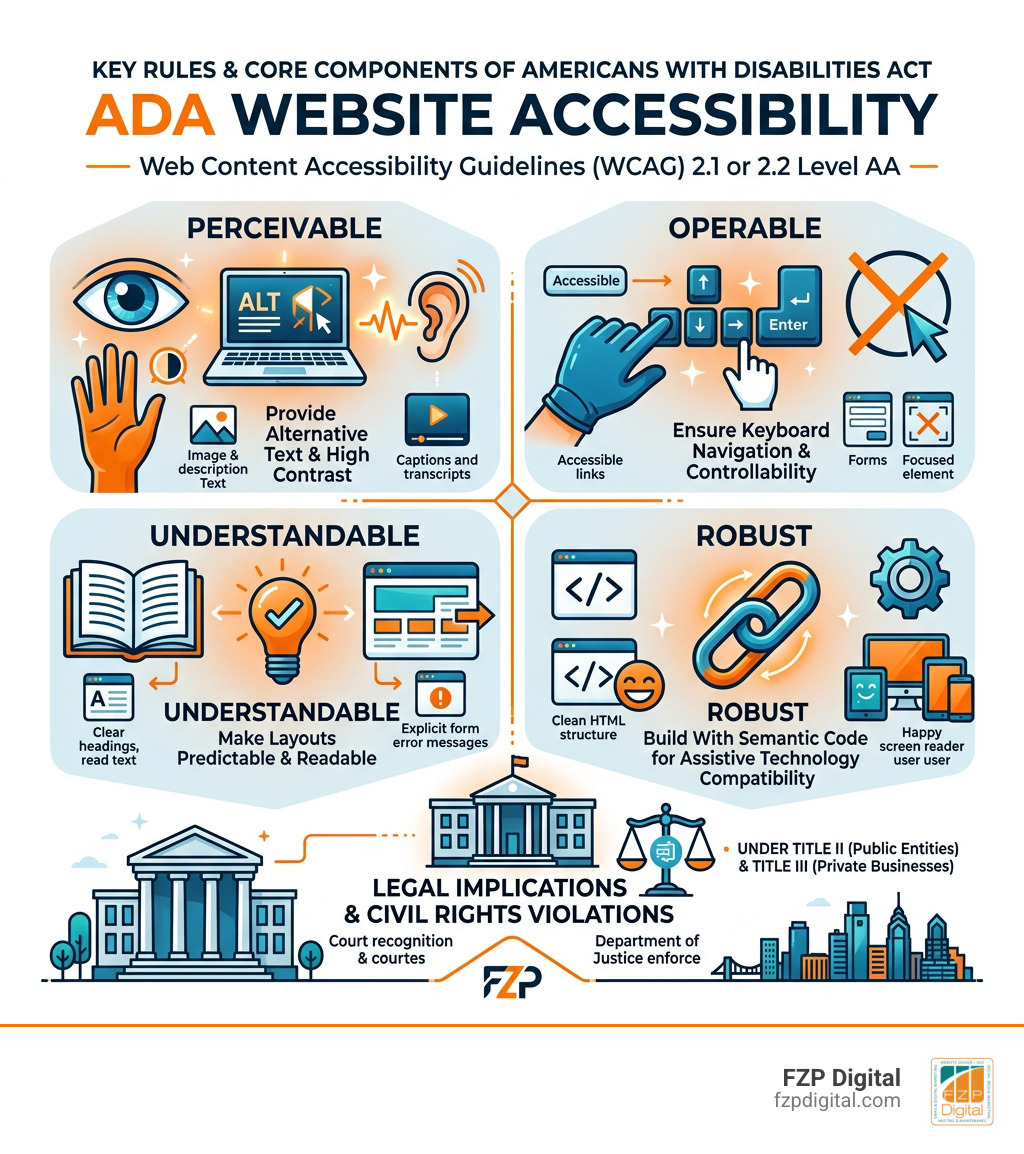
To achieve compliance in practice, your website must meet the Web Content Accessibility Guidelines (WCAG) 2.1 or 2.2 Level AA standards by ensuring:
- Perceivable content: Providing alternative text for images, high-contrast text, and accurate video captions.
- Operable navigation: Making every feature, link, and form fully accessible via keyboard without mouse reliance.
- Understandable design: Using predictable layouts, readable text, and clear error alerts on forms.
- Robust code: Building clean, semantic HTML that works seamlessly with modern screen readers and assistive tech.
Have you ever tried navigating a website with your screen turned off or without touching your mouse? For more than 70 million adults in the United States living with a disability, encountering inaccessible web pages is like running into a locked door.
Inaccessible websites are not just frustrating user experiences—they are recognized by federal courts and the Department of Justice as civil rights violations.
I’m Fred Z. Poritsky, founder of FZP Digital, where I combine decades of financial management and design experience to help organizations master americans with disabilities act website accessibility without unnecessary stress. Let’s cut through the confusing legal jargon and explore exactly what these rules mean for your website today.
Basic americans with disabilities act website accessibility glossary:
Understanding Americans with Disabilities Act Website Accessibility and the Law
When Congress passed the Americans with Disabilities Act in 1990, the modern commercial web didn’t exist yet. The law aimed to eliminate discrimination against individuals with disabilities in physical spaces known as “places of public accommodation”—think brick-and-mortar shops, restaurants, medical offices, and hotels.
As daily life moved online, the Department of Justice (DOJ) and federal courts stepped in to clarify that the digital realm is no different. If your digital storefront or informational portal is unusable for someone who relies on assistive technology, that barrier represents digital discrimination.
The legal principle is simple: you cannot deny someone equal access to your goods, services, or public information simply because of how they interact with a screen.
Title II vs. Title III: How Americans with Disabilities Act Website Accessibility Applies to Your Organization
To understand where your organization sits, you have to look at the two primary titles of the ADA:
- Title II (State and Local Governments): This applies to public entities, including municipal offices, public school districts, state universities, county health departments, and public transit systems. Under Title II, these bodies must ensure effective communication and equal access across all digital services, programs, and mobile apps.
- Title III (Public Accommodations & Private Businesses): This covers commercial entities open to the public. Whether you operate an e-commerce brand, a neighborhood dental practice, or a professional service firm, federal courts overwhelmingly treat customer-facing websites as places of public accommodation.
The DOJ’s guidance on web accessibility and the ADA reiterates that private businesses and public entities alike must provide equal digital access. If you’re building a new digital presence or auditing your current setup, understanding the fundamental basics of website accessibility gives you a clear path forward without having to decipher hundreds of pages of legal statutes.
ADA Compliance vs. Section 508: Key Differences Explained
People often mix up ADA requirements with Section 508. While both promote digital inclusion, they originate from different laws and apply to different groups:
- The ADA: A broad civil rights law protecting people with disabilities from discrimination across the private and public sectors.
- Section 508 of the Rehabilitation Act of 1973: Specifically governs federal government agencies and departments, requiring all electronic and information technology they develop, procure, maintain, or use to be accessible.
If you are a private commercial company selling to federal agencies or bidding on government contracts, you must comply with Section 508 procurement standards. Federal agencies rely on the federal accessible web design guide to evaluate vendor compliance. For a deep dive into these procurement rules, check out our comprehensive Section 508 guide.
The Litigation Landscape and Proposed Federal Legislation
Digital accessibility lawsuits remain a massive risk for businesses that neglect their websites. Recent years have seen thousands of federal and state ADA Title III filings alongside hundreds of thousands of formal demand letters.
Plaintiffs’ firms frequently target high-traffic e-commerce sites, retail brands, and service providers for simple, easily avoidable digital barriers. Why? Because automated scanning tools make it easy for anyone to find broken forms or missing image tags in seconds.
Federal lawmakers have introduced various legislative solutions over the years, such as H.R. 3417, attempting to establish unified national technical standards and “notice and cure” provisions. These proposed bills would give businesses a set grace period to fix identified issues before facing a lawsuit. However, without a universal safe harbor law passed by Congress for Title III, the courts rely directly on technical benchmarks to determine if you have provided effective communication.
Technical Standards and Common Compliance Barriers
How do judges, developers, and compliance auditors decide whether a website actually complies with the law? They look to the Web Content Accessibility Guidelines (WCAG), published by the World Wide Web Consortium (W3C).
WCAG 2.1 and 2.2: Conformance Levels and the POUR Principles
WCAG is structured around four foundational principles known as POUR:
- Perceivable: Information and user interface components must be presentable to users in ways they can perceive (it can’t be invisible to all of their senses).
- Operable: Interface components and navigation must be operable (users must be able to navigate using a keyboard, switch control, or voice commands).
- Understandable: Information and the operation of the user interface must be clear, readable, and predictable.
- Robust: Content must be robust enough that it can be interpreted reliably by a wide variety of user agents, including assistive technologies.
WCAG breaks criteria down into three levels of conformance:
| Conformance Level | Description | Legal Relevance |
|---|---|---|
| Level A | The absolute minimum baseline. Addresses the most severe web barriers. | Necessary, but insufficient on its own for legal compliance. |
| Level AA | Addresses the most common and impactful barriers for disabled users. | The universal legal benchmark used in ADA settlements, DOJ rules, and global standards. |
| Level AAA | The highest, most specialized level of accessibility. | Recommended for dedicated audiences, but not required for general ADA compliance. |
For a full breakdown of specific success criteria, explore our WCAG checklist with practical examples.
Frequent Web Accessibility Pitfalls and Practical Fixes
When Fred Z. Poritsky and our team conduct web audits, we consistently find the same common barriers causing 90% of compliance issues:
- Low Color Contrast: Text that blends into background colors strains users with low vision or color blindness. Text must maintain a minimum contrast ratio of 4.5:1 against its background (3:1 for large text).
- Missing Alternative Text: Screen readers cannot interpret images without descriptive
alttags. Provide concise, functional descriptions for informative images, and use emptyalt=""attributes for purely decorative graphics. - Keyboard Navigation Traps: Users who navigate with the Tab key can get trapped inside modals, drop-down menus, or embedded media players. Ensure focus indicators are clearly visible and that users can navigate into and out of all interactive elements using standard keystrokes.
- Inaccessible Forms: Missing form labels leave screen reader users guessing what information to input. Always pair
tags with explicitelements and dynamic error alerts.
Writing clean semantic HTML and applying ARIA attributes properly ensures your website functions smoothly for everyone. You can learn more practical strategies in our guide on designing for screen readers.
Evaluating the DOJ Title II Final Rule and State Government Deadlines
State and local government entities face strict, clear regulatory mandates. The Department of Justice issued a comprehensive Title II Final Rule that formally established WCAG 2.1 Level AA as the official technical standard for all public entity web content and mobile apps.
Compliance Timelines for Public Entities by Population Size
The DOJ rule established a structured, population-based timeline to give municipalities, school boards, and special districts adequate time to plan their budgets and update their digital systems:
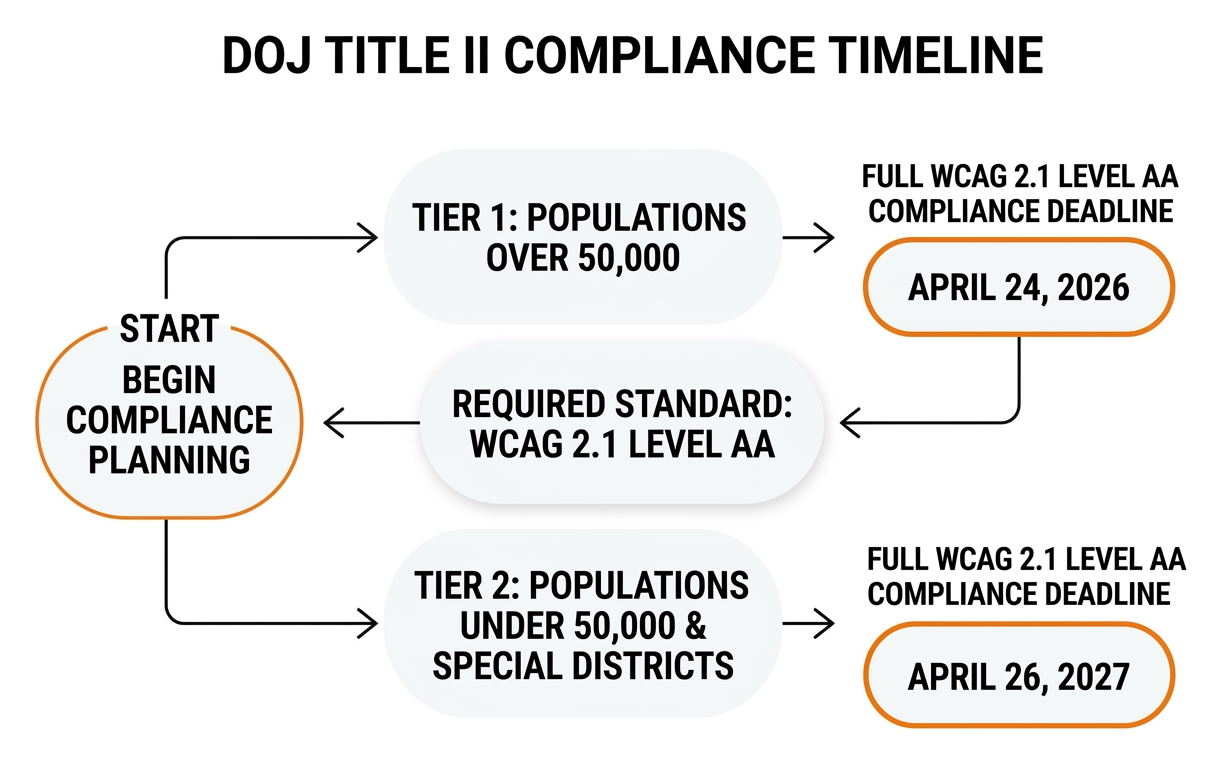
- Public entities with populations of 50,000 or more: Must achieve full WCAG 2.1 Level AA compliance by April 24, 2026.
- Public entities with populations under 50,000 and special purpose districts: Must achieve full compliance by April 26, 2027.
Public school districts calculate their deadlines based on the US Census Small Area Income and Poverty Estimates, while local government agencies can review the official Title II web rule guidance to determine their specific tier.
The Five Statutory Exceptions to the Title II Web Accessibility Rule
The DOJ recognized that requiring public entities to remediate decades of legacy files would place an undue burden on taxpayers. As a result, the Title II rule outlines five specific exceptions where WCAG 2.1 Level AA compliance is not strictly mandatory:
- Archived Web Content: Content maintained exclusively for historical reference, stored in a dedicated archive area, and not altered since archiving.
- Preexisting Electronic Documents: Conventional digital files (such as PDFs, Word docs, or spreadsheets) published before the entity’s compliance date, provided they are not currently used to apply for, access, or participate in active services.
- Third-Party Content: Unaffiliated content posted by external users on the public entity’s platform (such as an open public comment board), where the entity does not control or license the submission.
- Password-Protected Individualized Documents: Secure, personal electronic documents tied to specific individuals (like a personalized utility bill or property tax receipt).
- Preexisting Social Media Posts: Social media messages and media published prior to the organization’s formal compliance date.
Even when content falls under an exception, public entities still have an ongoing legal obligation to provide accessible versions upon request to guarantee effective communication.
Digital Accessibility Risk Management and Why Overlays Fail
Many business owners look for quick shortcuts when they first learn about accessibility lawsuits. This has led to the rise of automated accessibility widgets and overlays—small JavaScript plugins promising instant, one-click ADA compliance.
Unfortunately, relying on quick fixes often increases your legal and technical exposure.
The Risks and Legal Realities of Accessibility Overlays and Widgets
Overlays and toolbar widgets claim to adjust colors, enlarge text, or read content aloud. In reality, these third-party scripts sit on top of your website without correcting the underlying source code.
- They Fail Assistive Technology Users: People with disabilities already use their own tailored screen readers, custom stylesheets, and hardware switch controls. Overlays often intercept and disrupt these native tools, creating a frustrating, segregated user experience.
- They Do Not Prevent Lawsuits: Court records show that thousands of ADA lawsuits have been filed against businesses that had active accessibility widgets installed. Plaintiffs’ attorneys easily identify code-level violations that plugins cannot fix, such as broken keyboard traps or inaccessible checkout forms.
- False Sense of Security: Installing a widget creates the illusion of compliance while leaving critical compliance issues completely unaddressed in your core codebase.
Sustainable accessibility requires direct code remediation and proper semantic markup—not temporary cosmetic overlays.
Step-by-Step Roadmap to Achieve Americans with Disabilities Act Website Accessibility
Building a truly accessible, legally sound digital presence is a manageable, ongoing process. Here is the proven workflow we use at FZP Digital:
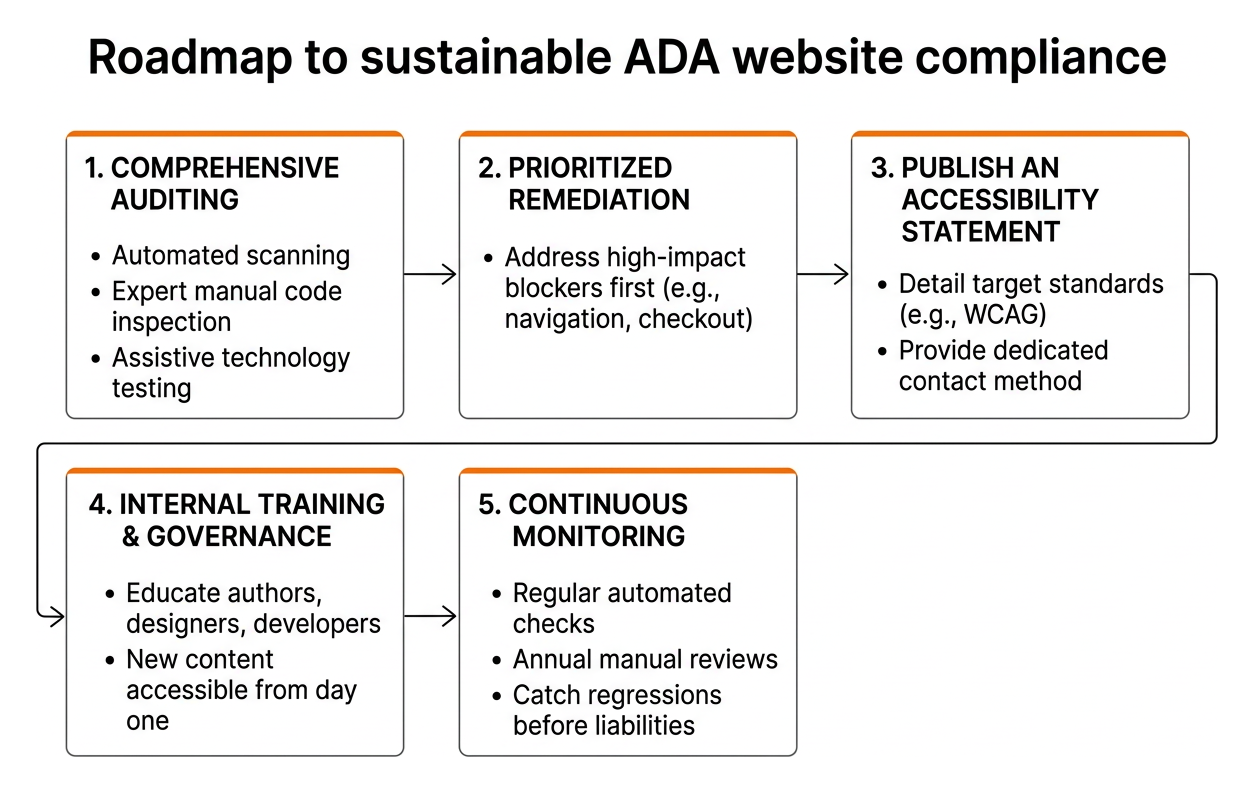
- Comprehensive Auditing: Combine automated scanning tools with expert manual code inspection and assistive technology testing to identify genuine functional barriers.
- Prioritized Remediation: Address high-impact blockers first—such as navigation menus, checkout flows, contact forms, and main content templates.
- Publish an Accessibility Statement: Add a clear, transparent accessibility statement in your footer detailing your target standards (e.g., WCAG 2.1/2.2 AA) and providing a dedicated contact method for users requesting assistance.
- Internal Training and Governance: Educate your content authors, designers, and developers so that new blog posts, images, and features are accessible from day one.
- Continuous Monitoring: Run regular automated checks and schedule annual manual reviews to catch regressions before they become legal liabilities.
Investing in a thorough professional website accessibility audit protects your brand and opens your digital doors to millions of underserved customers. To see the broader return on this investment, read our guide on how web accessibility drives brand growth.
Frequently Asked Questions About ADA Web Compliance
Does every commercial business website legally have to be ADA compliant?
Yes. Federal courts and the DOJ interpret Title III of the ADA as applying to commercial websites that provide goods, services, or information to the public. If your website is open to consumers, it must provide equal access and effective communication.
Are automated accessibility widgets enough to protect against lawsuits?
No. Automated widgets and overlays do not fix underlying code errors, server-side forms, or document accessibility issues. Because they frequently conflict with screen readers, hundreds of businesses with active widgets face ADA lawsuits every year.
What is the practical difference between WCAG 2.1 AA and WCAG 2.2 AA?
WCAG 2.2 builds upon 2.1 by adding new success criteria focused on mobile usability, cognitive accessibility, and fine motor control. These include larger touch target sizes (minimum 24×24 pixels), clearer focus appearance indicators, and simpler authentication methods that avoid difficult cognitive memory puzzles.
Conclusion
Digital accessibility isn’t about memorizing legal codes or checking off technical boxes—it’s about making sure your digital front door is open to every customer, client, and citizen. When you build an accessible website, you protect your organization from costly litigation, improve your search engine rankings, and deliver a cleaner, faster user experience for everyone who visits.
When it comes to building, hosting, and maintaining high-performance WordPress sites, choosing the right foundation makes all the difference. For managed WordPress hosting, we recommend industry leaders like GoDaddy and WP Engine for their outstanding reliability, speed, and security.
Are you wondering how your current site measures up against modern accessibility standards? At FZP Digital, we love helping business owners navigate digital compliance with total confidence. Explore our expert website accessibility services today, and let’s work together to make your web presence fast, beautiful, and welcoming to all.