

A Practical VoIP CRM Integration Field Guide for Modern Businesses

Why VoIP CRM Integration Matters for Every Customer Conversation
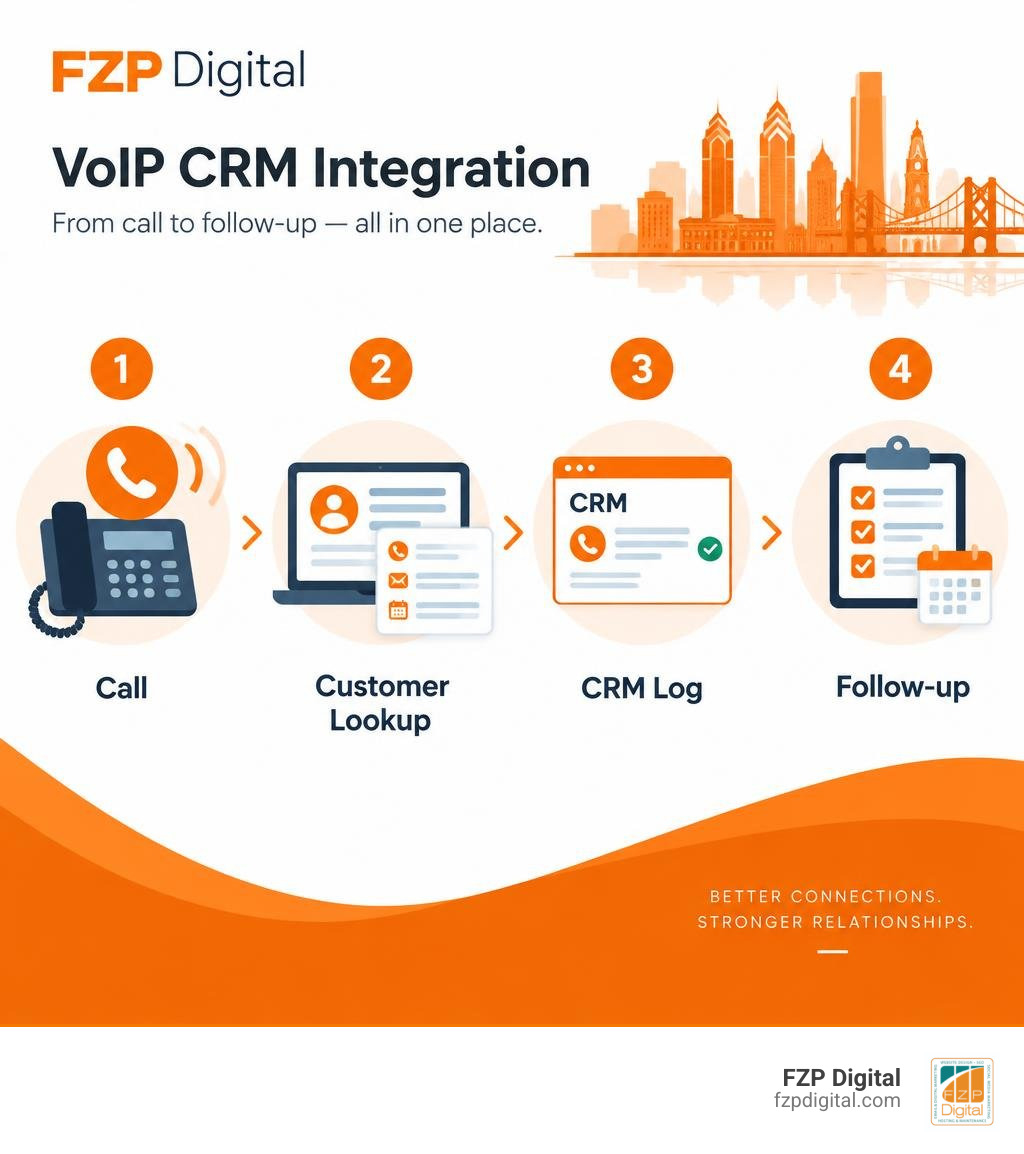
VoIP CRM integration connects your internet phone system to your customer relationship management software, so calls and customer data work together in one place. When someone calls, the CRM can identify the caller, display their history, log the call automatically, and prompt the next step – without forcing your team to switch between a phone, spreadsheet, and several browser tabs.
For a small business or nonprofit, the practical starting point is simple:
- Choose a VoIP provider that supports your CRM through a native connector or secure API.
- Sync contacts and map the call details you need, such as duration, recordings, notes, and call outcomes.
- Test inbound and outbound calls before training your team and rolling it out broadly.
The result is less manual data entry and more useful context at the moment it matters. A staff member can click a number to call from a contact record, while an incoming caller can trigger a screen pop-up with prior conversations, open tickets, donations, purchases, or lead details.
That context is increasingly important. Research cited in this guide shows that 71% of consumers expect personalized interactions, while 76% become frustrated when businesses do not provide them. A connected phone-and-CRM workflow makes personalization more realistic, even for teams without a large call center.
I’m Fred Z. Poritsky, founder of FZP Digital, and my background in nonprofit financial management, web design, and digital marketing helps me translate business workflows into practical technology decisions. In this guide, I’ll help you understand how voip crm integration can support better service, cleaner customer data, and more productive communication.
Basic voip crm integration glossary:
- crm cti integration
- how to integrate sms and phone systems with crm
- integrated customer relationship management
The Mechanics of VoIP CRM Integration in Modern Workflows
Connecting cloud voice systems to your customer records sounds complex on the surface, but modern web standards make it surprisingly elegant. At its core, VoIP (Voice over Internet Protocol) converts analog voice signals into digital packets that travel across the internet in less than a second. When you bridge this communication layer with your CRM, you eliminate the boundary between raw voice traffic and structured customer records.
The underlying magic relies on Session Initiation Protocol (SIP) combined with modern cloud PBX engines and REST APIs. These technologies allow bidirectional data exchange. When a call starts, the phone system pings the CRM to find matching caller records. When the call ends, the system automatically transmits call logs, audio recording links, and timestamps back into the contact’s profile. If you want a deep dive into how various data pipelines tie into your central stack, take a look at our comprehensive guide to CRM integration.
Today, businesses choose between pre-built native marketplace connectors or custom API setups. Here is how they stack up against each other:
| Feature / Consideration | Native Marketplace Connectors | Custom REST API Setups |
|---|---|---|
| Deployment Time | Minutes to a few hours | Several weeks of development |
| Technical Skill Needed | Minimal (point-and-click setup) | Intermediate to advanced developer skills |
| Custom Field Flexibility | Limited to pre-mapped fields | Fully customizable to bespoke databases |
| Maintenance | Handled by software vendors | Maintained in-house by your technical team |
| Best Suited For | Standard CRMs (Salesforce, HubSpot, Zoho) | Proprietary CRMs or complex legacy stacks |
Telephony Protocols and API Handshakes
How do these systems talk to one another in real time without lag? It comes down to webhooks and API handshakes. When an inbound or outbound call event takes place, the telephony server fires an HTTP webhook payload formatted in lightweight JSON directly to your CRM endpoint.
Security is paramount here. The integration uses OAuth 2.0 or secure Bearer tokens to authenticate these requests, ensuring caller data and customer details remain strictly encrypted. If you are curious about connecting custom data sources, our tutorial on connecting data to CRM via APIs walks through endpoint mapping in detail. For businesses running advanced PBX systems, referencing a technical Custom CRM Integration Guide helps map specific JSON paths to match caller IDs with CRM contact records flawlessly.
Browser-Based Calling and Softphone Embedding
Nobody likes juggling a desk phone, a separate softphone app, and five CRM tabs. WebRTC (Web Real-Time Communication) standards solve this issue by embedding a fully functional dialer directly inside your browser window.
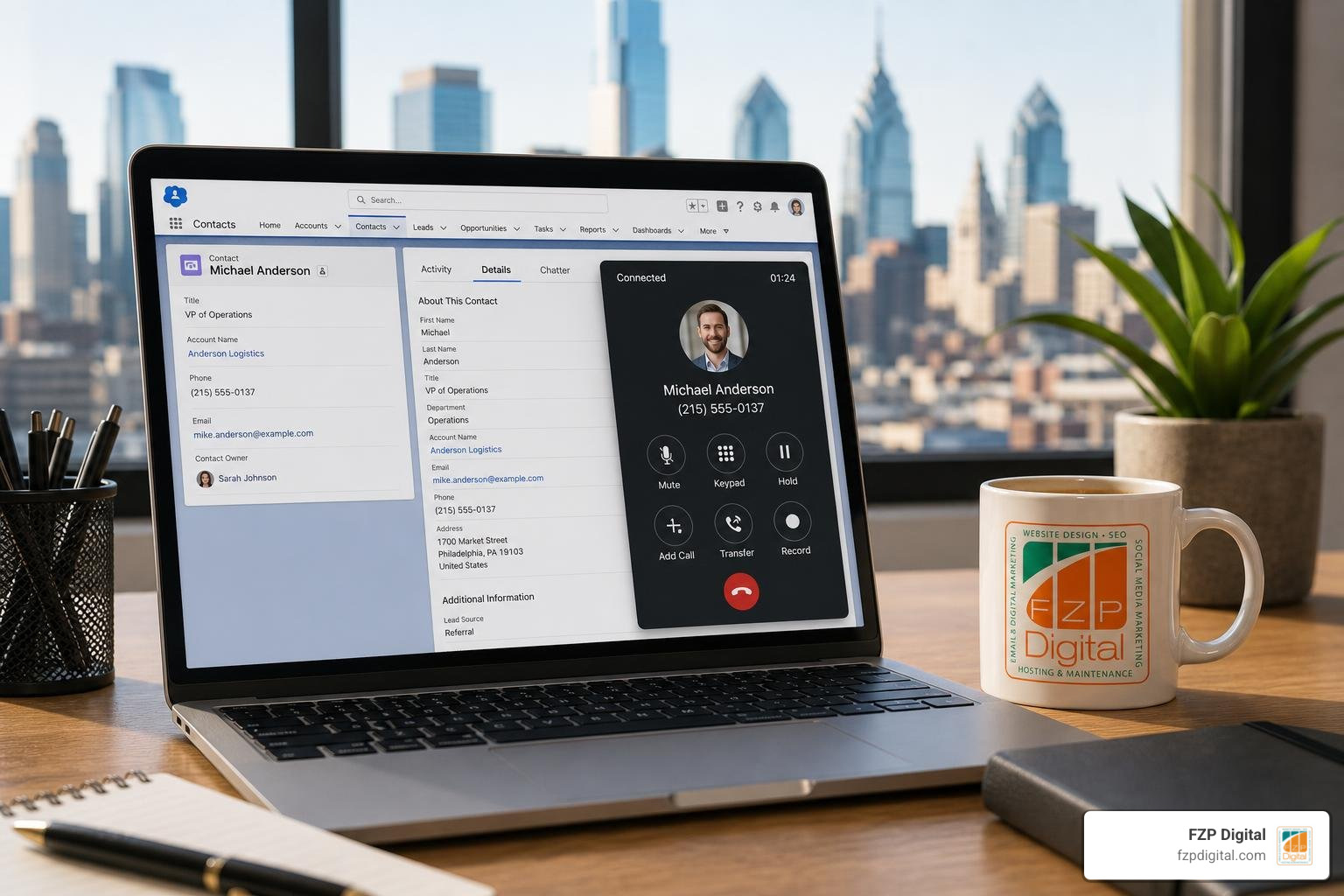
With an embedded softphone, your team can manage call controls, switch audio devices, view call durations, and take live notes inside the contact’s CRM profile without ever touching an external headset dialer or separate software window.
Core Business Benefits of Connecting Telephony to CRM
Bridging the gap between your voice communications and customer database produces immediate, measurable returns. Did you know there are over 1,853 active CRM providers in the United States alone? Regardless of which platform you run, operating your phone system in a separate silo creates blind spots and repetitive manual work.
When voice and data work as one unified engine, businesses unlock massive operational advantages. In fact, research indicates that integrating VoIP with a CRM can lead to a 21% to 30% increase in sales revenue, shorten overall sales cycles by up to 14%, and drive up to 300% more conversions. If you are evaluating the strategic return of this connectivity, our guide on why businesses need integrated customer management breaks down the long-term compounding value for growing teams.
Enhancing Agent Productivity with VoIP CRM Integration
Manual dialing is a massive productivity drain. Typing a 10-digit phone number, misdialing, looking up notes, and manually logging call outcomes wastes several minutes per conversation.
With click-to-dial functionality, sales reps and support agents click any phone number inside their CRM to instantly initiate a call. Once the conversation wraps up, automated disposition windows let reps choose the call outcome with a single click, instantly attaching the call duration and recording link to the record. This eliminates tedious administrative data entry, allowing agents to spend their time actually speaking with qualified prospects.
Driving Revenue Growth and Customer Retention
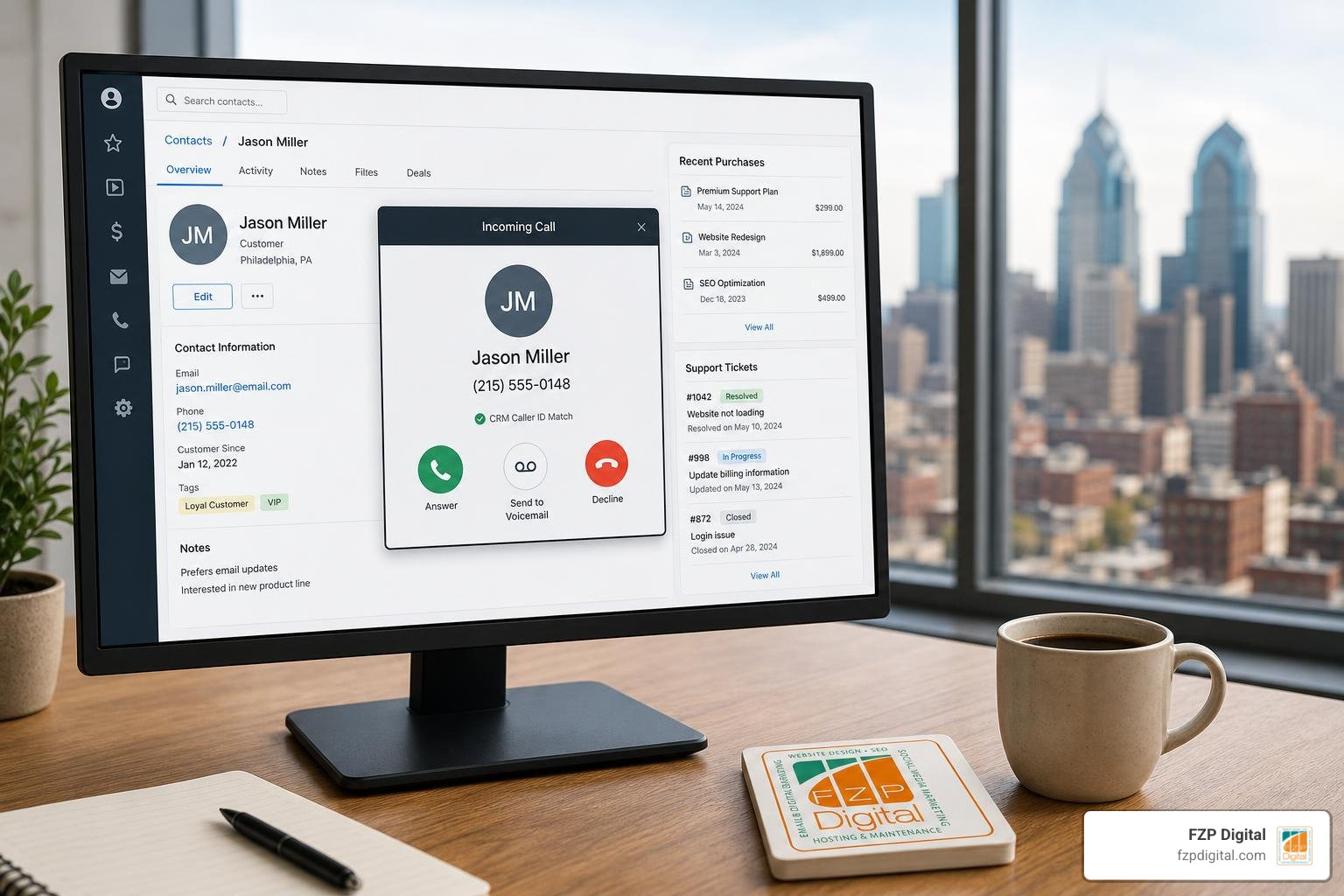
Customer satisfaction hinges on personal, attentive service. When your phone system instantly identifies incoming callers and surfaces their recent purchases, active support tickets, and past conversations, your team can deliver warm, personalized greetings right away.
Studies show that integrated telephony can lead to up to a 47% increase in customer satisfaction and retention. When clients feel recognized and do not have to repeat their issue to multiple agents, their loyalty grows. On the sales side, faster lead response times and automatic activity logging give managers complete visibility into deal velocity, helping them pinpoint exactly which communication tactics drive closed-won revenue.
Essential Features to Look for in Telephony Integrations
Not every voice integration offers the same depth. When evaluating options for your tech stack, look for tools that unify communications across multiple channels. For example, pairing phone calls with text messaging using our guide on connecting SMS and phone systems with CRM ensures that your team can send automated SMS confirmations immediately after a phone consultation.
Key capabilities to prioritize include:
- Interactive Voice Response (IVR) Sync: Direct callers to the right department based on CRM account owner tags.
- Voicemail Transcription: Convert voicemails into text notes attached directly to the contact record.
- Supervisor Monitoring & Coaching: Features like call listening, whisper mode, and call barging.
- Real-Time Analytics Dashboards: Track call volumes, handle times, and conversion outcomes by team member.
Real-Time Call Routing and Screen Pop-Ups
Using Automatic Number Identification (ANI), the integrated phone system searches your CRM the moment an inbound call arrives. If the system finds a match, a contextual screen pop-up appears on the agent’s screen before they even pick up the line.
Intelligent routing takes this a step further by evaluating customer tiers. If a high-value VIP client or an account with an urgent open ticket calls, the system automatically routes the call directly to their dedicated account manager instead of a general queue.
Automatic Call Logging and Data Synchronization
Automated logging creates a single source of truth for your entire organization. Every inbound, outbound, and missed call is logged with exact start times, call lengths, and direct links to cloud-hosted audio recordings. If an agent changes a contact’s title or adds post-call notes, two-way data synchronization updates all connected records across your system, preventing duplicate or conflicting entries.
Step-by-Step Implementation and Configuration Process
Deploying an integrated voice system requires thoughtful planning, but following a structured roadmap ensures a smooth rollout without dropped calls or lost customer records.
Here is a straightforward sequence to follow:
- Conduct a Network and Bandwidth Audit: VoIP calls require consistent bandwidth and low latency. Ensure your network supports dedicated Quality of Service (QoS) rules for voice traffic.
- Gather System Credentials and API Keys: Generate secure API tokens, client IDs, and webhook endpoints from both your CRM administrator settings and cloud phone provider.
- Configure User and Extension Mapping: Match individual PBX extensions to specific CRM user accounts so call logs attribute accurately to the right team members. For an example of how this works in specialized platforms, review this Odoo telephony setup guide.
- Set Up Data and Field Mappings: Specify how custom fields (like call disposition, recording URLs, and lead sources) populate within your CRM contact and deal records.
- Execute Pilot Testing: Run test inbound, outbound, and missed calls across multiple browser environments to verify screen pop-up speed, audio clarity, and automated logging accuracy.
- Train Your Team: Provide hands-on training for click-to-dial, note taking, and call transfer features before full deployment.
Best Practices for Seamless VoIP CRM Integration Setup
To get the most out of your setup, implement these best practices from day one:
- Normalize Phone Numbers: Ensure all phone numbers across your CRM follow a standard format (such as E.164 with country codes) so caller ID matching functions without errors.
- Set Role-Based Access Permissions: Restrict sensitive call recordings and customer notes based on user roles and management tiers.
- Establish Data Fallback Rules: Configure how the system handles unknown numbers, such as automatically creating a new lead record tagged “Inbound Caller.”
Overcoming Common Integration Challenges
During configuration, technical hiccups can pop up. Here is how to navigate the most common stumbling blocks:
- Browser Audio Permissions: If an embedded WebRTC softphone fails to ring, verify that browser settings permit microphone access and auto-play media for your CRM domain.
- Network Jitter and Packet Loss: Choppy audio usually stems from local network congestion. Configure QoS rules on your office router to prioritize SIP/RTP voice packets over general web traffic.
- API Rate Limiting: High call volumes can occasionally exceed CRM API request caps. Choose providers that queue batch log syncs during peak hours to stay within limits.
Navigating complex integrations, web architectures, and digital marketing funnels can feel daunting when you’re trying to run day-to-day operations. That is where partnering with seasoned experts makes all the difference. At FZP Digital, founder Fred Z. Poritsky and our team work closely with businesses across Philadelphia, Richboro, Newtown, and Bucks County to design clean, high-performing websites and digital workflows that turn incoming inquiries into loyal, long-term clients.
Future Trends Shaping Voice and CRM Connectivity
Voice technology continues to evolve rapidly, transforming business phone systems into intelligent conversational platforms.
Artificial intelligence now plays an active role in daily calling workflows. Modern systems use real-time AI transcription and sentiment analysis to monitor conversation tone, flagging customer frustration or buying interest as it happens. Proactive routing algorithms analyze past interaction history to route callers to the specific agent most likely to resolve their issue.
Furthermore, the widespread adoption of 5G mobile networks and Unified Communications as a Service (UCaaS) ensures crystal-clear audio quality and instantaneous data synchronization, whether your team is working at an office desk or taking calls in the field.
Frequently Asked Questions About Telephony Integration
How much does it typically cost to connect VoIP with a CRM?
Most cloud VoIP providers offer CRM integrations within their standard business plans, typically ranging between $25 and $50 per user per month. Specialized providers like CloudTalk offer integrated CRM capabilities starting around $29 per user per month. Because cloud systems rely on your existing internet connection and computers, you eliminate the hefty capital expense of on-premise PBX hardware and traditional copper phone lines.
What is the difference between CTI and VoIP CRM integration?
Computer Telephony Integration (CTI) is a broad term that historically described connecting traditional desktop computers to on-premise hardware phone systems using physical server cards and local network bridges. Modern VoIP CRM integration is a cloud-native evolution of this concept. It uses internet protocols, SIP signaling, and cloud REST APIs to link web-based CRMs with cloud phone systems without requiring on-site hardware. You can learn more about these foundational concepts in our guide to CRM CTI integration fundamentals.
Can businesses use custom REST APIs for telephony sync?
Yes! If your business uses a custom-built database or an industry-specific CRM that lacks a pre-built marketplace app, you can build a custom integration using REST APIs and webhooks. Most enterprise-grade cloud PBX systems provide open API documentation, allowing developers to create custom endpoints for contact lookups, automated call journaling, and real-time screen pop-ups tailored to your exact operational workflow.
Conclusion
Unifying your voice communications with your customer database brings clarity, speed, and professionalism to every conversation. Instead of losing valuable customer details in disconnected phone logs, an integrated system ensures every interaction informs your broader sales and support strategy.
Are you ready to modernize your digital presence and streamline how you capture, nurture, and convert incoming leads? Explore our full range of digital marketing services at FZP Digital, or reach out to us today to see how we can help your business build a seamless, growth-focused digital foundation.