

Why Your Business Needs Integrated Customer Relationship Management Now
Why Integrated Customer Relationship Management Is the Missing Piece in Your Business
Integrated customer relationship management is the practice of connecting your CRM software with every other tool your business uses — from email and marketing platforms to e-commerce, accounting, and customer support systems — so that data flows automatically between them, giving every team a single, accurate picture of each customer.
Here’s a quick breakdown of what that means in practice:
| Concept | What It Means for Your Business |
|---|---|
| What it is | Connecting your CRM to other apps so data syncs automatically |
| How it works | APIs, built-in connectors, or middleware pass data between systems in real time |
| Who benefits | Sales, marketing, service, and operations teams — all at once |
| Key outcome | One unified view of every customer, no manual data entry required |
| Common integrations | Email, e-commerce, ERP, help desk, social media, marketing automation |
Think about how many apps your business runs on right now. Email. Invoicing. A website. Maybe an online store. A customer support inbox. A social media scheduler.
Each one holds a piece of your customer’s story — but if they’re not talking to each other, you’re the one manually stitching it all together. Or worse, nobody is.
Here’s a number that puts it in perspective: the average organization uses over 900 apps, yet most businesses have only connected about 28% of them. Meanwhile, 81% of IT leaders say those disconnected data silos are actively slowing down their digital growth.
That’s not just an IT problem. That’s a revenue problem.
When your sales rep doesn’t know a customer just filed a support ticket, or your marketing team is emailing someone who already purchased, or your billing system doesn’t reflect what your CRM shows — those aren’t small inconveniences. They’re the kinds of friction that erode customer trust and quietly cost you business.
The good news? This is exactly the problem that integrated CRM is designed to solve.
I’m Fred Z. Poritsky, founder of FZP Digital, and my background spans nonprofit financial management, digital marketing, and web design — fields where understanding the full customer relationship, from first contact to long-term retention, is everything. That cross-functional perspective is exactly why integrated customer relationship management is something I help Philadelphia-area businesses implement as part of a broader digital strategy. Let’s walk through what it is, how it works, and why getting it right can transform the way your business operates.
Integrated customer relationship management vocabulary:
- how to integrate chatbot with crm for lead capture
- how to integrate company data into crm using api
- how to integrate inventory systems with crm
What is Integrated Customer Relationship Management and How Does It Work?
Have you ever wondered why your team spends so much time copying and pasting names, emails, and order numbers from one screen to another? It is because your systems are living on isolated islands.
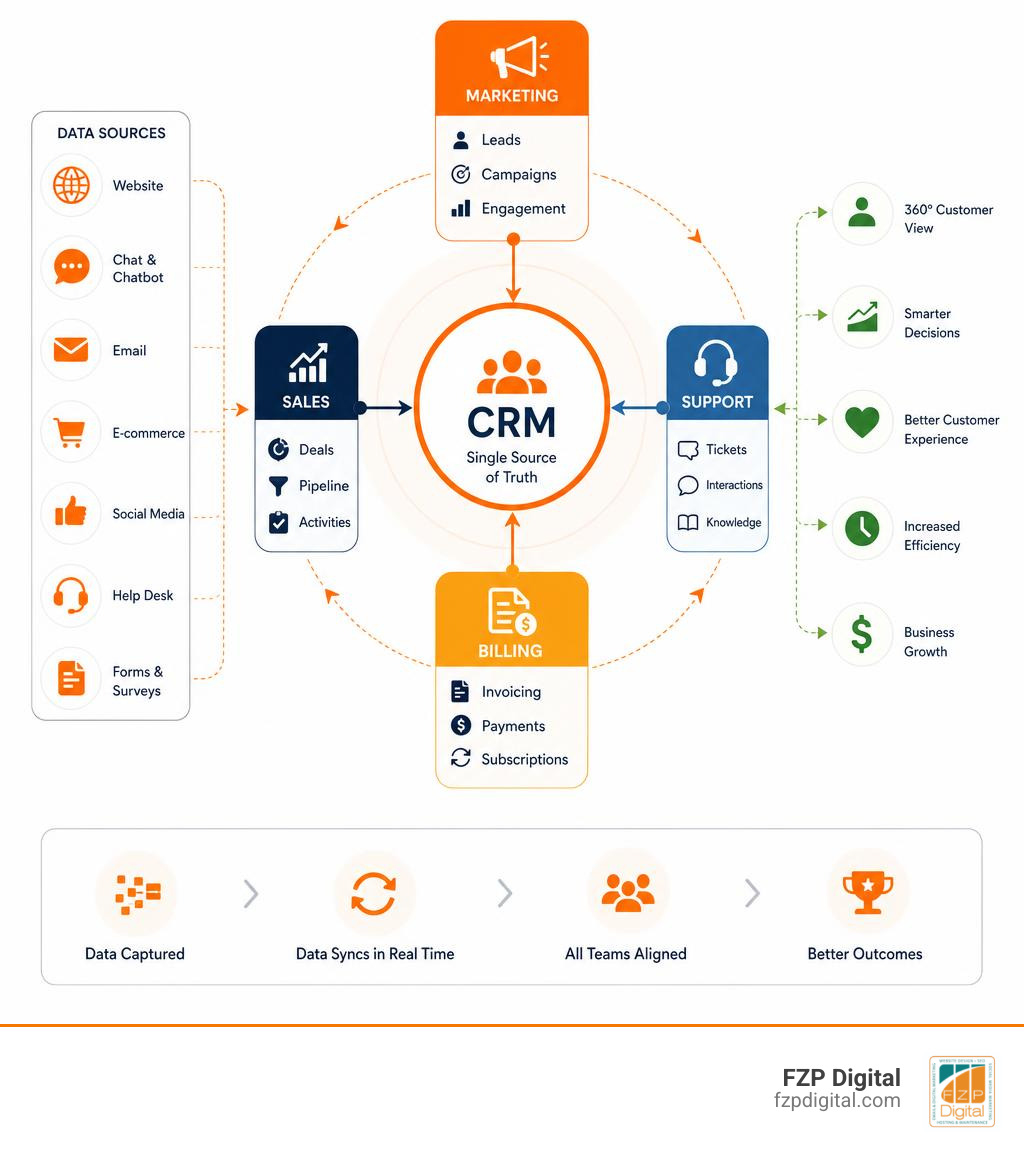
At its core, an integrated customer relationship management strategy bridges those islands. It establishes an automatic, real-time data exchange between your central CRM and your other business tools. Instead of your customer data being scattered across spreadsheets, billing software, and email platforms, integration creates a single source of truth (SSOT). This means that when a customer updates their phone number on your website, that change instantly ripples through to your sales team’s pipeline, your support desk, and your billing department.
How does this magic happen? It relies heavily on API connectivity. APIs (Application Programming Interfaces) act as digital translators, allowing different software programs to securely talk to one another and share information without human intervention. If you are curious about the technical side of making this connection, you can read our detailed guide on How to Hook Your Data Up to Your CRM Using APIs.
The Core Components of Integrated Customer Relationship Management
To truly understand how integrated CRM works, we have to look at the three main types of CRM systems that run behind the scenes:
- Operational CRM: This is the workhorse. It automates your day-to-day customer-facing tasks, such as tracking sales leads, managing marketing campaigns, and logging customer service requests.
- Analytical CRM: This is the brain. It gathers all the data collected by your operational systems and analyzes it to help you spot trends, understand customer behavior, and make smarter business decisions.
- Collaborative CRM: This is the bridge. It shares customer information across different departments—like sales, marketing, support, and billing—so everyone is on the same page.
When these three components are integrated, they cover the entire customer lifecycle. From the very first moment someone visits your website to their tenth repeat purchase, every touchpoint is tracked, organized, and made actionable.
How AI and Automation Power Modern Integrations
As we move through May 2026, artificial intelligence is no longer a futuristic concept—it is the engine driving modern CRM integrations. Major platforms like the Salesforce CRM: Try The World’s #1 Agentic CRM | Salesforce and Agentic CRM and ERP Solutions | Microsoft Dynamics 365 are shifting from simple databases to “agentic” systems of action.
AI enhances integrated CRMs in three primary ways:
- Conversational AI: Powers smart chatbots that can access your integrated CRM to resolve customer queries instantly, pulling up purchase histories or tracking numbers.
- Generative AI: Drafts highly personalized emails and follow-ups based on the customer’s specific interaction history stored in the CRM. For instance, tools like Zoho CRM | Top-rated Sales CRM Software by Customers use Zia Agents to write content and design custom layouts.
- Predictive AI: Analyzes historical data across integrated ERP and marketing platforms to score leads, predict customer churn, and suggest the “next best action” for your sales reps.
Instead of your team manually checking if an invoice was paid before calling a client, AI agents can autonomously orchestrate these workflows across your systems, saving your team hours of manual oversight.
The Strategic Benefits of Connecting Your Systems

When your business applications talk to each other, the daily grind gets a whole lot smoother. Did you know that office-based employees spend about 2 hours of their 8-hour workday dealing with unproductive emails and manual data hunting? That is 30 working days per year, per employee, lost to digital clutter!
By connecting your systems, you eliminate that waste. The operational efficiency gains are massive. Instead of jumping between tabs, your team has everything they need in one place. This leads to seamless team collaboration. When a support rep in Downtown Philadelphia can instantly see that a customer they are helping is also in a high-value sales pipeline, they can handle the call with the appropriate level of care.
This level of service boosts customer retention. Customers do not want to repeat their problems to three different people. They want you to know who they are, what they bought, and how to help them right away. If you want to see how these automations free up your sales reps to do what they do best, check out our article on How Pipedrive CRM Integrations Can Save Your Sales Team Time.
Why Integrated Customer Relationship Management is Essential for Modern Growth
If you are looking to scale your business in Richboro, Newtown, or Philadelphia, integration is not optional—it is the foundation of growth.
- Accelerated ROI Realization: You are already paying for your CRM, your website, and your marketing tools. Integrating them ensures you actually get the maximum value out of your software investments, often speeding up process automation by up to 80%.
- Unmatched Data Accuracy: Manual data entry is prone to human error. Automatic synchronization ensures your records are always clean, up-to-date, and reliable.
- Hyper-Personalized Marketing: When your marketing platform knows exactly what your customers are buying (thanks to e-commerce integration), you can send highly targeted campaigns that convert at a much higher rate.
- Deepening Customer Trust: 89% of CEOs are focused on building trust with their clients. When your business interactions are seamless, accurate, and proactive, customers feel valued and secure.
Key Types of CRM Integrations You Should Know
To build a truly integrated customer relationship management system, you need to understand the key touchpoints across your customer’s journey.
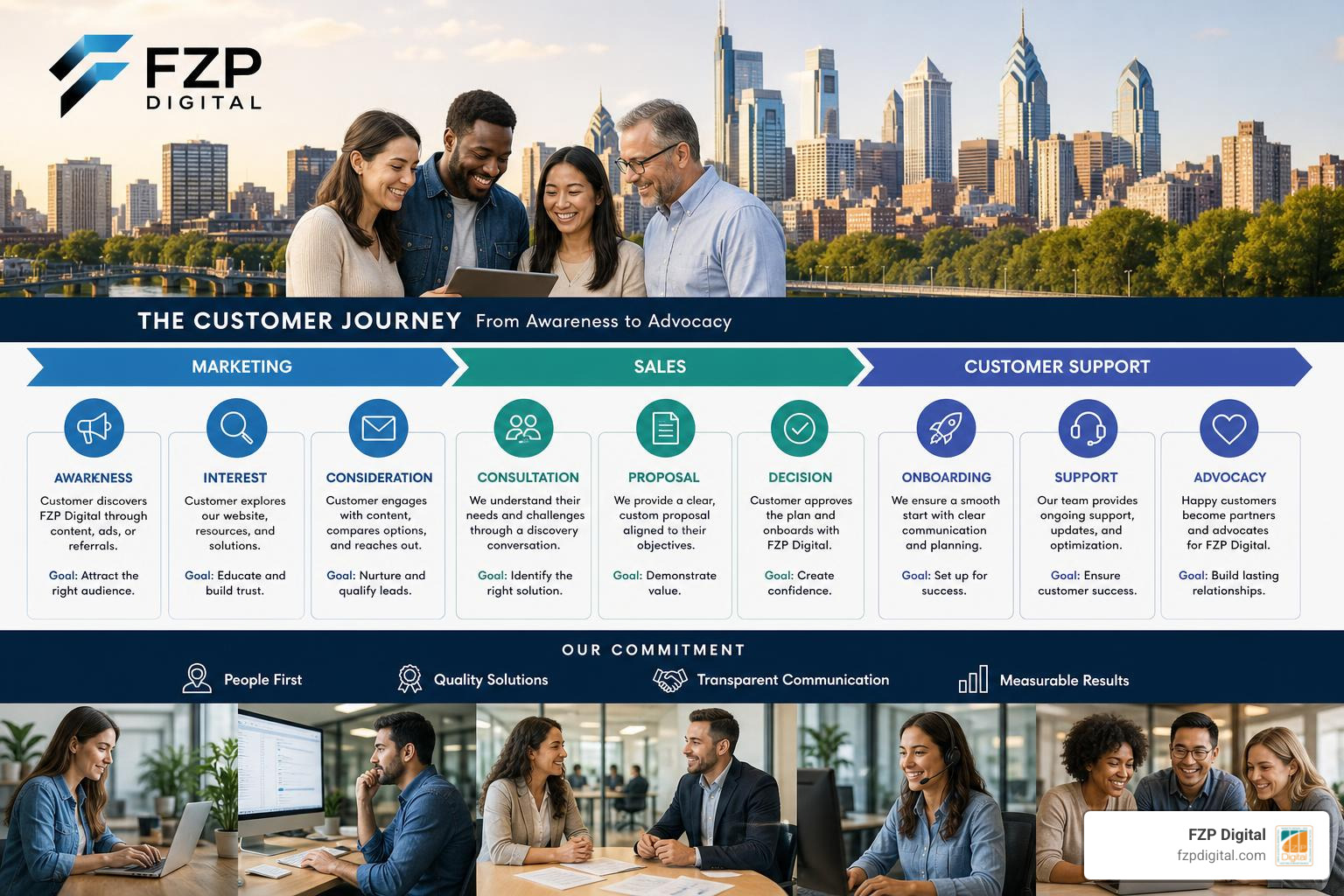
Let’s break down the most common and impactful types of integrations:
- Marketing Automation: Connecting tools like HubSpot or Mailchimp to your CRM ensures that leads captured from landing pages are instantly routed to sales reps.
- E-commerce Integration: Linking your online store (like Shopify or WooCommerce) to your CRM allows you to track purchase history, run abandoned cart campaigns, and update customer profiles automatically.
- ERP Systems: Integrating your Enterprise Resource Planning (ERP) software ensures that financial data, billing, and inventory levels match your CRM records. For a great example of an omnichannel platform with vertical industry logic, take a look at .one CRM: managing your customers simply – Aton .
- Customer Service Software: Connecting your help desk to your CRM allows support agents to view a customer’s entire sales history while resolving a ticket, creating a truly unified customer experience.
Marketing and Sales Alignment
Historically, sales and marketing teams have operated in silos, often leading to organizational friction. Marketing claims they sent 500 leads; sales claims only 50 were actually viable.
An integrated CRM acts as a digital peace treaty. By establishing shared lead scoring rules, both teams agree on what constitutes a qualified buyer. Closed-loop reporting allows marketing to see exactly which campaigns generated actual revenue, rather than just clicks. Automated handoffs ensure that the moment a lead shows high purchasing intent, they are instantly assigned to a sales rep with a real-time notification. This collaborative approach—often called “Smarketing”—is the fastest way to drive predictable revenue growth.
Communication and Support Channels
Your customers want to reach you on their terms—whether that is via email, live chat, social media, or phone. An integrated CRM consolidates all of these channels into a single, omnichannel inbox.
When you integrate your communication channels, your support team can view past email exchanges, social media messages, and call logs in one unified timeline. This is especially powerful when it comes to mobile and direct communication. To learn how to bring these channels together, read our guide on How to Integrate SMS and Phone Systems with CRM.
How to Choose Your Integration Method
Choosing the right way to connect your systems depends on your technical resources, budget, and business needs. Here is a quick comparison of the four primary integration methods:
| Integration Method | Technical Expertise Required | Scalability | Setup Speed | Best For |
|---|---|---|---|---|
| Built-In Connectors | Very Low | Limited | Instant | Standard, out-of-the-box apps |
| Connector Apps (e.g., Zapier) | Low to Medium | Moderate | Fast | Small to mid-sized workflows |
| iPaaS Platforms | Medium to High | High | Moderate | Enterprise-grade, multi-app sync |
| Custom APIs | Very High | Unlimited | Slow | Proprietary software & complex logic |
If you are a small business owner in the Bucks County area looking for local inspiration, you might want to check out this Customer Relationship Management Tools List For Newtown … to see what tools are popular among nearby businesses.
Built-In Connectors vs. Custom APIs
Many modern SaaS platforms offer built-in, out-of-the-box connectors. These are native integrations that you can turn on with just a few clicks. For example, connecting your Outlook calendar to your CRM is usually as simple as signing in and granting permission.
However, if you are using proprietary software or legacy systems, built-in connectors won’t cut it. That is where custom API development comes in. By working with a developer, you can build custom system APIs to pull raw data from your core databases, process APIs to combine that data into specific business workflows, and experience APIs to present that data beautifully to your end-users.
Leveraging iPaaS Platforms
If you have a complex tech stack but lack a massive team of developers, an Integration Platform as a Service (iPaaS) is often the perfect middle ground.
Platforms like Zapier, Workato, or MuleSoft act as secure middleware. They provide pre-built connectors for thousands of popular apps, allowing you to build complex, multi-step automation workflows without writing lines of code. Additionally, iPaaS solutions offer robust security permissions, allowing you to control exactly who has access to sensitive customer data across your integrated network.
Overcoming Common Integration Challenges
While the benefits of an integrated customer relationship management system are clear, the road to a successful rollout can have a few bumps.
One of the most common hurdles is data duplication. If your systems aren’t mapped correctly, you might end up with three different profiles for the same customer. Another risk is overconfidence in automation—assuming that once the integration is live, you never have to check it. Systems change, APIs update, and regular maintenance is required to keep things running smoothly.
There are also security risks and user adoption challenges to keep in mind. If your team isn’t properly trained on the new system, they will simply revert to their old spreadsheets. To explore more about keeping your systems securely connected, browse our Category: CRM Connection archive.
Best Practices for a Smooth Rollout
To ensure your integration project is a success, follow these foundational best practices:
- Perform Rigorous Data Mapping: Before connecting any systems, clearly define which data fields in System A match System B (e.g., ensuring “First Name” maps to “First_Name”).
- Engage Stakeholders Early: Involve representatives from sales, marketing, and customer service during the planning phase. They are the ones using the software daily; their feedback is invaluable.
- Implement Post-Integration Monitoring: Don’t just set it and forget it. Monitor data transfer speeds, error logs, and sync accuracy closely in the weeks following the launch.
- Provide Continuous Training and Support: Offer hands-on workshops and create simple documentation to help your team embrace the new integrated workflows.
Frequently Asked Questions About CRM Integration
How long does a typical CRM integration project take?
The timeline depends entirely on complexity. A simple integration using built-in connectors (like linking your Gmail to your CRM) can be done in a few minutes. Using iPaaS tools to connect standard marketing and e-commerce platforms usually takes a few days to a couple of weeks. However, a complex enterprise integration involving custom APIs, legacy systems, and extensive data migration can take anywhere from two to six months.
Can CRM be integrated with ERP systems?
Yes, absolutely! In fact, CRM-ERP integration is one of the most powerful connections a growing business can make. It bridges the gap between your front-office sales activities and your back-office financial, supply chain, and inventory management. This ensures that sales reps can check real-time stock levels before closing a deal, and invoices are automatically generated the moment a contract is signed.
What are the security risks of CRM integration?
Whenever you pass data between systems, security must be a top priority. The main risks include data exposure during transit, unauthorized access due to weak API credentials, and compliance violations (like GDPR or CCPA) if sensitive customer information is stored insecurely. You can mitigate these risks by using encrypted connections (HTTPS), implementing strict user access controls, and selecting integration platforms that comply with industry security standards.
Conclusion
At the end of the day, your business is only as strong as your relationship with your customers. In May 2026, trying to manage those relationships with disconnected tools and manual processes is like trying to drive a car with square wheels—it is slow, bumpy, and exhausting for your team.
At FZP Digital, we believe that technology should work for you, not the other way around. Through our collaborative “Develop . Design . Deliver” process, we don’t just build beautiful, responsive WordPress websites; we help local businesses in Richboro, Newtown, and throughout Philadelphia design and implement digital strategies that connect their systems, automate their workflows, and drive real growth.
Whether you are looking to improve your organic search rankings, design a stunning new brand, or finally connect your website to your CRM, Fred Z. Poritsky and the FZP Digital team are here to help you navigate the digital landscape with confidence.
Ready to eliminate the silos and unlock your business’s full potential? Let’s chat! Explore our premium digital marketing services today, and let’s build a unified digital presence that delivers results.