


CRM CTI Integration: An Essential Guide to Benefits & Setup
Why CRM CTI Integration Makes Every Call More Useful
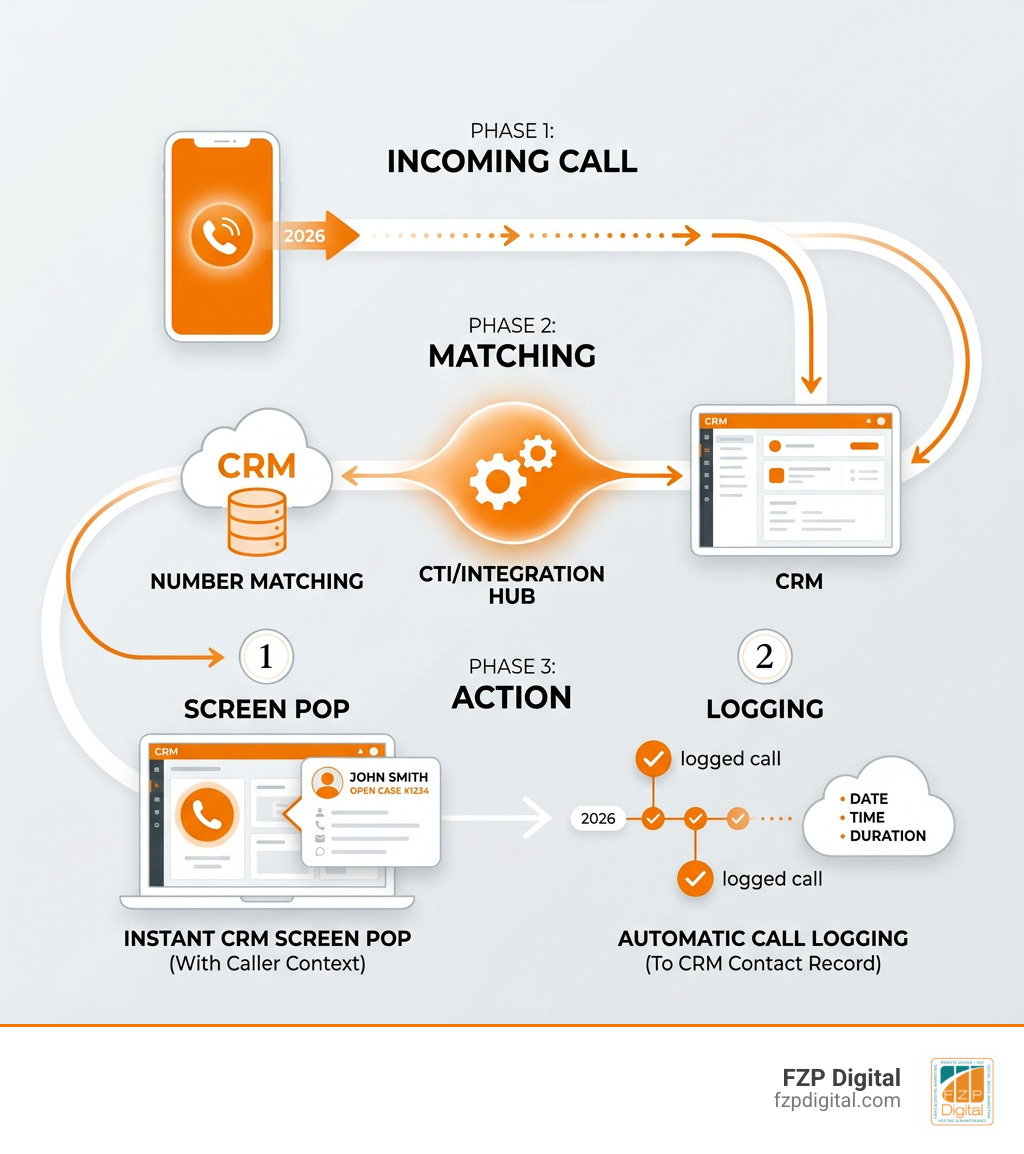
CRM CTI integration connects your phone system with your customer relationship management software so your team can answer, place, route, and document calls from one workspace. When a call arrives, the system can match the phone number to a CRM record, show the relevant contact or case, log the interaction, and prompt the next step.
To set it up well, start with three practical decisions:
- Identify where calls should be logged, such as leads, contacts, accounts, or support cases.
- Standardize and clean phone-number data so caller matching is dependable.
- Choose a connector that supports the call controls and automation your team actually needs, including screen pops, click-to-dial, routing, and automatic call logging.
For a Philadelphia business or nonprofit, this can mean less time searching for records and typing call notes after every conversation. Your staff gets context before they say hello, while your CRM builds a more complete history of the relationships that matter.
I’m Fred Z. Poritsky, founder of FZP Digital. My background in nonprofit financial management, web technology, and digital strategy helps me see CRM CTI integration as more than a software connection: it is a practical way to make customer and donor communications easier to manage.
You can build a fully connected communication system by integrating SMS and phone systems with your CRM, connecting a chatbot to capture leads, and adopting integrated customer relationship management.
What Is CRM CTI Integration and How Does It Work?
Have you ever answered the phone, opened three different browser tabs, searched a caller’s name, and asked them to spell their email address while scrambling to find their account? We have all been there, and it is a frustrating experience for both sides.
Computer Telephony Integration (CTI) bridges the gap between your telecommunications network and your business software. At its foundation, modern CTI leverages Voice over Internet Protocol (VoIP), Web Real-Time Communication (WebRTC), and Session Initiation Protocol (SIP) to transmit audio and signaling data over standard internet networks rather than copper telephone wires.
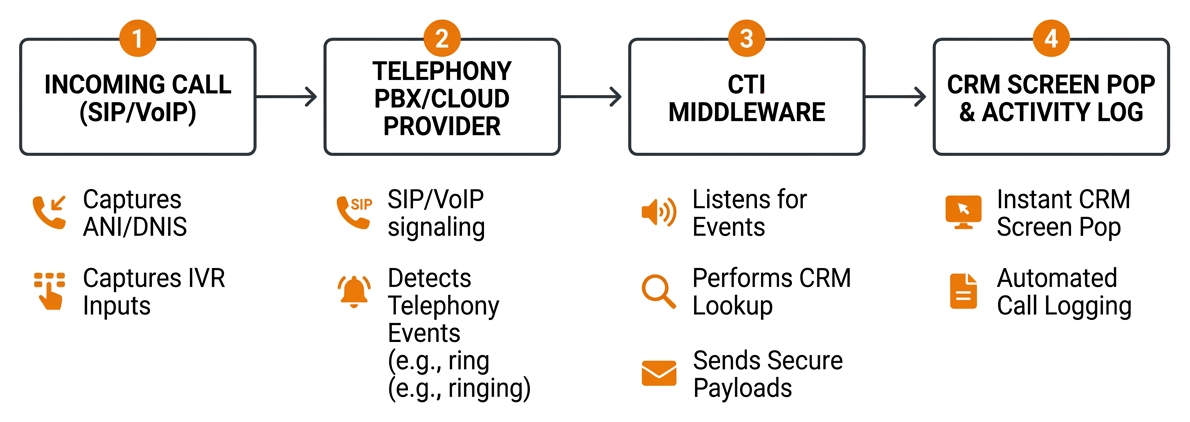
When a call enters your Private Branch Exchange (PBX) or cloud telephony provider, the system captures vital call metadata:
- Automatic Number Identification (ANI), which is the caller’s phone number.
- Dialed Number Identification Service (DNIS), which tells you which business line or campaign number the caller dialed.
- Interactive Voice Response (IVR) inputs, such as digits entered for an account number or support menu.
The CTI middleware listens for telephony events (such as “ringing,” “answered,” or “call ended”) and sends secure payloads to your customer database. By establishing real-time communication via WebSockets or REST endpoints, the integration performs instant lookups and triggers automated workflows. To see the broader picture of linking external tools into your database, explore CRM integration strategies and review established telephony integration standards to understand how data moves between systems.
Core Benefits of CRM CTI Integration for Support and Sales
When you eliminate the friction between your phones and your database, every conversation becomes significantly more productive. Here is what changes immediately across your team:
- Shorter Average Handle Time (AHT): Screen pops present the caller’s complete interaction history before an agent even says hello. Agents save anywhere from 15 to 30 seconds per call simply by avoiding manual database searches.
- Higher First-Call Resolution (FCR): When your support team sees open cases, recent transactions, and past service tickets on screen, they resolve issues on the initial contact without putting customers on extended holds.
- One-Click Outbound Dialing (Click-to-Dial): Sales reps click phone numbers directly inside lead records. This eliminates misdialed numbers, reduces downtime between outreach attempts, and accelerates outbound campaigns.
- Flawless Data Accuracy: Automated call logging records duration, timestamps, recordings, and custom tags directly to the contact record. You no longer have to rely on reps remembering to document their calls at the end of the day.
- Elevated Customer Satisfaction (CSAT): Callers appreciate not having to repeat their account details to three different people. The entire conversation feels personalized, informed, and efficient.
Native CRM Calling vs Dedicated CTI Architecture
Many cloud platforms now offer built-in browser calling features. While native calling is great for lightweight, single-rep outreach, it often lacks the robust infrastructure that expanding businesses and customer service teams require.
| Feature / Capability | Native CRM Calling Tools | Dedicated Enterprise CTI Architecture |
|---|---|---|
| Telephony Backbone | Fixed built-in VoIP service provider | Connects to your choice of PBX/CCaaS (Cisco, Avaya, Genesys, Zoom, Asterisk) |
| Call Routing Intelligence | Basic round-robin or single-user forwarding | Advanced skill-based, IVR data-driven, and VIP account routing |
| Supervisor Capabilities | Simple call monitoring or listen-only modes | Live barge-in, whispering (coaching), and real-time agent takeover |
| Carrier Flexibility | Vendor lock-in with standard per-minute rates | Retain existing telecom contracts, SIP trunks, and custom rate structures |
| Omnichannel Coordination | Limited cross-channel handoffs | Unified routing across phone, SMS, web chat, and ticketing channels |
| Complex Screen Logic | Standard contact pop-up | Multi-object matching, custom conditional flows, and automated case creation |
Core Features and Architectural Methods for Telephony Integration
Connecting telephony hardware or cloud phone providers to software requires flexible framework designs. Depending on your IT infrastructure, integrations generally fall into three architectural methods:
- Browser-Based JavaScript Frameworks (e.g., Open CTI): These embed softphones directly into your web browser without requiring desktop installations. They use JavaScript APIs to send messages between the browser window and telephony servers, offering cross-platform flexibility.
- Pre-Built AppExchange & Marketplace Connectors: Packaged solutions designed for platforms like Salesforce, Microsoft Dynamics, or HubSpot. These connectors provide pre-configured UI softphones, automated logging templates, and standard administrative control panels.
- Custom API & Webhook Integrations: For proprietary systems or bespoke databases, developers hook into REST endpoints and WebSocket servers to relay call events. Understanding how to hook your data up to your CRM using APIs shows how programmatic bridges streamline data pipelines, aligning with foundational CTI technical architecture.
Essential Features in Modern CTI Connectors
When selecting or building a CTI connector, make sure it includes the capabilities that directly assist daily operations:
- Interactive Voice Response (IVR) Data Passing: Gathers customer input (such as account numbers or billing queries) before the call routes to an agent.
- Skill-Based & Priority Routing: Directs callers to the agent best equipped to help them based on CRM attributes, such as language preference or open high-priority tickets.
- Live Call Monitoring & Supervisor Whispering: Allows managers to listen in on calls and coach agents in real time without the caller hearing the advice.
- AI Sentiment Analysis & Real-Time Transcription: Transcribes conversations live, highlighting key phrases and feeding customer sentiment directly into your CRM records for post-call analysis.
- Automated Ticket Creation: Instantly creates new support tickets or logs missed calls as callback tasks, ensuring no opportunity slips through the cracks.
Connector Architecture and Framework Options
If your team uses Microsoft Dynamics 365, you will often utilize the Channel Integration Framework (CIF), configuring entity mappings using JSON configurations as detailed in the Dynamics CTI adapter specifications. In cloud ecosystems, serverless middleware functions (such as AWS Lambda or Azure Functions) process telephony webhooks and translate them into standard CRM updates.
For companies maintaining on-premise PBX systems like Avaya Aura or Cisco Call Manager, a local CTI server acts as a bridge, translating legacy TAPI/JTAPI telephony signals into modern web protocols that your browser-based CRM can interpret effortlessly.
Record Association Logic and Automated Call Handling
The heart of any successful telephony setup is record association logic—the rules your system uses to match an inbound or outbound call to the right customer file.
Screen Pop Hierarchy and Search Logic
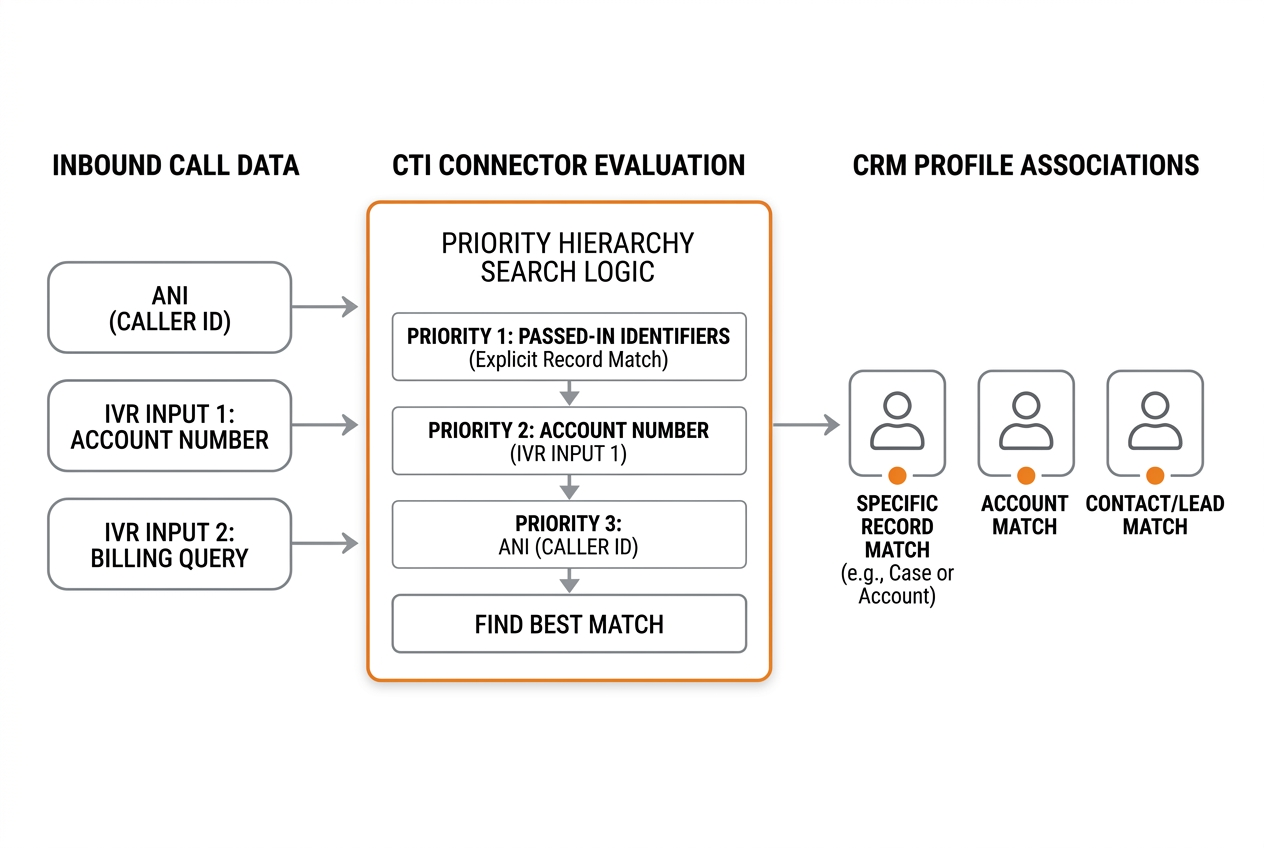
What happens when someone dials your company? The CTI connector evaluates data using an established priority hierarchy:
- Passed-In Identifiers (Explicit Record Match): If the caller navigated an authenticated self-service portal or entered a verified case number via IVR, the system opens that specific record immediately.
- IVR Data Search: If no exact ID is provided, the connector searches for secondary inputs captured during the IVR greeting, such as an order number, invoice ID, or account number.
- ANI / Phone Number Matching: The system queries your database for contacts, leads, or accounts containing the caller’s phone number.
When multiple contacts share the same phone number (such as a shared corporate line or family account), the CTI connector presents a disambiguation screen, allowing the agent to pick the right individual with a single click. If no match exists, the system automatically opens a pre-populated “New Lead” or “New Contact” form, saving your agent from typing the phone number manually.
Automated Activity Logging and Disposition Tagging
Once the conversation wraps up, the connector logs an Activity or Task record linked to the appropriate contact, account, or deal. The log captures essential call metrics:
- Start time, end time, and total duration
- Call direction (inbound, outbound, or missed)
- Link to call recording and transcription files
- Agent-selected wrap-up dispositions (e.g., “Left Voicemail,” “Demo Scheduled,” “Issue Resolved”)
By capturing these details automatically, you stop losing leads and create a reliable audit trail across your entire pipeline.
Business Use Cases and Measuring ROI Across Teams
How does telephony integration perform across different departments and industries?

High-Impact Industry Use Cases
- Customer Support & Service Operations: Support teams handle high ticket volumes with ease. When screen pops display recent order statuses and open inquiries, agents solve issues without placing callers on hold.
- Inside Sales & Outbound Business Development: Sales representatives execute targeted calling lists using power dialers and click-to-dial tools. When a prospect answers, the rep instantly sees their lead source and past email interactions.
- Healthcare & Patient Services: Medical practices and clinics manage patient intake, appointments, and telemedicine coordination. With verified Business Associate Agreements (BAAs) in place, CTI tools securely log calls while maintaining HIPAA compliance.
- Financial Services & Advisory: Wealth managers and insurance professionals quickly access portfolio balances and claims history, ensuring verified identity checks before sharing sensitive financial information.
Calculating ROI and Productivity Gains
To determine whether CTI makes financial sense for your business, evaluate the math behind repetitive manual work.
Consider an outbound sales or customer support team of 10 people where each person handles 40 calls per day. Without CTI, reps spend an average of 45 seconds per call manually looking up records, dialing digits, and logging notes:
- 45 seconds x 40 calls = 30 minutes lost per agent every day.
- For a 10-person team, that totals 5 hours of lost productivity daily, or 25 hours per week.
At standard operating costs, reclaiming those hours pays for software licensing within months. When you factor in higher sales conversion rates from rapid callbacks and reduced customer churn through personalized support, the return on investment becomes clear.
Implementation Pitfalls and Deployment Best Practices
Rolling out a CTI project requires thoughtful planning. Avoid these common missteps to ensure a smooth transition:
- Neglecting Data Hygiene: If your database contains duplicate phone numbers or inconsistent area code formats, screen pops will fail. Standardize all phone fields to international E.164 formats (
+1XXXXXXXXXX) before launching. - Overcomplicating Call Dispositions: Keep your wrap-up codes concise. When reps face dropdown menus with 35 options, they pick random values just to clear their screen. Stick to 5 to 8 clear outcomes.
- Treating CTI as an IT-Only Project: Include sales reps, customer service agents, and operations managers during the planning stages. Designing workflows around real daily habits ensures high adoption.
- Skipping Pilot Testing: Always run a pilot with a small group of 5 to 10 agents before deploying across the entire company. Test call handoffs, transfers, multi-match scenarios, and recording quality under everyday working conditions.
Frequently Asked Questions
What is the difference between Open CTI and pre-built CTI connectors?
Open CTI is a browser-based JavaScript framework that allows developers to build custom softphone integrations within web applications without desktop software. Pre-built CTI connectors are ready-to-install packages available in software marketplaces that offer out-of-the-box phone controls, automated call logging, and standard screen pop behaviors with minimal coding.
How does CTI handle callers with duplicate CRM records?
When an incoming phone number matches multiple records (such as two contacts at the same company branch), the CTI connector displays a multi-match selection list. The agent selects the correct contact with one click, which immediately opens the associated profile and links the call activity to the chosen file.
When does a business achieve ROI on a CTI deployment?
Most businesses achieve measurable ROI within 3 to 6 months of deployment. For teams making or receiving 30 or more calls per agent daily, eliminating manual dialing and post-call logging saves several hours per week per employee while increasing lead conversion and customer retention rates.
Modernizing Your Telephony and Digital Operations
Connecting your phone system to your CRM turns everyday customer conversations into structured, actionable business intelligence. By arming your team with instant caller context, one-click dialing, and automated activity logging, you reduce administrative fatigue and deliver the responsive service that modern customers expect.
If you are looking to refine your broader online lead generation, search presence, and web workflows, explore our full suite of digital marketing services. At FZP Digital, we help businesses throughout Philadelphia, Bucks County, and surrounding communities build connected, high-performing digital platforms that drive sustainable growth.