


Make Your Money Talk by Connecting CRM and Accounting
When Your CRM and Your Accounting Software Don’t Talk, Your Business Pays the Price
If you’ve been wondering how to integrate CRM with accounting software, here’s the short answer:
How to Integrate CRM with Accounting Software — Quick Overview:
- Choose your integration method — native connector, middleware (like Zapier), or custom API
- Clean your data first — remove duplicates and standardize fields before connecting systems
- Map your data fields — match CRM contacts, deals, and products to accounting invoices, payments, and customers
- Configure and test — run the integration in a sandbox environment before going live
- Train your team and monitor — set up error alerts and review sync performance regularly
Picture this: your sales team closes a deal, celebrates, and moves on. Three days later, someone in finance realizes the invoice was never created. Sound familiar?
This kind of disconnect happens constantly in small businesses — not because people aren’t working hard, but because their tools aren’t working together.
Your CRM holds all the gold: contact history, deal stages, customer behavior. Your accounting software holds the financial reality: invoices, payments, cash flow. But when these two systems live in separate silos, you’re essentially running your business with one eye closed.
The numbers back this up. Research from Xero found that leaders of small businesses spend less than 50% of their working week on their core job — the rest gets eaten up by administrative tasks. And when CRM and accounting systems are disconnected, manual data re-entry is one of the biggest culprits.
The good news? Connecting these two systems is more accessible than ever in 2026 — whether you’re a solo operator, a growing team, or a nonprofit trying to stretch every dollar.
I’m Fred Z. Poritsky, founder of FZP Digital, and my background spans nonprofit financial management, public accounting, and digital marketing — which means I’ve lived the frustration of disconnected data systems firsthand, and I understand exactly what it takes to integrate CRM with accounting software in a way that actually sticks. Let’s walk through everything you need to know so your money and your customer data finally start talking to each other.
How to integrate crm with accounting software vocab explained:
- how to integrate chatbot with crm for lead capture
- how to integrate company data into crm using api
- how to integrate inventory systems with crm
Why Connecting Your Sales and Finance Teams is a Game-Changer
When your sales and finance teams operate in separate software ecosystems, you’re not just dealing with minor inconveniences—you’re actively leaking revenue and wasting valuable team energy. Think about the classic scenario: a client calls your sales representative in Newtown to ask about an outstanding balance. Your sales rep has to open a separate system, message the accountant in Richboro, or worse, tell the client, “Let me get back to you on that.”
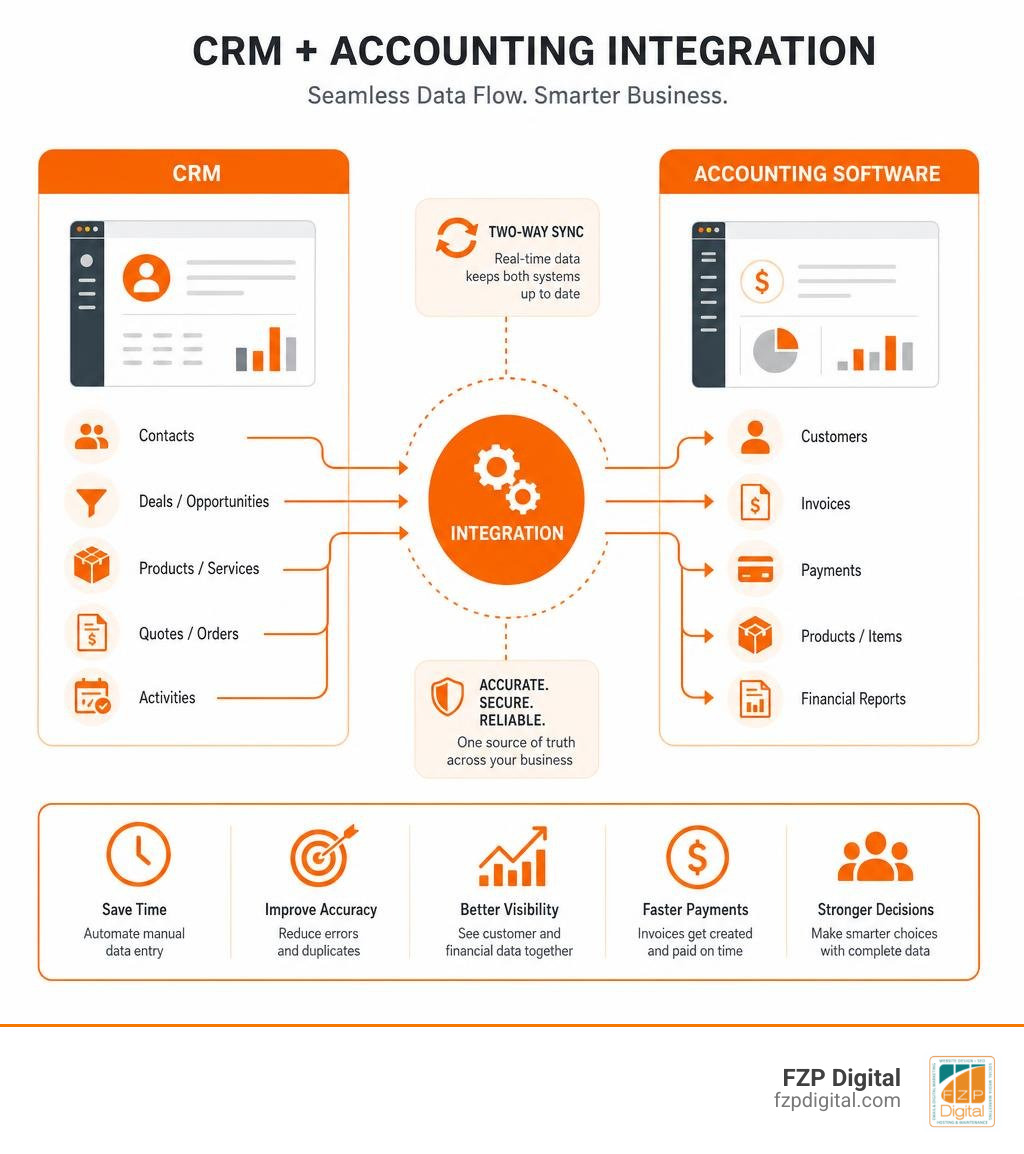
By bridging this gap, you unlock a unified operational environment where everyone works with the exact same numbers. This is where the true power of the Benefits of CRM and Accounting Software Integration comes into play. It transforms your systems from isolated databases into a single, reliable source of truth.
When you bring these two worlds together, your team gains a 360-degree view of your customer relationships. Your sales reps can instantly see if a client has overdue invoices before trying to upsell them. At the same time, your finance team can view upcoming deal pipelines to project cash flow with incredible accuracy. This connection also allows you to calculate true customer lifetime value (CLV) based on actual paid invoices, not just closed-won opportunities.
Here is a quick look at the core benefits your business will experience once these systems are connected:
- Complete Financial Transparency: Sales and finance work from the same live ledger data.
- Accelerated Cash Flow: Invoices are generated automatically the second a deal is marked as won.
- Proactive Churn Prevention: Identify customers who might be struggling based on payment delays.
- Hyper-Personalized Client Care: Use purchase history to send targeted, highly relevant offers.
Why Knowing How to Integrate CRM with Accounting Software Saves You Hours
Let’s talk about the silent productivity killer: manual data entry. Did you know that 73% of small businesses lose over 8 hours per week to manual data entry? That is an entire working day gone every single week, per employee! For a small business in Downtown Philadelphia or Richboro, that administrative burden is a massive drag on growth.
When you learn how to integrate CRM with accounting software, you eliminate the need to manually copy customer names, addresses, and line-item totals from your CRM into your invoicing tool. Instead of spending your evenings cross-referencing spreadsheets, the systems handle the heavy lifting for you. In fact, standard integrations can save up to 40 minutes per order while delivering a whopping 90% reduction in manual data errors.
Think about how much smoother your operations will run when this automation is paired with your other communication channels. For instance, once your finance and sales data are synced, you can set up automated text alerts to notify clients when an invoice is ready. If you want to dive deeper into streamlining your client outreach, check out our guide on How to Integrate SMS and Phone Systems with CRM to see how unified communication keeps your business running like clockwork.
Real-Time Financial Visibility for Smarter Decisions
Making business decisions based on month-end reports is like driving a car while only looking in your rearview mirror. You need to know what is happening right now.
Real-time data synchronization gives you an instant snapshot of your business’s financial health. You can see outstanding invoice statuses, track payment histories, and view customer interactions in one central dashboard. This immediate visibility changes how you forecast revenue. Instead of guessing next month’s cash flow based on gut feeling, you can look at your CRM pipeline alongside active payment cycles to make data-driven decisions.
If a client in Newtown has a habit of paying 15 days late, your CRM can flag this pattern. Your sales team can then adjust payment terms on future quotes without having to ask the accounting team for a manual audit. It is all about having the right data at your fingertips when you need it most.
The Three Main Ways to Connect Your Systems
Now that we understand why this connection is so vital, let’s explore how to actually make it happen. Every business has a unique software ecosystem, and the method you choose to synchronize your data will depend on your budget, your technical expertise, and your specific workflow requirements.

Native Integrations: The Plug-and-Play Route
If you are looking for the absolute fastest way to get your systems talking, native integrations are your best friend. Many modern CRMs and accounting platforms offer pre-built, “out-of-the-box” connectors. These are plug-and-play solutions designed to be turned on with just a few clicks.
For example, if you are using WordPress alongside your sales pipeline tools, you might use a native connector to pass lead details directly into your database. To get a feel for how simple and effective these native connections can be, take a look at FZP Digital’s Beginners Guide to WordPress Pipedrive Integration for an easy, step-by-step walkthrough of setting up a seamless native connection.
While native integrations are incredibly easy to set up and usually require zero coding skills, they can sometimes be a bit rigid. They work beautifully if your processes align perfectly with the software creator’s default settings, but if you have highly customized workflows or unique data fields, you might find yourself hitting a wall.
Middleware and iPaaS: The Flexible Switchboard
What happens when your CRM and accounting software don’t have a direct, native connection? That is where middleware and Integration Platform as a Service (iPaaS) tools like Zapier or Make come in. Think of middleware as a digital switchboard operator that sits between your systems, listening for “trigger events” and executing “actions.”
For example, you can set up a workflow where:
- Trigger: A deal is marked as “Closed Won” in your CRM.
- Action: The middleware searches your accounting software for an existing customer.
- Action: If the customer doesn’t exist, it creates a new profile.
- Action: It automatically generates a draft invoice with the correct line items and tax codes.
This approach gives you incredible flexibility. You can add filters, format dates, normalize currencies, and map custom data fields without writing a single line of code. It is an ideal middle ground for growing businesses in Newtown or Philadelphia that need customized workflows without the high cost of custom software development.
Custom APIs: Tailor-Made for Your Unique Business
For enterprise-level organizations, or businesses with highly specialized operational models, generic templates simply won’t cut it. If you need absolute control over how, when, and where your data flows, a custom API (Application Programming Interface) integration is the gold standard.
A custom API connection allows your developers to build a direct, secure bridge between your CRM and accounting ledgers. This means you can design complex, bi-directional sync schedules, handle massive transaction volumes, and support intricate multi-currency or multi-location setups.
Building a custom solution does require technical expertise and a dedicated development budget, but the scalability and long-term ROI are unmatched. If you want to understand the underlying mechanics of how these custom connections work, check out our technical guide on How to Hook Your Data Up to Your CRM Using APIs to learn how to securely link your databases.
Step-by-Step: How to Integrate CRM with Accounting Software
Ready to roll up your sleeves and connect your systems? Let’s walk through a practical implementation roadmap to ensure your integration is a complete success.
Before we dive into the steps, let’s compare the three main integration approaches to help you decide which path is right for your business:
| Feature | Native Integrations | Middleware (iPaaS) | Custom API Integration |
|---|---|---|---|
| Setup Time | Hours | Days | Weeks to Months |
| Technical Skill | None (Plug-and-Play) | Low to Medium | High (Requires Developer) |
| Customization | Low (Pre-set fields) | Medium to High | Unlimited |
| Ongoing Cost | Often Free / Built-in | Low Monthly Subscription | High Initial Build + Maintenance |
| Best For | Standard workflows | Growing businesses | Complex, enterprise needs |
Step 1: Clean Your Data Before You Begin
There is an old saying in the software world: “Garbage in, garbage out.” If your CRM is cluttered with duplicate contacts, outdated addresses, or incomplete records, pushing that data into your accounting system will only create a financial headache for your bookkeeper.
Data hygiene is the absolute foundation of a successful integration. Before you flip the switch, take the time to run a deduplication process. Standardize your contact naming conventions, verify email addresses, and ensure your product names and SKUs match perfectly across both platforms.
If you are looking to maximize the financial return on your integration efforts, treating data cleanup as a non-negotiable prerequisite is key. For a deeper dive into planning this stage, read about how to plan a High-ROI Accounting Software Integration to make sure your financial data remains pristine and audit-ready.
Step 2: Map Your Fields to Ensure Perfect Alignment
Field mapping is the process of telling your integration software exactly which data field in your CRM matches which field in your accounting ledger.
For example, you need to map:
- CRM “Account Name” to Accounting “Customer Name”
- CRM “Deal Value” to Accounting “Invoice Amount”
- CRM “Billing Address” to Accounting “Billing Address”
It sounds simple, but you must pay close attention to detail here. Ensure that currency formats, date structures, and tax codes match perfectly. If your CRM uses a simple text field for “State” (e.g., “PA” or “Pennsylvania”), but your accounting software requires a specific dropdown code, you’ll need to set up a transformation rule to prevent sync errors.
Best Practices on How to Integrate CRM with Accounting Software Safely
To ensure a smooth transition, never test your integration in your live, active databases. Always utilize a “sandbox” or testing environment first. This allows you to run test transactions and verify that the data is flowing exactly where it should without messing up your active financial ledgers.

Once you’ve verified that the sandbox sync works perfectly, roll the integration out to a small pilot group of users first. Gather their feedback, refine the workflows, and provide thorough team training before launching the system company-wide. Finally, set up automated error notifications so you are immediately alerted if a sync fails.
Overcoming Common Integration Roadblocks
Even with the best planning, software integrations can occasionally run into bumps. The key to success is knowing how to anticipate these challenges and handle them gracefully.
Handling Duplicate Records and Sync Errors
The most common roadblock businesses face is the creation of duplicate records. If a customer already exists in your accounting system as “ABC Holdings LLC,” but your CRM syncs them as “ABC Holdings, LLC” (with an extra comma), your system might create a duplicate profile.
To prevent this, always implement a “search before create” logic in your integration workflows. Instruct the system to search for an existing record using a unique identifier—such as an email address or a tax ID number—before creating a new customer profile. If a sync does fail, make sure your team receives a clear error notification so they can resolve the discrepancy within 48 hours.
Managing Security, Permissions, and Compliance
Financial data is incredibly sensitive, and protecting it is paramount. When you connect your CRM and accounting systems, you are opening up new pathways for data to travel.
Make sure your integration uses secure, encrypted APIs (TLS 1.3 or higher) to protect data in transit. Implement strict user access controls. Your sales representatives in Downtown Philadelphia need to see invoice statuses, but they probably don’t need permission to edit your chart of accounts or delete historical financial records. Use role-based permissions to ensure team members only have access to the data they need to do their jobs.
Frequently Asked Questions About CRM and Accounting Connections
How much does it cost to integrate CRM with accounting software?
The cost depends entirely on the method you choose. Native integrations are often free or included in your existing software subscriptions. Middleware tools like Zapier typically range from $20 to $100+ per month depending on your transaction volume. A custom API integration is a larger upfront investment, usually starting around $3,000 to $20,000+ for the initial build, but it offers complete customization and scales effortlessly as your business grows.
Can I sync historical data when setting up the integration?
Yes! Most integration methods allow you to run a historical data migration. However, we highly recommend performing a deep data cleanup before you run the historical sync. Pushing years of unorganized data into a brand-new integration is a recipe for system errors.
What happens if a sync fails or data mismatches occur?
If a sync fails, the integration platform will typically flag the error and log it in an error report. Most modern systems can be configured to send an email or Slack notification to your administrator. From there, you can manually reconcile the mismatch, update the field mapping, and trigger a manual re-sync to get the systems back in alignment.
Conclusion
At the end of the day, learning how to integrate CRM with accounting software isn’t just about saving time on admin work—it’s about giving your business the operational foundation it needs to thrive. When your sales and finance teams are in perfect sync, you make fewer mistakes, close deals faster, and gain the real-time financial visibility you need to make smart, confident decisions.
At FZP Digital, we believe in a collaborative, hand-in-hand process to help businesses in Richboro, Newtown, Philadelphia, and Downtown Philadelphia build a powerful digital presence. Whether you need to boost your organic search rankings, design a beautiful WordPress website, or connect your complex business tools to work as one cohesive system, we are here to help you navigate the challenge.
Ready to make your business systems work smarter? More info about digital marketing services is just a click away. Let’s team up and build an automated, high-performing system that helps your business grow!