


The Definitive Guide to Web Usability and Accessibility Basics
Why Web Usability and Accessibility Matter for Every Visitor

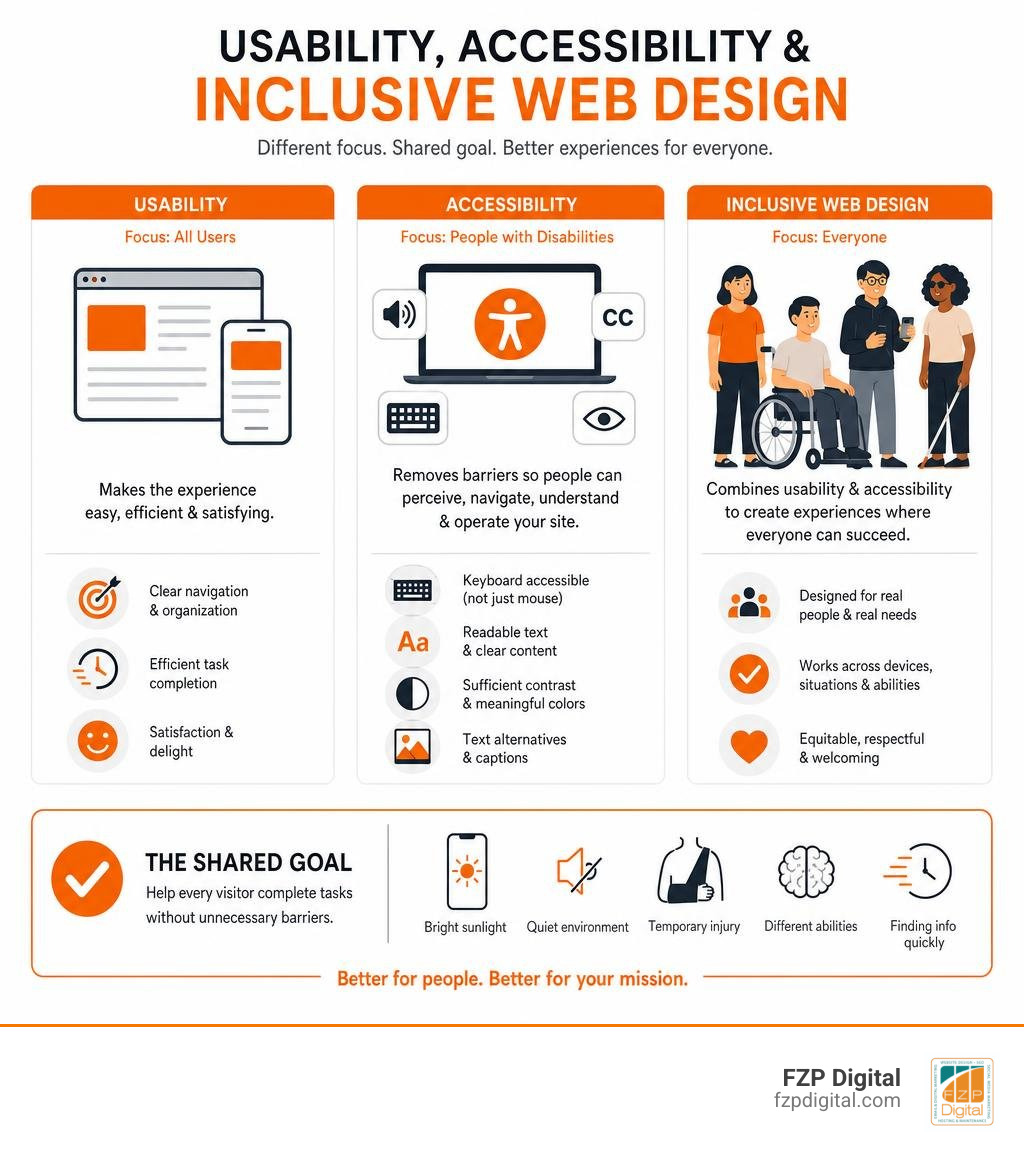
Web usability and accessibility work together to help every visitor complete a task without unnecessary barriers. Usability asks whether your website is easy, efficient, and satisfying to use. Accessibility makes sure people with disabilities can perceive, navigate, understand, and operate it, including with tools such as screen readers, keyboards, magnification, or voice control.
For a practical starting point, make sure your website:
- Uses clear headings, plain language, and consistent navigation.
- Works fully with a keyboard, not only a mouse or touch screen.
- Provides text alternatives for meaningful images and captions for video.
- Uses sufficient color contrast and never relies on color alone to communicate meaning.
- Gives visitors clear labels, instructions, and helpful form-error messages.
These choices are not just for compliance. They make your site easier to use when someone is on a phone in bright Philadelphia sunlight, watching a video in a quiet waiting room, dealing with a temporary injury, or simply trying to find information quickly.
The distinction can seem blurry because accessibility and usability share many goals. But accessibility has a specific focus: removing barriers that disproportionately affect people with disabilities. A website might look polished and feel simple to a typical mouse user, yet still be unusable for someone who navigates by keyboard or listens through a screen reader.
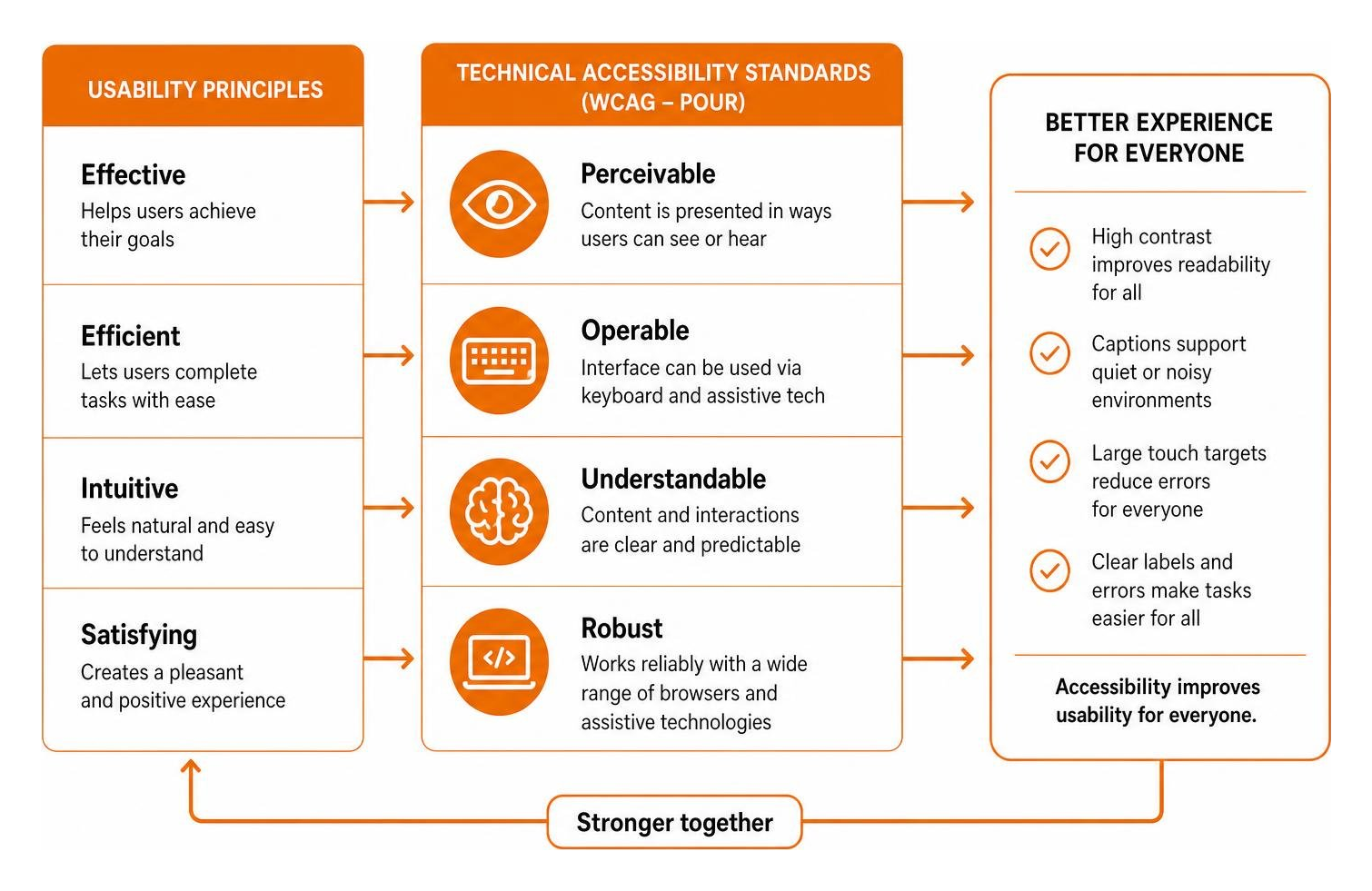
WCAG 2.2, the current W3C accessibility standard, gives teams testable guidance organized around four principles: Perceivable, Operable, Understandable, and Robust. Think of it as a strong technical foundation. Then add real usability testing with people who use assistive technology, because a passing automated scan cannot tell you whether a person can actually complete a donation, purchase, appointment request, or contact form.
I’m Fred Z. Poritsky, founder of FZP Digital. My background in nonprofit financial management, web design, and digital marketing helps me approach web usability and accessibility as both a human need and a practical way for Philadelphia-area organizations to better serve clients, customers, and supporters.
Related content about web usability and accessibility:
The Foundations of Web Usability and Accessibility: Distinctions and Overlap
Have you ever landed on a website that seemed visually stunning, yet you couldn’t figure out where to click to find simple contact information? Or perhaps you’ve tried filling out a checkout form on your phone, only to encounter tiny buttons that resulted in accidental taps and endless validation errors. These everyday frustrations highlight the close connection between usability, accessibility, and universal inclusion.
To build an online presence that genuinely serves everyone, we need to understand how these concepts complement one another while serving distinct purposes:
| Concept | Primary Focus | Core Measurement Standard | Primary Audience |
|---|---|---|---|
| Web Usability | Overall ease of use, efficiency, task speed, and user satisfaction | ISO 9241-11 (Effectiveness, Efficiency, Satisfaction) | General users operating standard hardware and software |
| Web Accessibility | Barrier removal and direct functional access for people with disabilities | WCAG 2.2 (POUR Principles: Perceivable, Operable, Understandable, Robust) | People with visual, motor, auditory, cognitive, or speech disabilities |
| Inclusive Design | Broad social inclusion addressing diverse human experiences | Universal Design principles & socio-economic frameworks | Diverse users across varying ages, bandwidths, languages, and literacies |
Defining Usability: Effectiveness, Efficiency, and Satisfaction
At its core, usability measures how easily a visitor can accomplish their goals on your website. The International Organization for Standardization (ISO 9241-11) formally defines usability as the extent to which a product can be used by specified users to achieve specified goals with effectiveness, efficiency, and satisfaction in a specified context of use.
In practical web design, usability is often evaluated through Jakob Nielsen’s foundational quality components:
- Learnability: How easy is it for first-time visitors to accomplish basic tasks?
- Efficiency: Once users understand the design, how quickly can they perform tasks?
- Memorability: When visitors return after a period of absence, how easily do they re-establish proficiency?
- Errors: How many errors do users make, how severe are they, and how easily can they recover?
- Satisfaction: How pleasant and intuitive is it to use the interface?
When a website has high usability, visitors rarely have to stop and think about where to go next. The interface becomes practically invisible, allowing users to focus entirely on their objectives.
Defining Accessibility: Universal Access and Barrier Removal
While usability looks at overall user satisfaction, digital accessibility addresses specific barriers that prevent people with disabilities from accessing the web. If you are wondering what is web accessibility, it is the dedicated practice of designing websites and digital tools so that individuals with disabilities can perceive, understand, navigate, interact with, and contribute to the digital world.
Accessibility ensures full compatibility with assistive technologies such as:
- Screen Readers (NVDA, JAWS, VoiceOver): Software that converts on-screen text and layout structure into synthesized speech or refreshable Braille.
- Screen Magnifiers: Tools that enlarge interface elements for users with partial vision.
- Voice Recognition Systems: Software allowing hands-free navigation for individuals with physical or motor impairments.
- Alternative Input Devices: Switch controls, eye-tracking hardware, and head pointers for users unable to operate a traditional mouse or keyboard.
As highlighted by the W3C Web Accessibility Initiative on accessibility and usability, accessibility must maintain an explicit focus on disability. If we dilute accessibility into generic user experience research, we risk overlooking the specialized technical requirements needed to support assistive devices.
How Web Usability and Accessibility Guidelines Intersect
When you improve accessibility, you naturally improve usability for everyone. This dynamic is often called the “curb-cut effect,” named after the sidewalk ramps originally created for wheelchair users that ended up benefiting parents with strollers, delivery workers with handcarts, and travelers pulling luggage.
Here are just a few ways accessibility features enhance everyday usability:
- High Visual Contrast: While critical for individuals with low vision or partial color blindness (affecting about 10% of men), strong contrast allows anyone to read a screen easily in bright outdoor sunlight.
- Synchronized Captions: Captions make video content accessible to deaf and hard-of-hearing individuals, while also serving commuters on a loud train or parents watching videos quietly next to a sleeping baby.
- Large Touch Targets: Generous button padding aids people with motor tremors or arthritis, but it also prevents accidental clicks for someone using a smartphone one-handed while walking down a busy street in Downtown Philadelphia.
- Descriptive Form Labels: Providing clear error prompts and persistent labels assists visitors with cognitive or memory limitations while significantly reducing checkout abandonment for all customers.
Learning all about website accessibility basics helps your team build digital experiences that gracefully accommodate situational limitations, temporary injuries, and age-related changes.
The Four POUR Principles and Their Direct Usability Benefits
The Web Content Accessibility Guidelines (WCAG) are organized around four foundational principles known as POUR: Perceivable, Operable, Understandable, and Robust. These principles form the bedrock of accessible design and directly influence your site’s overall usability.
Perceivable and Operable: Sensory Presentation and Navigation Control
An interface is Perceivable when users can process content using one or more of their senses. It must not rely solely on a single sensory capability, such as vision or hearing.
- Text Alternatives: Providing meaningful alternative text allows screen readers to vocalize graphic content. When learning how to design for screen reader users, descriptive alt text also benefits users on weak internet connections where images fail to download.
- Color Independence: Never use color as the sole indicator of an action, requirement, or system status. Supplement red error states with clear warning icons and text labels.
- Adaptable Content: Content must adapt across device orientations (portrait or landscape) and allow users to zoom text up to 200% without horizontal scrolling or overlapping text.
An interface is Operable when users can control and navigate interactive components using their preferred input method.
- Complete Keyboard Navigation: Every link, button, dropdown menu, and form input must be fully operable using the Tab, Shift+Tab, Enter, Spacebar, and Arrow keys alone.
- Visible Focus Indicators: Keyboard users need a prominent visual focus indicator showing exactly where they are on the page.
- Intuitive Navigation: Applying structured website navigation best practices ensures keyboard visitors and screen reader users can find content quickly without getting trapped in repetitive menus.
- Generous Target Sizes: Under WCAG 2.2, interactive targets should maintain a minimum size to accommodate pointer accuracy on touch screens.
Understandable and Robust: Predictable Systems and Code Integrity
An interface is Understandable when information and operational controls are clear, logical, and predictable.
- Predictable Navigation: Menus, search bars, and utility links should appear in identical locations across every page of your site.
- Clear Form Guidance: Input fields should feature persistent labels, clear formatting instructions, and descriptive error messages that explain exactly how to fix mistakes.
- Plain Language: Writing content at an accessible reading level helps people with cognitive disabilities, non-native language speakers, and busy visitors scanning for fast answers.
An interface is Robust when content can be interpreted reliably by a wide variety of browsers, operating systems, and assistive technologies.
- Semantic HTML Markup: Using proper HTML tags (such as
, - Clean Code Standards: Clean, standard-compliant markup ensures your site renders consistently across modern devices and legacy software.
- Responsive Layouts: Embracing modern responsive website design ensures your layout scales smoothly across desktop displays, tablets, and smartphones.
Adhering to the official W3C Web Content Accessibility Guidelines 2.2 guarantees that your digital assets remain future-proof as new assistive hardware and mobile devices emerge.
Moving Beyond the Checklist: Usable Accessibility and Conflict Resolution
A common mistake organizations make is treating accessibility as a simple compliance checklist. It is entirely possible to build a website that technically passes an automated accessibility scan, yet proves frustrating and confusing for an actual assistive technology user.
The Pitfalls of Checklist-Only Compliance
Automated testing tools and third-party accessibility overlays can be helpful diagnostic starting points, but they cannot replace human evaluation. Automated software typically catches only 30% to 50% of potential WCAG violations. For example, an automated scanner can verify that an alt attribute, but it cannot determine whether the description “IMG_4021.jpg” accurately conveys the image’s context and meaning.
True digital inclusion requires combining technical standards with real-world usability testing. Involving individuals with visual, motor, and cognitive disabilities during your design and testing phases uncovers functional roadblocks that no automated script can detect.
Resolving Friction Points Between Standard Usability and Accessibility Rules
Occasionally, standard visual design conventions can create unintentional friction for accessibility. Here is how thoughtful teams resolve these common tensions:
- Repetitive Navigation: Placing identical navigation bars at both the top and bottom of a page might seem convenient for mouse users, but it forces screen reader users through tedious audio loops. Solution: Implement a clean “Skip to main content” link at the very top of the DOM so keyboard and screen reader visitors can bypass header menus directly.
- Complex Multi-Column Layouts: Visual layouts with sidebars, callouts, and banner ads can disrupt the linear reading sequence. Solution: Ensure your DOM source order matches the logical reading sequence from top-to-bottom, left-to-right, regardless of how CSS positions visual elements on screen.
- Dynamic Modals and Popups: Visual dialog boxes can trap keyboard users or fail to announce their appearance to screen readers. Solution: Set programmatic keyboard focus directly inside the open modal, restrict tab navigation within the active dialog, and return focus to the triggering element when dismissed.
- Status Badges and Charts: Relying on green/red charts creates barriers for color-blind visitors. Solution: Pair colors with distinct text labels, patterned lines, and hover tooltips.
Legal Mandates, Technical Standards, and Practical Implementation
Digital accessibility is an ethical responsibility, an excellent business strategy, and an established legal requirement.
Navigating ADA Regulations and Technical Benchmarks
In the United States, the Department of Justice (DOJ) has consistently affirmed since 1996 that Title II (state and local governments) and Title III (public accommodations and commercial businesses) of the Americans with Disabilities Act apply to web content. Inaccessible websites are viewed under the law just like physical barriers, such as a business entrance that lacks a wheelchair ramp.
When exploring practical steps for making your website ADA compliant, courts and regulatory bodies look to the Web Content Accessibility Guidelines (WCAG) Level AA as the recognized technical benchmark. Keeping an essential checklist of WCAG guidelines on hand helps your organization maintain proactive compliance and avoid unnecessary legal vulnerability.
Public institutions and regional businesses often lead the way in establishing strong digital standards. For instance, the City of Philadelphia Digital Accessibility Standards provide clear public guidelines ensuring civic information remains barrier-free for all community members.
Integrating Web Usability and Accessibility into Design Workflows
The most cost-effective way to build an accessible website is to incorporate accessibility from the very beginning of your project rather than attempting to retrofit code later.
To establish an inclusive development lifecycle:
- Educate Your Team: Ensure designers, developers, content creators, and project managers understand how people with disabilities interact with digital content.
- Shift Testing Left: Evaluate wireframes and design system components for color contrast, touch target sizes, and layout hierarchy before writing a single line of code.
- Adopt Inclusive Design Thinking: Consult our comprehensive guide to inclusive web design to craft user journeys that comfortably accommodate diverse human abilities.
- Select Reliable Hosting: A fast, secure server environment is essential for keeping websites responsive and accessible. When evaluating managed hosting platforms, FZP Digital recommends GoDaddy and WP Engine for their exceptional reliability and WordPress performance.
- Conduct Regular Audits: Combine automated testing tools with manual keyboard evaluations and screen reader checks whenever releasing new content or features.
Frequently Asked Questions About Digital Accessibility and UX
What is the primary difference between web usability and web accessibility?
Web usability focuses on the overall efficiency, effectiveness, and satisfaction of an interface for general audiences using standard browsing setups. Web accessibility specifically addresses the removal of barriers so that people with disabilities—including visual, motor, auditory, and cognitive impairments—can perceive, understand, navigate, and interact with digital content using assistive technologies.
Can a website be technically compliant with WCAG but still hard to use?
Yes. A website can satisfy automated technical criteria while still presenting an awkward, confusing user experience. For example, a page might have proper ARIA attributes and valid code, but if the content is cluttered, the language is convoluted, and the navigation structure is disorganized, both disabled visitors and typical users will struggle to complete their tasks.
How do accessibility improvements benefit users without disabilities?
Accessibility enhancements create universal design benefits known as the “curb-cut effect.” High color contrast helps people view screens outdoors in bright sunlight, video captions assist people in noisy transit hubs or quiet offices, large clickable targets make mobile one-handed browsing easier, and clear form instructions reduce errors for every visitor.
Conclusion
Creating a website that harmonizes usability and accessibility is more than a technical achievement or a legal safeguard—it is a commitment to welcoming every visitor who interacts with your brand. When you eliminate barriers and prioritize clear, intuitive user experiences, you open your digital doors to a wider audience, elevate your search visibility, and build lasting trust.
At FZP Digital, we believe digital experiences should be accessible, beautiful, and easy to use. Whether you are building a new WordPress website or looking to upgrade your existing site, our team is here to guide you through every stage of the “Develop . Design . Deliver” journey.
Are you ready to make your digital presence welcoming to all? Learn more about how our FZP Digital website accessibility services can help you create an engaging, fully compliant web experience today.